Answered
Pixel size in InDesign vs. Photoshop
I created a 255x220 px image at 300 ppm in Photoshop but it imports into InDesign at 100% as a 62.2 x 52.8 px image. Why?

I created a 255x220 px image at 300 ppm in Photoshop but it imports into InDesign at 100% as a 62.2 x 52.8 px image. Why?
I regret that I still do not understand why the 255x220px image that I made in Photoshop (at 300ppi) isn’t filling the 255x220px frame that I made for it in my InDesign layout when imported at 100%.
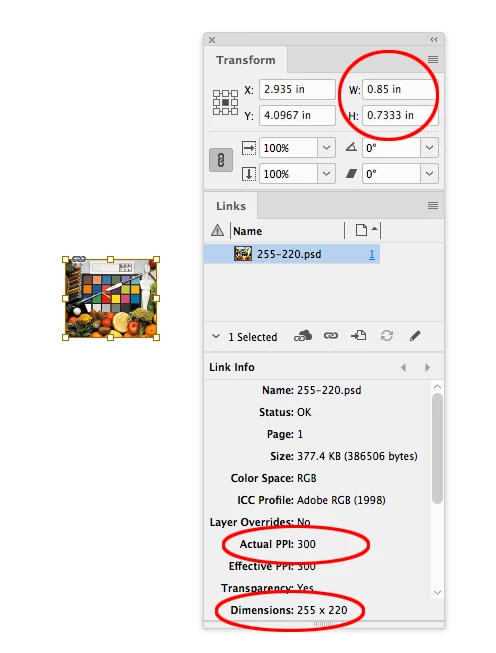
InDesign uses the placed file's print output dimensions in inches when you place at 100%—the pixel dimensions are not considered.
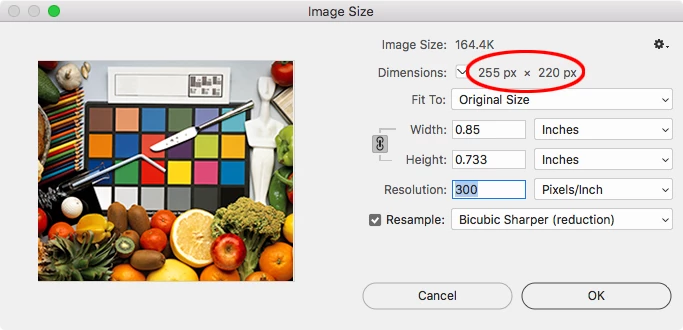
So if you check your Image Size in Photoshop its output dimensions at 300ppi are .85" x .733":
When I place on an InDesign page with the ruler units set to inches the image's output dimensions are the same:
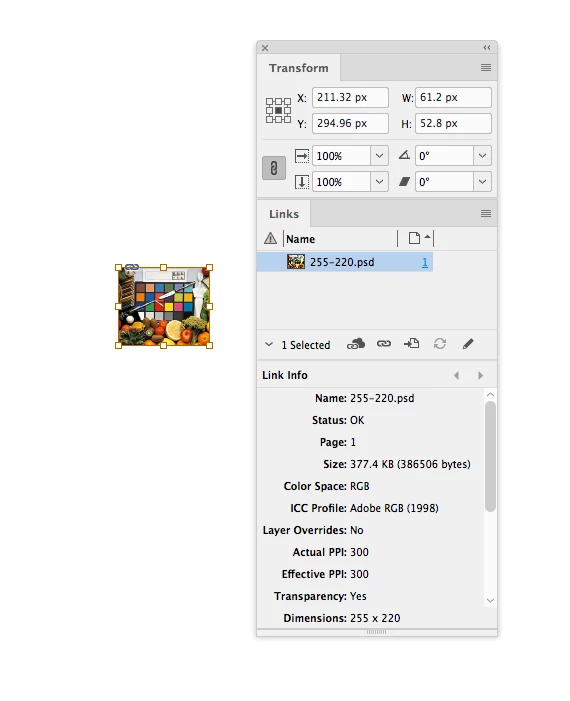
If I change my ruler units to pixels the image's pixel dimensions and resolution have not changed, but the Transform panel shows me pixel ruler units where 1 pixel =1/72".
An InDesign page has no resolution, as John points out, the pixel unit is just a convenience for exporting a page to an image format with a specific pixel dimension.
Already have an account? Login
Enter your E-mail address. We'll send you an e-mail with instructions to reset your password.
 AdChoices