
Participant
April 1, 2017
Question

Place holder text is to large

  • April 1, 2017
  • 6 replies
  • 755 views

I have my template document set up as a standard magazine size of approx 8.25" x 10.75". I inserted a text box and went to fill with place holder text but it is displaying only one to two lines of text and it's huge. But when I go to adjust the size of the text even down to size 6 there are still only 4-5 lines of text showing... I have played around with making the box size larger and that is not helping. Picture below is a screenshot of the issue and the font size is set to 12.
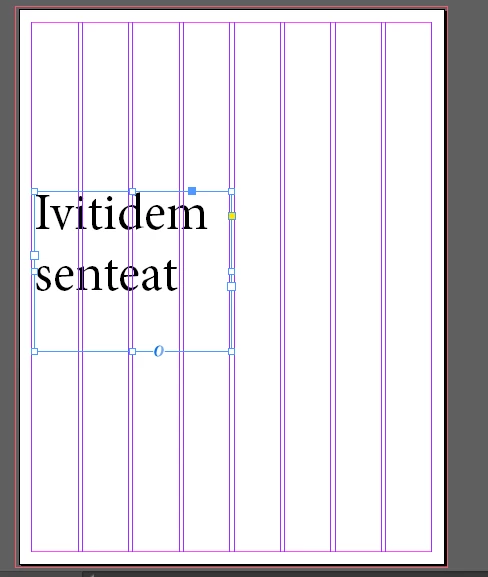
This topic has been closed for replies.

6 replies

jane-e
Community Expert
Community Expert
April 2, 2017

Before you fill with placeholder text, check your Paragraph Styles, Character Styles, and Control Panel. If you set character attributes with nothing selected, they become the defaults for the document. It looks like you have done that here.

If you resize placeholder text after you have filled a frame with it, it does not expand. You have to do it again.

Put your Type tool in the text and show a picture of the Control panel.

Willi Adelberger
Community Expert
Community Expert
April 2, 2017

Make your own placeholder text:

Write your text, you would like to have to work as the placeholder in InDesign. Export it as "placeholder.txt" and save it at the very same place where InDesing App is found. (If you have other languages too, save it as txt file with the expression of that language at the same place like in German Platzhalter.txt.

I recommend to save it out from InDesign as this is the only way to be sure that you use the same decoding as InDesign on your computer would decode. There are several differences with extended characters and symbols, which would result in different letters, if the file would be saved in different programs like Word. This might not be so problematic in English, but it causes problems with languages like Castellano or German, where you find a lot of extended characters in any text like ñÑéÉóÓ äöüÄÖÜß çåÇÅ and many others.

Barb Binder
Community Expert
Community Expert
April 1, 2017

Picture below is a screenshot of the issue and the font size is set to 12.

Reposting the screen shot with the Control panel and the rulers visible and the text cursor in the text will help us.

~Barb at Rocky Mountain Training
BobLevine
Community Expert
Community Expert
April 1, 2017

Is there a character style or object style applied?

winterm
Legend
April 1, 2017

There must be something wrong with your numbers.

You say, page size is 8.25" x 10.75" and font size 12 pt?

Then it should look something like this:

rohit_ID
Adobe Employee
Adobe Employee
April 1, 2017

Try placing your text with the Shift key pressed and the text will reflow automatically. Then you can adjust the text as you want.

Derek Cross
Community Expert
Community Expert
April 1, 2017

The OP is discussing placeholder text.