
Participant
March 8, 2019
Answered

Place RTF while preserving formatting

  • March 8, 2019
  • 5 replies
  • 5614 views

Is there any way to place an RTF in an InDesign textbox while preserving the formatting of the RTF file? I have tried altering the RTF Import Options and setting them to "Preserve Styles and Formatting from Text and Tables", but as soon as I click OK and place the RTF, all my formatting is missing (i.e. italics are no longer italic, bold text is no longer bold). Any ideas for how to properly link an RTF file to an InDesign text box?
This topic has been closed for replies.
Correct answer Derek Cross

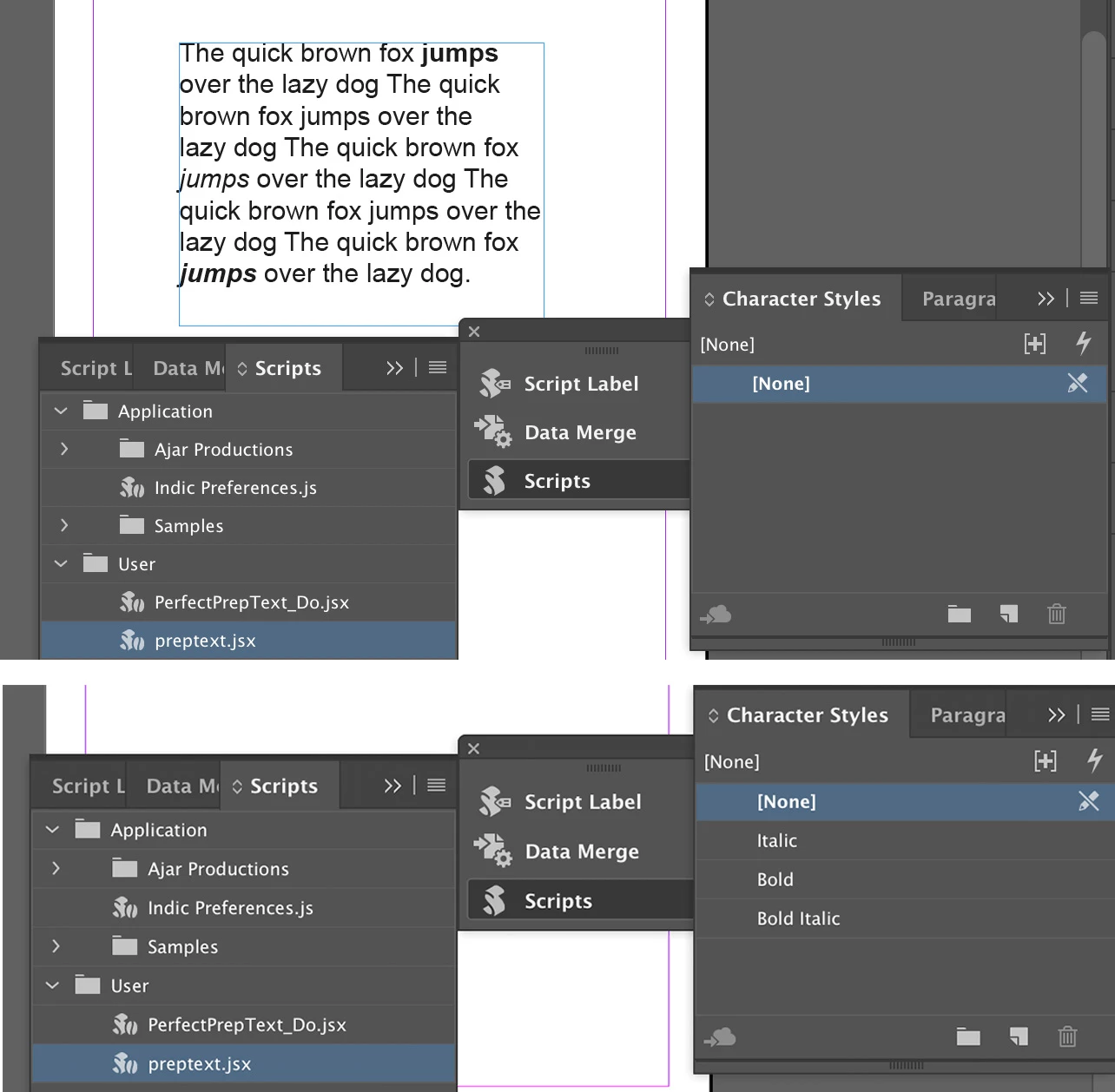
(Top pic) Here's a Word document without any Character Styles, Placed in InDesign without any Character Styles and (Bottom pic) after running the script – InDesign Character Styles have been applied in one go to the whole document and in seconds for the longest documents.

5 replies

Participating Frequently
October 29, 2020

Hi, i have this document from word in PC exported as RTF to be placed in InDesign 2020 in a Mac, I have placed the file but doesn't keep the styles (bold, italic, sizes) I have tried all the options at placing and won't work both in RTF and Word, styles just dissapear, when i place it ask for fonts and I ignore it because they are PC fonts exclusively???? like Leelawade...help pls. 

Best Regards

Participating Frequently
October 29, 2020

Derek Cross
Community Expert
Community Expert
March 9, 2019

If you run the preptext.jsx script it converts Word Character Styles to InDesign Character Styles.

https://indesignsecrets.com/perfectpreptext-a-smart-way-to-style-local-formatting.php

Barb Binder
Community Expert
Community Expert
March 9, 2019

FWIW, I used paragraph styles in my example, but just the bold/italic buttons for inline formatting.

I normally convert inline formatting to character styles once the files are in InDesign with FindChangeByList.

~Barb

~Barb at Rocky Mountain Training
Derek Cross
Community Expert
Derek CrossCommunity ExpertCorrect answer
Community Expert
March 9, 2019

(Top pic) Here's a Word document without any Character Styles, Placed in InDesign without any Character Styles and (Bottom pic) after running the script – InDesign Character Styles have been applied in one go to the whole document and in seconds for the longest documents.

Community Expert
March 9, 2019

Hi,

what's the source of your RTF file?

MS Word? Acrobat?

Regards,
Uwe

Barb Binder
Community Expert
Community Expert
March 9, 2019

Hi Devin:

This is an RTF file in Word with inline formatting:

In InDesign CC 2019, RTF Import Options:

Results:

I'm not clear why yours isn't working the same way. Does your InDesign document already have styles defined? Are you using styles in Word? If so, try changing the two style conflicts to Redefine InDesign Style to maintain the Word style definitions.

~Barb

~Barb at Rocky Mountain Training
Legend
March 9, 2019

Did you use fake bold and fake italics, that is choose bold when you have only the regular font, and italics when you have only the regular font? Word will fake bold and italics, but this is considered the enemy of typesetting, and so InDesign won't (last time I looked).