Inspiring
June 18, 2018
Answered

Place specific pdf layer into indesign with javascript

  • June 18, 2018
  • 1 reply
  • 4586 views

Hi,

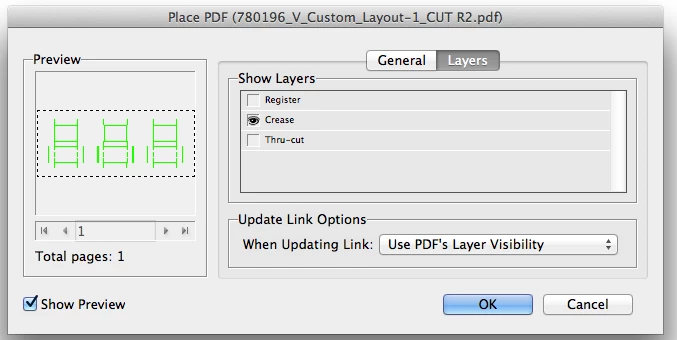
I have multi-layered pdf file and I need to place into indesign CS6 only specific layer from that pdf:

creaseLayer = myDoc.layers.item("Crease");

How can I do it with javascript?

Thank you.

Yulia

This topic has been closed for replies.
Correct answer Loic.Aigon

Yes indeed. I was trying to say that you cannot set layer's visibility during the import phase but later (like just after the place command) once the file has been placed onto the layout.

var f = File ( Folder.desktop+"/layers.pdf" );

var pdf = app.activeDocument.pages[0].rectangles.add().place( f )[0];

pdf.parent.fit ( FitOptions.FRAME_TO_CONTENT );

pdf.parent.move ( [0,0] );

var layers = pdf.graphicLayerOptions.graphicLayers;

var layerA = layers.itemByName ("LAYER A");

var layerB = layers.itemByName ("LAYER B");

layerA.isValid && layerA.currentVisibility = false;

layerB.isValid && layerB.currentVisibility = true;

1 reply

Loic.Aigon
Legend
June 19, 2018

Hi Yulia,

Nothing you set on import but once file has been placed. See "graphicLayerOptions" of PDF instance

https://www.indesignjs.de/extendscriptAPI/indesign-latest/#GraphicLayerOption.html#d1e315264

Inspiring
June 20, 2018

Hi Loic.Aigon,

If I understand you correctly, it can not be done through scripting and can only done by person?

Thank you

Yulia

Loic.Aigon
Loic.AigonCorrect answer
Legend
June 20, 2018

Yes indeed. I was trying to say that you cannot set layer's visibility during the import phase but later (like just after the place command) once the file has been placed onto the layout.

var f = File ( Folder.desktop+"/layers.pdf" );

var pdf = app.activeDocument.pages[0].rectangles.add().place( f )[0];

pdf.parent.fit ( FitOptions.FRAME_TO_CONTENT );

pdf.parent.move ( [0,0] );

var layers = pdf.graphicLayerOptions.graphicLayers;

var layerA = layers.itemByName ("LAYER A");

var layerB = layers.itemByName ("LAYER B");

layerA.isValid && layerA.currentVisibility = false;

layerB.isValid && layerB.currentVisibility = true;