Participant
September 25, 2020
Answered

Placing Images in InDesign

  • September 25, 2020
  • 2 replies
  • 1295 views

Hi,

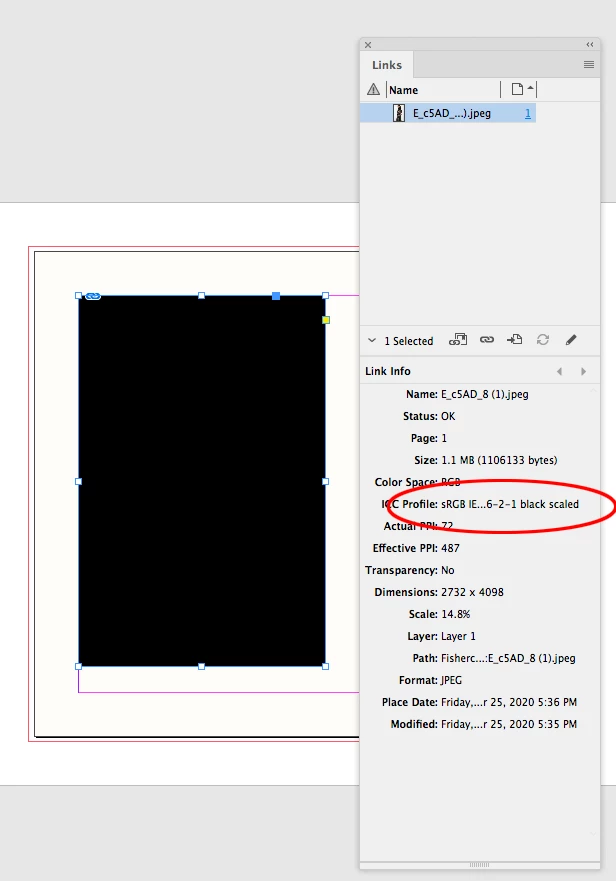
I'm fairly new to using InDesign and am struggling with placing images in rectangle frames. Whenever I try to place the images they turn black, and can be adjusted but the image itself is not shown. Would anyone be able to help?
This topic has been closed for replies.
Correct answer rob day

Im trying to use multiple images to create a slideshow but I can include one photo.


There have been a few posts lately that seem to relate, but you are the first the share a file.


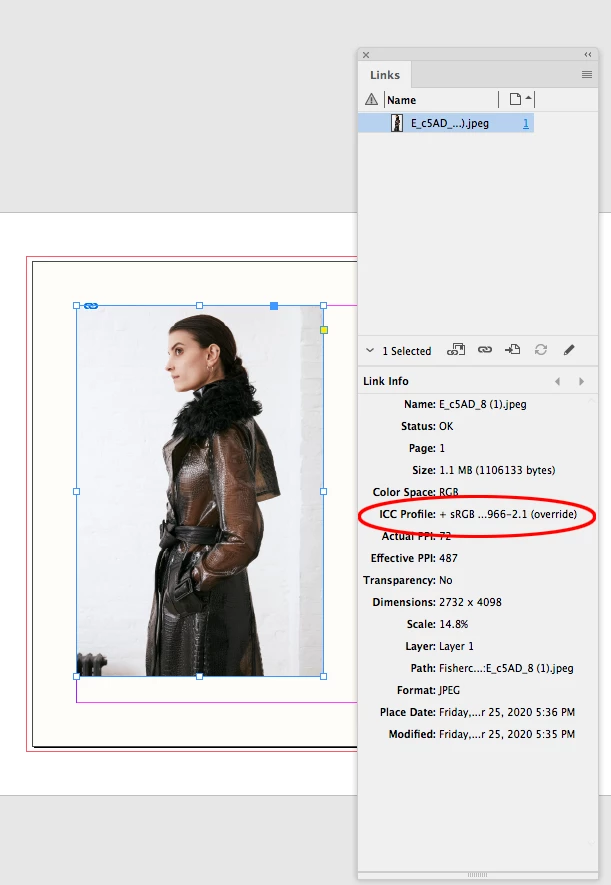
It looks like it is a problem with the assigned RGB profile sRGB IEC61966-2-1 black scaled. If I reassign sRGB IEC61966-2.1by selecting the image and choosing Object>Image Color Settings... the image displays correctly:


2 replies

Community Expert
October 1, 2020

Hi Rob,

perhaps you remember this, we already had one thread about profile sRGB IEC61966-2-1 black scaled back in 2018:

https://community.adobe.com/t5/indesign/export-problem-mit-srgb-iec61966-2-1-black-scaled/td-p/9876334?page=1


Laura-Marie, the OP of this thread back in May 2018 states:
"The files can no longer be exported from InDesign, the export simply terminates."


Also found a hint in German, that sRGB IEC61966-2-1 black scaled is used now and then by Facebook:

"Übrigens: Facebook nutzt nicht immer das c2-Profil. In einigen Bildern ist auch das Profil »sRGB IEC61966-2-1 black scaled.icc« eingebettet. Wann welches benutzt wird, ist mir unbekannt. Beim »black scaled«-Profil handelt es sich jedenfalls nicht um ein extra verschlanktes Profil."

Source: http://www.prepress-secrets.at/index_files/tag-icc-farbprofil.html


Regards,
Uwe Laubender

( ACP )

rob day
Community Expert
Community Expert
October 1, 2020

Thanks Uwe, it also seems like it has something to do with what application applies the black scaled profile, or maybe there are different versions out there. If I open the OP’s file, Photshop throws up a warning and strips the profile. If I then embed the version of  sRGB IEC61966-2-1 black scaled I have in my profiles folder, resave with the profile, and place in InDesign, the image dispays correctly.

hammer0909
Community Expert
Community Expert
September 25, 2020

What file format are you trying to place into those frames?

NIA5C05Author
Participant
September 25, 2020

Its a jpeg

rob day
Community Expert
Community Expert
September 25, 2020

Can you share the jpeg via Dropbox or youe CC account?