Inspiring
December 5, 2020
Answered

Placing text with style import - text structure/line breaks are corrupted

  • December 5, 2020
  • 3 replies
  • 1260 views

When I place my text into InDesign from .docx I seem to lose the formatting of paragraphs. Some line breaks stay the way they are in Word, but others disappear.


Could I be missing something obvious?

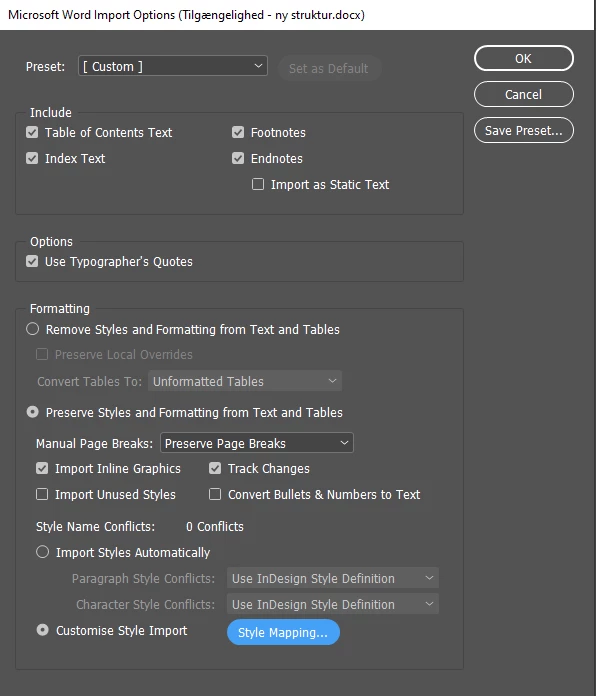
I am placing text with import options set to these settings:


This topic has been closed for replies.
Correct answer jmlevy

Interesting! Just to make sure I get this: is it the standard/correct way of setting up a text to press enter to change to a new line for each paragraph but not to have a blank line? And then I just need to set up my style so that it adds more spaces between lines when there is a break/paragraph break between them?


I have read quite a bit about InDesign but haven't seen this described. 


is it the standard/correct way of setting up a text to press enter to change to a new line for each paragraph

To create a new paragraph, you have to press the return key. On a standard keyboard (the one with a numeric keypad) the enter key, which is on the numeric part of the keyboard, on the right, is used to either jump to a threaded text frame, if the text frames have only one column or to jump to the next column if the text frame has more than one column.


I just need to set up my style so that it adds more spaces between lines when there is a break/paragraph break between them?

Not between lines of the same paragraph (well you can adjust this in the paragraph options, that's the leading), but between the different paragraphs.

3 replies

simon5CD0Author
Inspiring
December 7, 2020

When I import with style mapping the blank lines are deleted which changes the text. Here in the first picture, the text is imported without style mapping and it looks like it does in Word.


Now in the second picture is how it looks when I do style mapping:


The result is the same when I change the style mapping and set it to a default paragraph style. So it does not seem to be simply the one paragraph style that causes this. 

simon5CD0Author
Inspiring
December 7, 2020

It's not a huge problem. But I try to automate as much as possible and it is a bit bothersome so go through every chapter and adjust paragraphs. 

hammer0909
Community Expert
Community Expert
December 6, 2020

I think we need more info here as per Bob's request. You cannot and should not expect your line breaks from Word to match the line breaks in InDesign. They never will unless you put a hard/soft return at the end of every line which I definitely don't recommend. If there a chance that the paragraph style you're mapping to in InDesign is doing something funky? Try mapping to a differnt style. Also, InDesign will try to maintain any additional formatting coming in from Word resulting in overrides on the InDesign style that is applied to the text. Try clearing the overrides on those styles. Again, some screen shots would help.

simon5CD0Author
Inspiring
December 5, 2020

If I do it without specifying anything under Style Mapping, the text is not corrupted.

But as soon as I map the "normal" from word to my paragraph style for standard text, the line breaks disappear and I have to go through the entire text manually.

BobLevine
Community Expert
Community Expert
December 5, 2020

I'm not sure what you're saying (a screenshot might help) but if you mean there's no text showing up it sounds like there might be a no break style applied somewhere.

simon5CD0Author
Inspiring
December 6, 2020

Most of the text simply becomes one long paragraph. Empy lines between paragraphs are deleted.