Participating Frequently
May 6, 2019
Answered

Postscript is adding white over images.

  • May 6, 2019
  • 4 replies
  • 1420 views

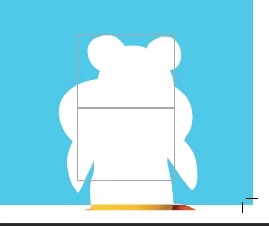
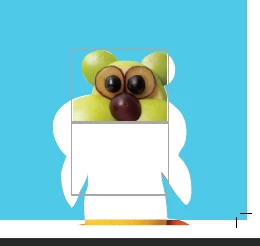
When I create a PDF of a saddle-stitched booklet from InDesign (Print booklet > postscript file > distill through acrobat), it sometimes places a white box overtop of images. It doesn't seem to be specific to any file types either it's more or less just random. Most images within the booklet are fine, but some are obscured by white.

I had asked this question previously, and someone had thought it was just an overprint preview issue, which I thought solved the issue. While turning on overprint preview did fix the issue on screen, the printed file still has the white. So, unfortunately, turning on overprint can cause me to miss these boxes and send an incorrect file to print.

The boxes are not behind the images and it does not seem to be the white box effect or the yucky discolored syndrome issues that I have seen posted previously.

I can manually go into acrobat edit and delete the white boxes which are just covering the images, but this doesn't always work great. Attached are a few screenshots, first is what the PDF looks like after distilling, second is what I see after entering acrobat edit and the third is after deleting the "box" covering part of the image.

All my creative cloud programs are up to date. Any advice is appreciated!

    This topic has been closed for replies.
    Correct answer Laubender

    kylef59038392  wrote

    …I had asked this question previously, and someone had thought it was just an overprint preview issue, which I thought solved the issue. While turning on overprint preview did fix the issue on screen, the printed file still has the white. So, unfortunately, turning on overprint can cause me to miss these boxes and send an incorrect file to print.

    Hm. Then your desktop ( ? ) printer does not support overprinting. Not good.

    Workaround: Simulate overprinting.

    There should be a checkbox for this in the printing menu, I think.

    What printer have you connected to your machine?

    Can you show some screenshots of the menus and settings you are using when doing Print Booklet?

    Regards,
    Uwe

    4 replies

    dave c courtemanche
    Inspiring
    May 6, 2019

    Kyle

    You may be better off creating a template in indesign with a 12x18 size with crops and bleeds in the template. Export your file to Press quality PDF with bleeds and then place in your template file. A bit of a workaround, but a heck of a lot cheaper than impositioning software. Pretty easy to do.

    LaubenderCommunity ExpertCorrect answer
    Community Expert
    May 6, 2019

    kylef59038392  wrote

    …I had asked this question previously, and someone had thought it was just an overprint preview issue, which I thought solved the issue. While turning on overprint preview did fix the issue on screen, the printed file still has the white. So, unfortunately, turning on overprint can cause me to miss these boxes and send an incorrect file to print.

    Hm. Then your desktop ( ? ) printer does not support overprinting. Not good.

    Workaround: Simulate overprinting.

    There should be a checkbox for this in the printing menu, I think.

    What printer have you connected to your machine?

    Can you show some screenshots of the menus and settings you are using when doing Print Booklet?

    Regards,
    Uwe

    Participating Frequently
    May 7, 2019

    Hi Uwe,

    The Simulate Overprint worked! Though you did mention it was a workaround, are there any concerns with using it regularly?

    I have run the postscript files on both a RICOH Aficio SP C821DN and a Canon iRA C5500. Both have the same issues with the white showing up after distilling. Are there any specific settings you would like me to share?

    Thank you!

    BobLevine
    Community Expert
    Community Expert
    May 7, 2019

    Stop using spot colors and you won't have this issue.

    BobLevine
    Community Expert
    Community Expert
    May 6, 2019

    In addition to Bill’s advice, there is a booklet feature in Acrobat.

    As for the white, I suspect you have some transparent objects over spot colors. You can turn on simulate overprint, but this is really an awful way to produce an imposed document.

    Participating Frequently
    May 6, 2019

    Hi Bob,

    I am not printing the booklets myself, rather I send out the PDF with crops and bleeds on the spreads. So that the print shop can just run the PDF as is, cut and stitch. As far as I am aware the booklet function in Acrobat does not add in crops and bleeds to the file. Also I am not sure, but I didn't think you could save the booklet file that is created by the booklet function in Acrobat.

    Thank you!

    Bill Silbert
    Community Expert
    Community Expert
    May 6, 2019

    The method that you are using to make your pdfs is an antiquated one which should only be used in extreme cases. The best way to make a clean pdf is through File>Export>Adobe Pdf (Print). Try it that way and see if it helps.

    Participating Frequently
    May 6, 2019

    Hi Bill,

    I am only using this method for inbooklet PDF's with the pages shuffled for saddle stitching. I don't use it every day, but I do create these PDF's fairly often to send out for print. For all other files and for proofing purposes I do use normal exporting.

    Thank you!