

adding ppd to printers
Participating Frequently
February 8, 2021
Answered

PPD for InDesign 2021

  • February 8, 2021
  • 4 replies
  • 16651 views

I have been trying unsuccessfully to get the PPD to work with InDesign 2021. Not sure what I'm doing wrong or if it's not supported at all. My IT guy suggest I reach out to the community to see if anyone has any answers. I am running Mac OS 10.15.7 (Catalina). Thank you in advance!
Correct answer rob day

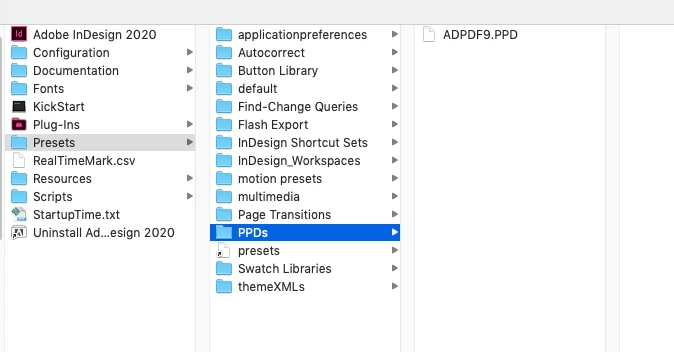
You’ll need to install it in the InDesign application folder. Quit ID and in the Presets folder make a folder named PPDs (name is case sensitive). Move the ADPDF9.PPD folder inside of the PPDs folder:


4 replies

Mike Witherell
Community Expert
Community Expert
April 28, 2025

That elusive PPD file is available here, near the bottom of the page:

ADPDF9.ppd

Mike Witherell
deenas69190555
Participant
May 1, 2024

I don't see it noted in this topic so I'll add; if you do not have a PPD folder in your Presets folder you need to create it. Call it "PPDs" typed exactly or it won't work 😉

You're welcome

Dave Creamer of IDEAS
Community Expert
Community Expert
June 13, 2025

Actually, making the folder was mentioned in 2021 in the correct answer.


David Creamer: Community Expert (ACI and ACE 1995-2023)
Scott.Olling
Known Participant
February 1, 2023

I have come back to this type of answer to this question every few months now because I keep losing my PPD folder with the InDesign updates. I guess I have to mention this over in ADD THIS FEATURE ADOBE FOR THE LOVE OF ALL THAT'S PAGEWORTHY to get it fixed.

rob day
Community Expert
Community Expert
February 2, 2023

There’s zero chance that the Adobe PDF 9 PPD is going to be included in an upgrade install. Also, there could be any number of third party plugins, fonts, scripts, PPDs, swatches, that would be lost on an upgrade when you choose to remove the older version. I always archive the current application folder before upgrading, so I have a backup of the files I’ve added.

rob day
Community Expert
Community Expert
February 8, 2021

For what printer? Is the printer a Postscript printer? 

adding ppd to printers
Participating Frequently
February 8, 2021

I am trying to make a color separated file. I don't know the technological terms, but in InDesign I go to file > print > and the printer dialog box I choose printer > Postscript file and then the pull down for the PPD which was ADPDF9.PPD. I have the PPD installed in Library > Printers > PPDs folder.

Thank you!

rob day
Community Expert
Community Expert
December 6, 2021

@adding ppd to printers where did you get the PPD file? I don't seem to have one installed and can't find one anywhere! Same process as yours


There‘s a download link here:

https://helpx.adobe.com/indesign/kb/add-acrobat-ppd.html