


Exit
  • Global community
    • Language:
      • Deutsch
      • English
      • Español
      • Français
      • Português
  • 日本語コミュニティ
  • 한국 커뮤니티
0

Print Alignment Anomaly Troubleshooting Request

Explorer ,
Jan 04, 2021 Jan 04, 2021

Everything in my document is aligned correctly, but when I print it it is misaligned (see attachments), and I have no clue as to why. Anyone have any ideas where to start?

TOPICS
Print
1.4K
Translate
Report
Community guidelines
Be kind and respectful, give credit to the original source of content, and search for duplicates before posting. Learn more
community guidelines

correct answers 1 Correct answer

Community Expert , Jan 05, 2021 Jan 05, 2021

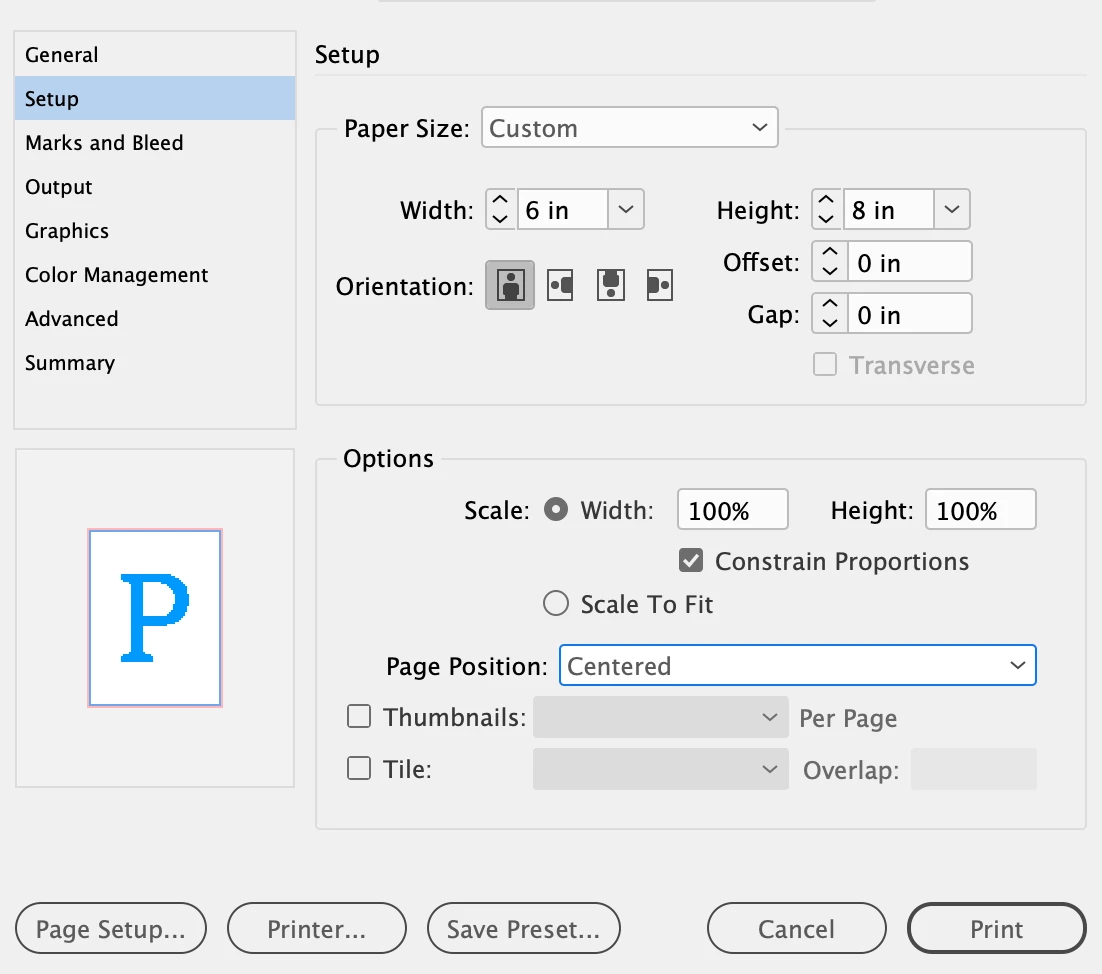
If youre printing on actual 6" x 8" paper, you should set a Custom page size in your Print dialog. Also, make sure your orientationj is correct. in your screen shots, you're 90° off.
 

Screen Shot 2021-01-05 at 8.07.56 AM.png

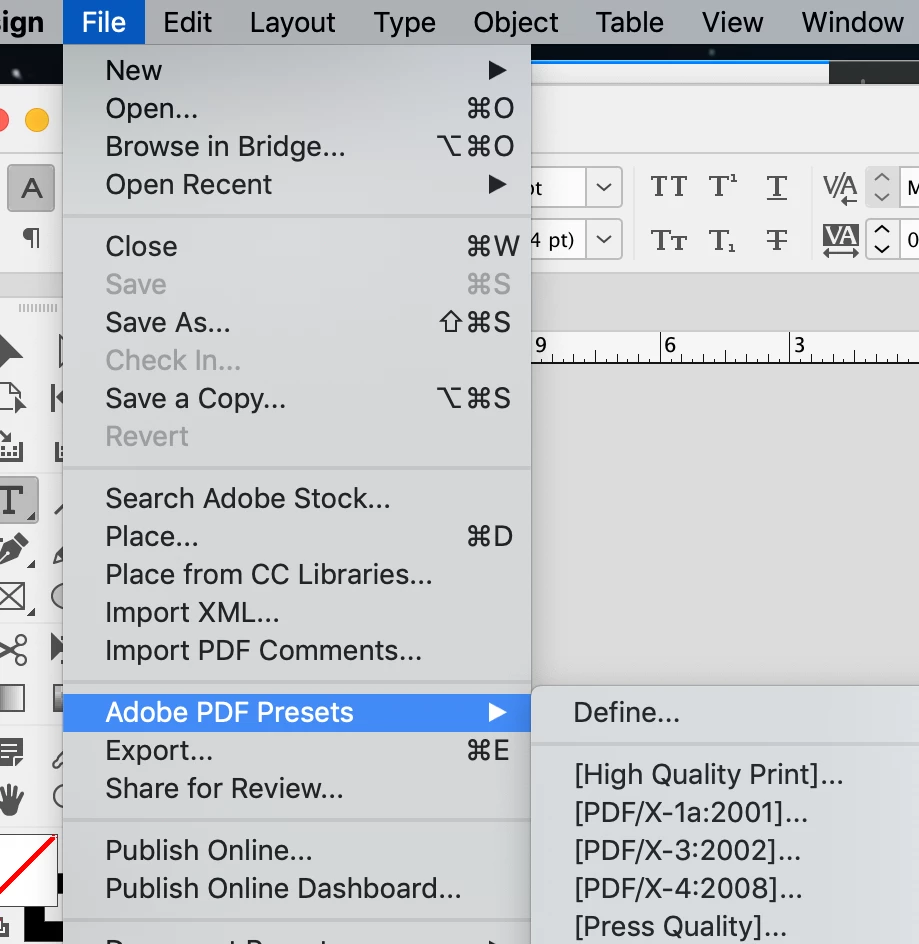
As for making a PDF, that should never be done from the Print Dialog in ID. Export it from the File > Adobe PDF Presets menu. For your purpose, try either Press Quality or High Quality. No need to change any of the options when you Export.
Screen Shot 2021-01-05 at 8.03.57 AM.png

But since you have a special paper size, you will need to configure Acrobat ac

...
Translate
Community Expert ,
Jan 04, 2021 Jan 04, 2021

If I'm understanding the issue, in the Print dialog window, look in the "Setup" section and for Page Position, choose Centered.

Translate
Report
Community guidelines
Be kind and respectful, give credit to the original source of content, and search for duplicates before posting. Learn more
community guidelines
Explorer ,
Jan 04, 2021 Jan 04, 2021

Thanks Jeff, but that doesn't seem to be the problem. Centered was already selected.

Translate
Report
Community guidelines
Be kind and respectful, give credit to the original source of content, and search for duplicates before posting. Learn more
community guidelines
Community Expert ,
Jan 04, 2021 Jan 04, 2021

Are you printing from ID directly? or from a PDF?

Translate
Report
Community guidelines
Be kind and respectful, give credit to the original source of content, and search for duplicates before posting. Learn more
community guidelines
Explorer ,
Jan 04, 2021 Jan 04, 2021

Directly from ID.

Translate
Report
Community guidelines
Be kind and respectful, give credit to the original source of content, and search for duplicates before posting. Learn more
community guidelines
Community Expert ,
Jan 04, 2021 Jan 04, 2021

Sound slike a mismatch somehwhere with your Printer Driver. In the Print > Setup > Paper Size, what do you have there?

If you have "Defined By Driver" check Page Setup at bottom left to make sure there's not some weird page size selected in there.


In any case, what I recommend now is create a Print Quality PDF and use Acrobat to print your file instead of doing it from ID (making sure you again have the right page size slected and "Actual Size" checked) and see if there's an improvement.

Translate
Report
Community guidelines
Be kind and respectful, give credit to the original source of content, and search for duplicates before posting. Learn more
community guidelines
Explorer ,
Jan 04, 2021 Jan 04, 2021

1) Screen Shot 2021-01-04 at 4.47.25 PM.png2) Screen Shot 2021-01-04 at 5.26.12 PM.png3) Screen Shot 2021-01-04 at 5.27.20 PM.png4) Screen Shot 2021-01-04 at 5.29.01 PM.png

Translate
Report
Community guidelines
Be kind and respectful, give credit to the original source of content, and search for duplicates before posting. Learn more
community guidelines
Explorer ,
Jan 04, 2021 Jan 04, 2021

I tried saving as a PDF, per your suggestion, RM, but I got rejeccted: 1) Screen Shot 2021-01-04 at 5.30.40 PM.png2) Screen Shot 2021-01-04 at 5.30.54 PM.png

Translate
Report
Community guidelines
Be kind and respectful, give credit to the original source of content, and search for duplicates before posting. Learn more
community guidelines
Community Expert ,
Jan 04, 2021 Jan 04, 2021

Is the paper size specified in ID print window, the same size as paper in printer?

Translate
Report
Community guidelines
Be kind and respectful, give credit to the original source of content, and search for duplicates before posting. Learn more
community guidelines
Explorer ,
Jan 04, 2021 Jan 04, 2021

Well, yes and no. I've specified A5, but the actual paper size is 6" x 8". I assume that that is close enough. True?


Translate
Report
Community guidelines
Be kind and respectful, give credit to the original source of content, and search for duplicates before posting. Learn more
community guidelines
Community Expert ,
Jan 05, 2021 Jan 05, 2021
LATEST

If youre printing on actual 6" x 8" paper, you should set a Custom page size in your Print dialog. Also, make sure your orientationj is correct. in your screen shots, you're 90° off.


Screen Shot 2021-01-05 at 8.07.56 AM.png

As for making a PDF, that should never be done from the Print Dialog in ID. Export it from the File > Adobe PDF Presets menu. For your purpose, try either Press Quality or High Quality. No need to change any of the options when you Export.

Screen Shot 2021-01-05 at 8.03.57 AM.png

But since you have a special paper size, you will need to configure Acrobat accordingly. (Page setup > Paper size > Manage Custom Sizes....)

Translate
Report
Community guidelines
Be kind and respectful, give credit to the original source of content, and search for duplicates before posting. Learn more
community guidelines