
Participant
February 27, 2020
Question

Print Dialog box missing "print Preview" option in latest version of InDesign

  • February 27, 2020
  • 2 replies
  • 1252 views

Hi,

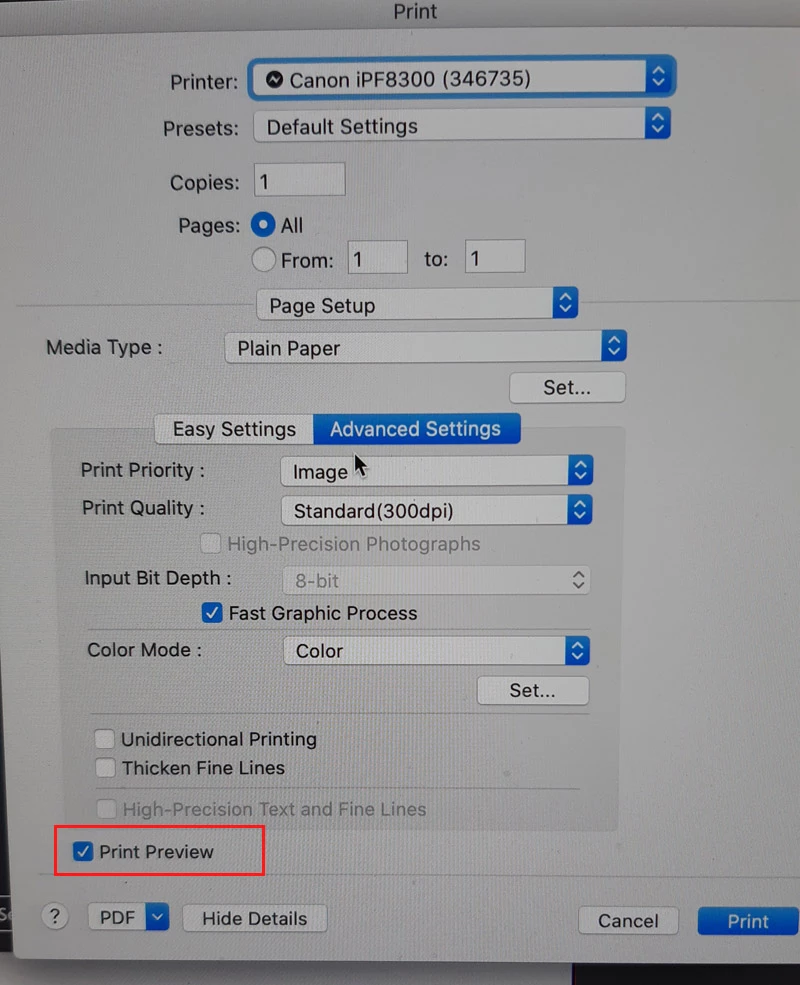
We have had to update one of our Macs and also updated to the latest version of InDesign, but we can no longer see the “Print Preview” option in the print dialog box in advanced settings.

We use this option when sending jobs to a large format Canon printer so that they are held prior to printing in a window that allows us to set the media, position of the image, adjust the colour settings etc. Without it the job is output straight away without us setting it up correctly first.

Does any one have any suggestions as to how to get this option back please.

I’ve attached a screen grab to show the option concerned.

Thanks
This topic has been closed for replies.

2 replies

Steve Werner
Community Expert
Community Expert
February 27, 2020

I support what Colin said. Since it could have something to do with the printer driver version, I'd try checking with Canon technical support.

fendr63Author
Participant
February 28, 2020

Thanks for the replies, we had to update from Sierra to Catalina. Not sure about other applications as we only print from InDesign and the other apps tend to all have different dialog boxes (I assume that both our Macs have the same print drivers as they were installed at the same time - this was before I came to the company), I'll have to check that out but in the meantime I'll check Canon tech support.

Willi Adelberger
Community Expert
Community Expert
February 28, 2020

I would strongly recommend to export a PDF and print from Acrobat Pro.

Colin Flashman
Community Expert
Community Expert
February 27, 2020

What Mac operating system did you migrate to and from?

Does this issue happen with other applications, not only InDesign?

Is the print driver the same as the one used from the screen capture, or is a different print driver being used?

I've a feeling this is an operating system issue rather than an InDesign issue.

If the answer wasn't in my post, perhaps it might be on my blog at colecandoo!