Participant
March 31, 2016
Answered

Print issue - white box around a transparent image

  • March 31, 2016
  • 4 replies
  • 54633 views

Hi there,

Please can someone help I am pulling my hair out with this!!

I have an image which I am placing into Indesign, I am then exporting as a pdf and printing. In both Indesign and the pdf on screen the image looks perfect, transparent background, however once it prints the image has a white box around it.

I have tried saving the image out as a psd, png, tif, eps, ai you name it and I can't get passed the issue.

Any help would be great, I have read hundreds of forums and still nothing has worked!

Thanks
Correct answer modernaff

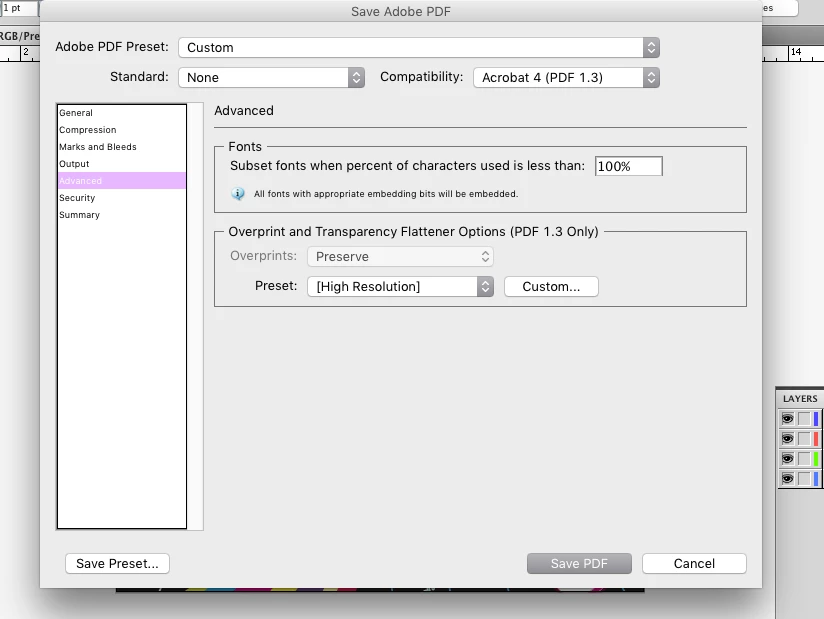
I agree with what Rob says. I had this issue today. To fix the overprint issue, your setting for Compatibility should be Acrobat 4 PDF 1.3

Then click on the Advanced option on the left side menu. You should see the Overprint and Transparency Flattener Options for pdf 1.3 only. Under Preset drop down (High Resolution) should be selected. This will enable your gradient and mesh resolution to print at 300 ppi. If you have further concerns, you can hit the Custom button and change the ppi to whatever setting you need it to be,

I hope this helps. I have Adobe CS5.

4 replies

modernaffCorrect answer
Participant
August 13, 2018

I agree with what Rob says. I had this issue today. To fix the overprint issue, your setting for Compatibility should be Acrobat 4 PDF 1.3

Then click on the Advanced option on the left side menu. You should see the Overprint and Transparency Flattener Options for pdf 1.3 only. Under Preset drop down (High Resolution) should be selected. This will enable your gradient and mesh resolution to print at 300 ppi. If you have further concerns, you can hit the Custom button and change the ppi to whatever setting you need it to be,

I hope this helps. I have Adobe CS5.

rob day
Community Expert
Community Expert
March 31, 2016

I am then exporting as a pdf and printing. In both Indesign and the pdf on screen the image looks perfect, transparent background, however once it prints the image has a white box around it.

If both the PDF and InDesign previews look fine then your printer is not handling the flattening of the page correctly when you print the PDF with live transparency. Try flattening the PDF when you export—set the Compatibility to Acrobat 4, or if it's ok to convert all color to CMYK export using PDF/X-1a

Peter Spier
Community Expert
Community Expert
March 31, 2016
Willi Adelberger
Community Expert
Community Expert
March 31, 2016

The mentione box might either this: http://indesignsecrets.com/eliminating-ydb-yucky-discolored-box-syndrome.php

Or you choosed in the import options (place dialog) not to have transparency or your frame is white.

Images with transparency are best imported as PSD, never use EPS in InDesign PNG is not good for print.