
Participant
March 11, 2023
Answered

Print two copies of my double-sided design on a single A4 page

  • March 11, 2023
  • 2 replies
  • 636 views

Hiya,  


I have created a double sided tri-fold leaflet design which is 80x240mm.


I can print this successfully on a piece of A4 paper and it prints double sided beautifully - just how I wanted.


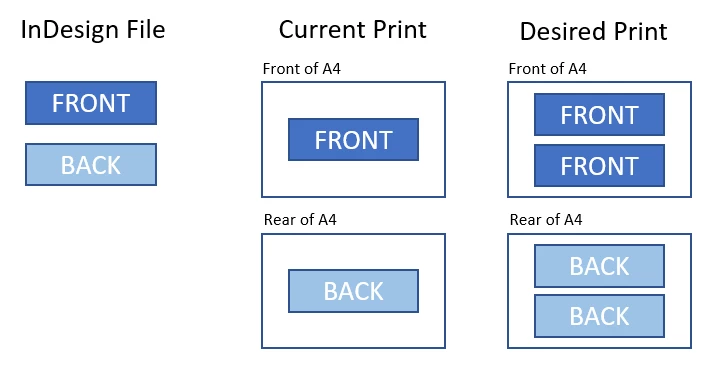
I am concerned about wasting paper, however, so would like to print two of my designs per single sheet of a4, i.e. the front of the leaflet would be printed twice on one side of the a4 and the reverse of the leaflet printed twice on the rear of the a4.  The two copies of my design would need to be aligned such as I can cut them both out - see image below. 


At present, I can only print my design once in the centre of a single piece of A4, which is terribly wasteful.


Please can anyone tell me how I go about doing this please?


Thanks,


Chris
This topic has been closed for replies.
Correct answer James Gifford—NitroPress

The very simplest approach would be to actually double up your layout. Create a copy, enlarge the page size if need be, group all the elements of each side, move it to the first double position, copy/paste, move that copy to the second double position. Repeat for the other side. It should be trivial to do with numeric positioning and/or smart guides.


That make sense?


There are ways to do 2-up printing, but they are dependent on your printer and things like how either InDesign or Acrobat might choose to lay things out for a print page. Much simpler to just do it that way yourself.


2 replies

Peter Spier
Community Expert
Community Expert
March 11, 2023

I usually make my two-up layouts by placing the original file twice into a new dcoument.

Robert at ID-Tasker
Legend
March 11, 2023

But there is a bug in the latest version - when trying to export PDF from INDD file with placed other INDD file - so placing PDF would be much safer. 


James Gifford—NitroPress
Legend
March 11, 2023

The very simplest approach would be to actually double up your layout. Create a copy, enlarge the page size if need be, group all the elements of each side, move it to the first double position, copy/paste, move that copy to the second double position. Repeat for the other side. It should be trivial to do with numeric positioning and/or smart guides.


That make sense?


There are ways to do 2-up printing, but they are dependent on your printer and things like how either InDesign or Acrobat might choose to lay things out for a print page. Much simpler to just do it that way yourself.


Participant
March 12, 2023

Thanks @James Gifford—NitroPress will give that a go.


It was my first thought, but I just wanted to double chdck I hadn't missed a clever setting somewhere that might just do it for me! 😉