

alexa.wall
Participant
May 10, 2022
Answered

Printing in the US - Convert to black only

  • May 10, 2022
  • 3 replies
  • 801 views

I have a small issue and hopefully, someone will be able to help me.


I usually have brochures printed in Europe and have never had a problem before. Now for a customer we are having brochures printed in the United States. These files have been converted to CMYK and exported to PDF print. But I am receiving an email from the printers saying the following.


The copy and QR codes are still showing as RGB instead of just black. They just need to be converted to black only. The same thing needs to be done for the black text throughout the brochure. 


I do not understand what I am doing wrong. Can anyone help me? 
This topic has been closed for replies.
Correct answer jmlevy

Black only means that you use the Black color to setup your text and not a rich black. That's what the printer asks for. If you use a rich black for your text, there are potential risks of misregistration.

Are you really sure that it is not setup with a rich black?

I have seen on your first screenshot that you have PitStop. You can use it to convert rich black into black only.

3 replies

Jumpenjax
Community Expert
Community Expert
May 17, 2022

can you open the original QR code. If so you can check and see if it in gray scale. If not make it gray scale and save. Go back to InDesign and double click on the QR code there to replace. I print in US all the time and any image or graphic place in InDesign should be cmyk or gray scale for black. The export your pdf to your printer specs. That should clear the problem.

Lee- Graphic Designer, Print Specialist, Photographer
Community Expert
May 10, 2022

"I do not understand what I am doing wrong. Can anyone help me?"


Hi Alexa,

I assume you do a color conversion from one CMYK space to another CMYK space when you export to PDF (Print).

All colors will be converted and that enforces a conversion from 100% K to the CMYK values you see for your text and the QR code in the PDF. Best show some screenshots of your PDF export settings.


Also do a screenshot of your page in InDesign with InDesign's Color Separation Preview enabled and Black ink disabled.


Thanks,
Uwe Laubender

( ACP )

jmlevy
Community Expert
Community Expert
May 10, 2022

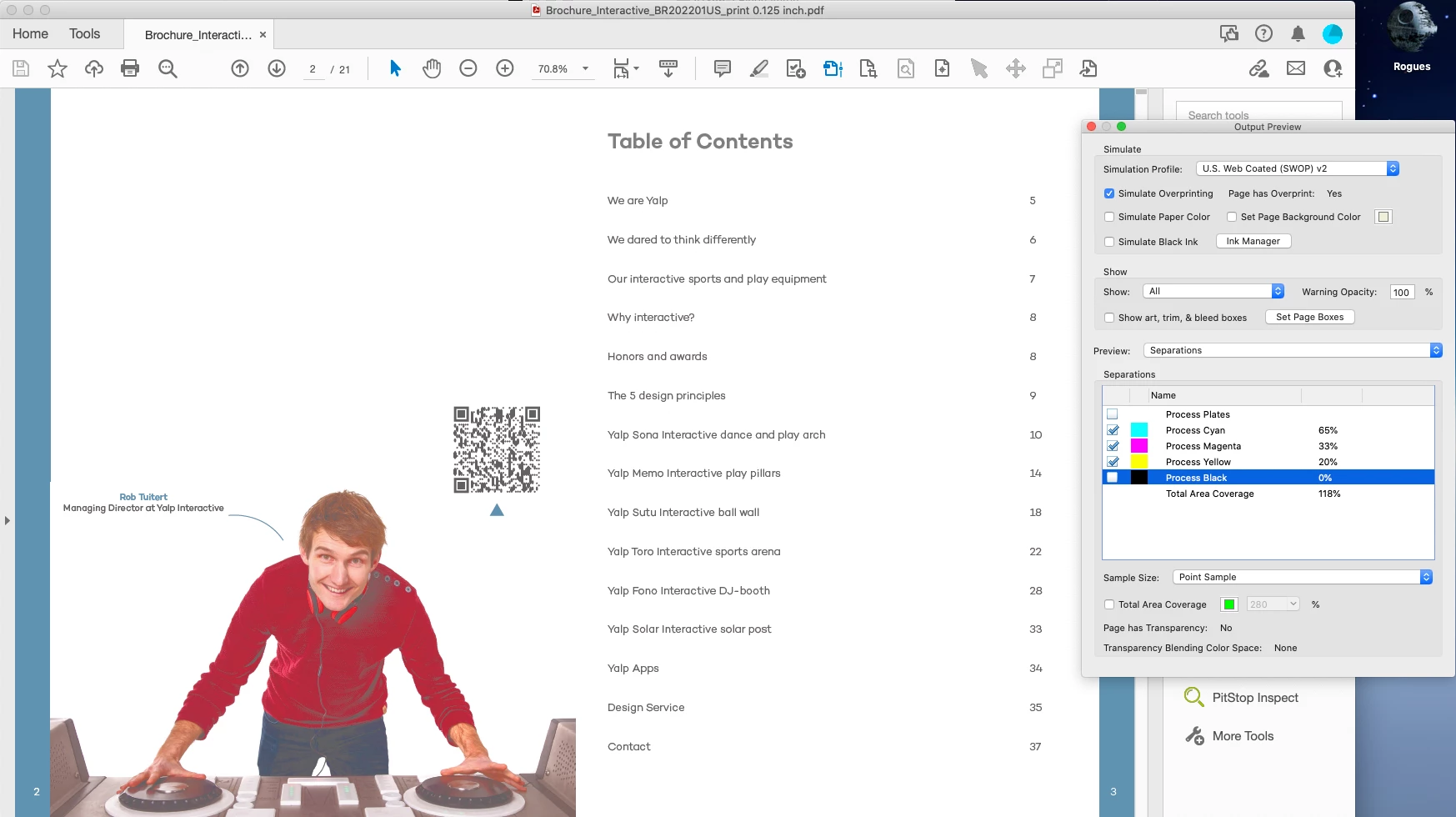
I do not see any RGB colors on your screenshot but the black which is used for the text and QR code is CMYK black. Are you sure that you have used black only? If yes, what are your export settings?

alexa.wall
Participant
May 10, 2022

I think I am not sure what is meant with black only. 


The text black is c:0 m:0 y:0 k:100, and I was thinking of changing that to c:40 m:60 y: 60: 100 (rick black)


jmlevy
Community Expert
jmlevyCommunity ExpertCorrect answer
Community Expert
May 10, 2022

Black only means that you use the Black color to setup your text and not a rich black. That's what the printer asks for. If you use a rich black for your text, there are potential risks of misregistration.

Are you really sure that it is not setup with a rich black?

I have seen on your first screenshot that you have PitStop. You can use it to convert rich black into black only.