Exit
  • Global community
    • Language:
      • Deutsch
      • English
      • Español
      • Français
      • Português
  • 日本語コミュニティ
  • 한국 커뮤니티
0

Problem with font

New Here ,
Apr 27, 2020 Apr 27, 2020

Hello,


I have to use the Whitney font on my document and it does not recognise a character from my language ”ț”, instead in all documented it replaces it with a rectangle with an X inside (see file attached). What can I do to solve this?
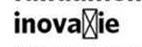
 

Example.jpg

Thank you.

TOPICS
How to
1.9K
Translate
Report
Community guidelines
Be kind and respectful, give credit to the original source of content, and search for duplicates before posting. Learn more
community guidelines

correct answers 1 Correct answer

Community Expert , Apr 27, 2020 Apr 27, 2020

It is possibly that the font you now installed already was installed.

Step 1: with the font in use, check the location of the actual file using the Find Font dialog.

Step 2: quit InDesign. It theoretically can handle fonts' installation and deinstallation while running but you never know.

Step 3: remove the font from your system. (It depends on your OS how to do that.)

Step 4: restart InDesign and check if the font is still available. If it is, that was the reason. Repeat from #1 until InDesign

...
Translate
Community Expert ,
Apr 27, 2020 Apr 27, 2020

Use a different font.

Translate
Report
Community guidelines
Be kind and respectful, give credit to the original source of content, and search for duplicates before posting. Learn more
community guidelines
New Here ,
Apr 27, 2020 Apr 27, 2020

I cannot, it's the font my company uses. Changing it is not an option...

Translate
Report
Community guidelines
Be kind and respectful, give credit to the original source of content, and search for duplicates before posting. Learn more
community guidelines
Community Expert ,
Apr 27, 2020 Apr 27, 2020

What version of Whitney have you? In the OpenType version, it exists.

Translate
Report
Community guidelines
Be kind and respectful, give credit to the original source of content, and search for duplicates before posting. Learn more
community guidelines
New Here ,
Apr 27, 2020 Apr 27, 2020

I have the OpenType version and I know it exists because it used to work in the past, but not anymore, that's why I think it's strange and I cannot find a solution.

Translate
Report
Community guidelines
Be kind and respectful, give credit to the original source of content, and search for duplicates before posting. Learn more
community guidelines
Community Expert ,
Apr 27, 2020 Apr 27, 2020

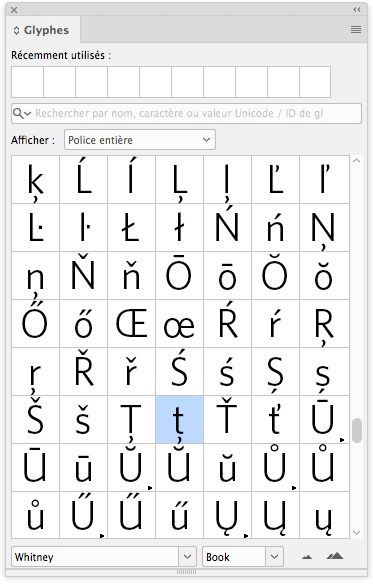
Open the glyphs panel and find the glyph you need there.

Translate
Report
Community guidelines
Be kind and respectful, give credit to the original source of content, and search for duplicates before posting. Learn more
community guidelines
New Here ,
Apr 27, 2020 Apr 27, 2020

I tried that as well, but it does not work... 

Translate
Report
Community guidelines
Be kind and respectful, give credit to the original source of content, and search for duplicates before posting. Learn more
community guidelines
Community Expert ,
Apr 27, 2020 Apr 27, 2020

Capture d’écran 2020-04-27 à 16.01.18.jpg

Translate
Report
Community guidelines
Be kind and respectful, give credit to the original source of content, and search for duplicates before posting. Learn more
community guidelines
New Here ,
Apr 27, 2020 Apr 27, 2020

Yes, I found it but I cannot replace the rectangle in the whole document with it. That is what I tried and does not work.

Translate
Report
Community guidelines
Be kind and respectful, give credit to the original source of content, and search for duplicates before posting. Learn more
community guidelines
Community Expert ,
Apr 27, 2020 Apr 27, 2020
How did you get the text into the document in the first place?
Translate
Report
Community guidelines
Be kind and respectful, give credit to the original source of content, and search for duplicates before posting. Learn more
community guidelines
New Here ,
Apr 27, 2020 Apr 27, 2020

Copy and paste from a Word document.

Translate
Report
Community guidelines
Be kind and respectful, give credit to the original source of content, and search for duplicates before posting. Learn more
community guidelines
Community Expert ,
Apr 27, 2020 Apr 27, 2020
There's your problem. Place the text, don't paste it.
Translate
Report
Community guidelines
Be kind and respectful, give credit to the original source of content, and search for duplicates before posting. Learn more
community guidelines
New Here ,
Apr 27, 2020 Apr 27, 2020

Yes, like that it works, but the text is a brochure and I have to insert part of the text in different text boxes, I cannot insert the whole word document into a text box because I have several pages, each with different text. Isn't it a better way of inserting the text, because I cannot create soo many word documents to use place option....

Translate
Report
Community guidelines
Be kind and respectful, give credit to the original source of content, and search for duplicates before posting. Learn more
community guidelines
Community Expert ,
Apr 27, 2020 Apr 27, 2020

I cannot reproduce your problem: it works when I copy and paste.

Translate
Report
Community guidelines
Be kind and respectful, give credit to the original source of content, and search for duplicates before posting. Learn more
community guidelines
New Here ,
Apr 27, 2020 Apr 27, 2020

I tried again, but for me it does not work. When I copy the text back in Word all the letters are in Whitney font, but the "ț” which is converted to Calibri font...

 

rorapa_0-1587997966526.png


Translate
Report
Community guidelines
Be kind and respectful, give credit to the original source of content, and search for duplicates before posting. Learn more
community guidelines
Community Expert ,
Apr 27, 2020 Apr 27, 2020

Is your font properly installed in your system or is it located in a “document fonts” folder? If this is the case, Word will not recognize it.

Translate
Report
Community guidelines
Be kind and respectful, give credit to the original source of content, and search for duplicates before posting. Learn more
community guidelines
New Here ,
Apr 27, 2020 Apr 27, 2020

What do you mean by "properly installed in your system"? I received it from my colleagues, I pressed install and that was it. It is wrong how I installed it?

Translate
Report
Community guidelines
Be kind and respectful, give credit to the original source of content, and search for duplicates before posting. Learn more
community guidelines
Community Expert ,
Apr 27, 2020 Apr 27, 2020
Place the text into an empty document and then copy/paste from there to your brochure.
Translate
Report
Community guidelines
Be kind and respectful, give credit to the original source of content, and search for duplicates before posting. Learn more
community guidelines
New Here ,
Apr 28, 2020 Apr 28, 2020
LATEST

I tried that, same problem. I even use place and it still does not dispaly that character...

Translate
Report
Community guidelines
Be kind and respectful, give credit to the original source of content, and search for duplicates before posting. Learn more
community guidelines
Community Expert ,
Apr 27, 2020 Apr 27, 2020

Did you receive the font files located in a folder called "document fonts”? If this is the case, it means that these fonts have been packaged with the indd document and can only be used in this document. If you have installed the fonts in your system, they should be recognized also by Word.


Translate
Report
Community guidelines
Be kind and respectful, give credit to the original source of content, and search for duplicates before posting. Learn more
community guidelines
Community Expert ,
Apr 27, 2020 Apr 27, 2020

Hi rorapa,

you said:

…What do you mean by "properly installed in your system"? I received it from my colleagues, I pressed install and that was it. It is wrong how I installed it?


Perhaps. What is your operating system?


Regards,
Uwe Laubender

( ACP )

Translate
Report
Community guidelines
Be kind and respectful, give credit to the original source of content, and search for duplicates before posting. Learn more
community guidelines
Community Expert ,
Apr 27, 2020 Apr 27, 2020

It is possibly that the font you now installed already was installed.

Step 1: with the font in use, check the location of the actual file using the Find Font dialog.

Step 2: quit InDesign. It theoretically can handle fonts' installation and deinstallation while running but you never know.

Step 3: remove the font from your system. (It depends on your OS how to do that.)

Step 4: restart InDesign and check if the font is still available. If it is, that was the reason. Repeat from #1 until InDesign cannot find the font anymore.

Finally, step 5 is to re-install the latest version that you have.

Step 3:


Translate
Report
Community guidelines
Be kind and respectful, give credit to the original source of content, and search for duplicates before posting. Learn more
community guidelines