barbaramuller
Participant
February 5, 2022
Question

Problem with Tamil Fonts
  • February 5, 2022
  • 2 replies
  • 10101 views

Hello all

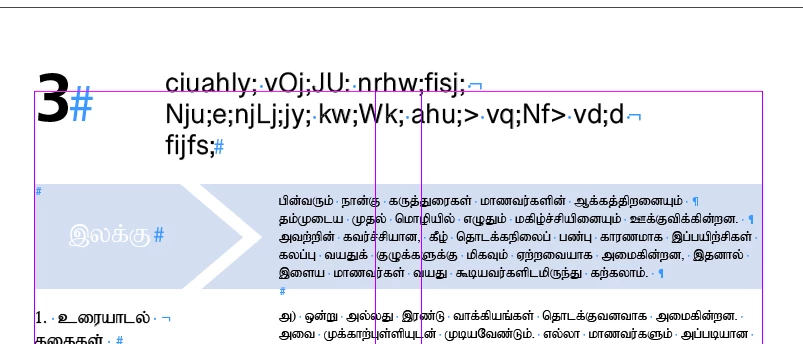
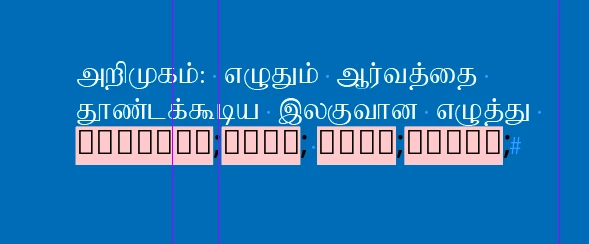
Can someone please help me. I have designed a book that is now also published in Tamil. The layout works fine with the font „Baamini“. But now I have been asked to layout everything in a Unicode font (e.g. „Latha“ or „Noto Sans Tamil“). Unfortunately, Baamini is not a Unicode font and I simply cannot manage to install the two fonts „Latha“ or „Noto Sans Tamil“ correctly. Only (pink) rectangles or latin letters appear (see screenshots).

Does anyone know how I can solve this problem? I would be very grateful for any helpful tips.

Barbara

2 replies

Participant
July 27, 2025
Screenshot_20250727_091556.jpg
Joel Cherney
Community Expert
Community Expert
July 27, 2025

Okay, Vinoth, that isn't in InDesign. We're supposed to be talking about Adobe InDesign, in here.  But:


I couldn't have told you that it was corrupted Tamil specifically just by looking at it, but it's clearly some kind of Unicode-encoded text that is being displayed as Latin-1. You posted it without commentary in this thread, which I'm going to take as permission to assume it's Tamil.  It looks like UTF-8 text looks when the encoding fails. (Also, when I gave up and asked Claude.ai if it could extract any meaningful text, it correctly identified it as Tamil without being given any hints.)


That Latin-1 mess then must have passed through some other encoding that didn't support one of the incorrectly rendered glyphs, causing one of those extended Latin glyphs to fail to be rendered.


Because of these dropped glyphs, there's no real way to rescue this text.  I'm not sure how VNI742926 sent this to you, but maybe you could call 'em up and ask them to resend through some other app, once which hopefully had robust Unicode support. 

Joel Cherney
Community Expert
Community Expert
February 6, 2022

I'm fairly certain that you've installed the fonts correctly; the problem here is that Baamini isn't a Unicode font. It's a pre-Unicode font. Take a look at what the Glyphs menu reports when I highlight the same character set in Baamini and in Latha. 


See what I mean? The encoding in Baamini is what we used to do, back in the Bad Old Days, to work with non-Latin-script languages. We'd take a Latin-script font and empty it of its glyphs, then put in new glyphs for our target language. So the software would think it was a lowercase j, and you'd whack J on your keyobard to key in a Tamil letter ta. One of the reasons that Uniocode was developed in the first place is to make this kind of workaround obsolete - to give each glyph in each language its own codepoint. You've installed the fonts correctly, I'm sure. But you need to convert your text to Unicode, not just mark it with a Unicode font. 


If I were in your shoes, here are some of the things I might try: 


1) If it's not beyond my modest scripting abilities, I'd write a little Javascript that converts from the old pre-Unicode encoding to Unicode. This can be easy, hard, or impossible. (I think it'd only be "hard" in Tamil.) I'd run that script, then export a PDF, then hand it off to a Tamil reviewer to find errors induced by the conversion. 


2) However, it's usually much faster to use a converter someone else has written. If I was working with small amounts of text, I might just search Google for "Baamini to Unicode converter" and just copy my Baamini text into some helpful stranger's web tool and paste it back in (and reformat b/c of the size difference). Then, I'd make a PDF and hand it off to a Tamil reviewer to find errors induced by the conversion. 


3) If I couldn't write the tool in JS and the amount of text I was dealing with was quite large, I'd consider finding a commercial tool to do the conversion. I didn't find one that would be easy to use, in three minutes of searching, but that doesn't mean it's not out there. This might involve some export/import work, in which you'd try to find a format that your converter would consume, and then export to that format, convert, then re-import, re-format, and then make the PDF for a Tamil reviewer to find errors induced by the conversion. 


4) If none of the above would work, I'd find a Tamil translator who could rekey the whole document, That would be the most expensive by far, but on the plus side, I wouldn't have to go very far to get a Tamil reader to review the conversion. 


Note that Baamini is a very different size than either Latha or Noto (in my GIF above, the Latha is at 12 points, and the Baamini is at 18 points) so considerable reflow can be expected. 


In short, this isn't easy, and you can expect to spend considerable time and effort on this. 


barbaramuller
Participant
February 7, 2022

Hallo Joel

Thank you very much for taking the time to send me such detailed feedback on my problem with the Tamil fonts.
It seems to be very complicated and expensive to change the entire book (approx. 520 pages) to a font other than Baamini. I will have to discuss with my client, what effort makes sense in this case.

Many thanks and kind regards
Barbara

Joel Cherney
Community Expert
Community Expert
February 8, 2022

My pleasure, Barbara. Sometimes, the best outcome for someone in your situation is to be able to say in the post-publication debrief meeting "... can we just have it typed in a Unicode font, next time?" Or "... can we do the conversion to Unicode at the editorial stage, chapter by chapter, next time? Instead of talking about it after the book is laid out?" There are many compelling reasons why a writer might stick with a pre-Unicode font (e.g. having learned to touch-type in it twenty years ago) but few reasons so compelling as to make sticking with that font all the way through publication a good idea. 


Anyways, good luck, and feel free to come back to this thread if you find yourself needing additonal complex-script encoding-conversion support.