


- Home
- InDesign
- Discussions
- Re: problem with writing a log file using writeln
- Re: problem with writing a log file using writeln
problem with writing a log file using writeln

Copy link to clipboard
Copied
Hi All,
Am writing script for InDesign CS5 and have problem with writing log file using writeln statement. Already i generate these kind of log file using with InDesign CS4.
I am working with directory and there is collection of names and phone numbers. Yet I have to recieve some hundreds of phone number for the particular names. I want to collect those names and generate the log report. for example, John. K 000 000 00.
Simply by using findGrep method, i found all the names and phone numbers which are having zeros. All these found items should be generated with one log file. I couldn't write the log using javascript "writeln" class. But I can alert and show all the found names and zeros. Simply i can write some text, and those texts are written in log file. But these things are not write in the log file and i couldn't generate the report.
If anyone already faced and have a solution for this, please provide your valuable suggestion and ideas.
Many thanks
Peru.


 14
Replies
14
14
Replies
14


Copy link to clipboard
Copied
Hi Peru,
Please try this below JS Code.
var myDoc = app.activeDocument;
var myDocname = myDoc.name
var Report = new File("~/Desktop/Indd_Report.log" );
Report .open( "w" );
// here i write the file name only in log file, You already alert the text, just you replace the below (myDocname) instead of you finding result.
Report.writeln(myDocname);
Report.close();
thx
csm_phil
Copy link to clipboard
Copied
Hi csm_phil,
Thanks for your reply. The same thing only i have been used in my code. Please see below.
I can alert and show the found items. But, the generated log file is empty. That is what my problem.
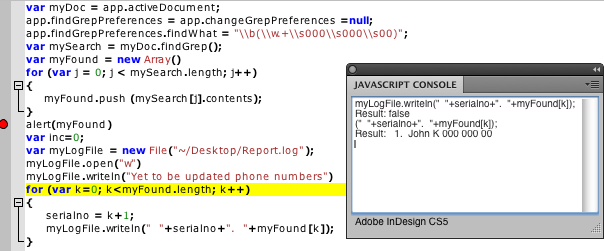
Pleas look into the Javascript console. I have written the "myLogFile.writeln(" "+serialno+". "+myFound
Please advice.
Thanks
Copy link to clipboard
Copied
Hi Peru,
Please try this JS code i have modified your JS code. Its working fine to me.
var myDoc = app.activeDocument;
app.findGrepPreferences = app.changeGrepPreferences = null;
app.findGrepPreferences.findWhat = "\\b(\\w.+\\s000\\s000\\s00)";
var mySearch = myDoc.findGrep();
var Report = new File("~/Desktop/Indd_Report.log" );
Report .open( "w" );
for (var i =0; i<mySearch.length; i++){
Report.writeln(mySearch.contents);
}
Report.close();
app.findGrepPreferences = app.changeGrepPreferences = null;
alert("Done!");
thx
csm_phil

Copy link to clipboard
Copied
THat's weird. I don't suppose it will help, but please put semicolons (;) at the end of your JavaScript lines and try again.
Copy link to clipboard
Copied
Hello John,
Am always using semicolons at end of the JavaScript lines, also checked once again and tried. Eventhough I couldn't get the generated report.
Any other suggestion would be helpful.
Many thanks
Peru.
Copy link to clipboard
Copied
Hi Peru,
Have you tried my previous post JS Code is working fine in my system. Please use that and revert.
thx
csm_phil
Copy link to clipboard
Copied
Hi csm_phil,
Yes. I tried your code in both CS5 and CS4. But i got only the empty report as usual. If i alert, i can see all the searched contents. But its not written inside the log file.
This might be any system related problem? I am using the Mac OS 10.5.2. InDesign CS5 7.0.
Please suggest anyone.
Thank you all


Copy link to clipboard
Copied
Hello Peru,
The code written by csm_phil should work, could you make sure that you have all the rights on the location where you are trying to create the log file and that the path you are using is correct.
I mean we need to be sure first that the file is being created. You can use a simple script like
var logFile = new File("~/Desktop/Report.log");
logFile.open("w");
logFile.writeln("Hello");
and see if it works or not, if not then what is the status, the file is created but not written or not created at all. You can try out by using a different path to save the log file.
I am using MAC 10.6.8 and the above code works both for CS4 and CS5.
Try this and let us know.
Manan Joshi
- Efficient InDesign Solutions -
MetaDesign Solutions
http://metadesignsolutions.com/services/indesign-development.php
Copy link to clipboard
Copied
Hi Manan,
I don't have any problem with creating .log file. My real problem is inside the log file, there is no text to be generated.
Please look into my post dated Sep 29, 2011 10:27AM. I am able to create a .log file. Alos have a look at the Javascript console. I have written the "myLogFile.writeln(" "+serialno+". "+myFound
Manan, need more explanation regarding my problem, please let me know.
Any other suggestion would be helpful for me to write the myFound in my log report.
Thanks for all
Regards
Peru.
Copy link to clipboard
Copied
Peru,
Did you try out with my peice of code, i means lets keep the code simple and just try to write a file. You could also try trashing your preferences and then run the code.
Manan
Copy link to clipboard
Copied
Hi Peru,
Can you please post the full JS code?
thx
csm_phil
Copy link to clipboard
Copied
Hi csm_phil,
Please find below as my code.
var myDoc = app.activeDocument;
var myDocPath = myDoc.filePath;
var myDocName = myDoc.name;app.findGrepPreferences = app.changeGrepPreferences = null;
app.findGrepPreferences.findWhat = "\\b(\\w.+\\s000\\s000\\s00)";
var mySearch = myDoc.findGrep();
var myFound = new Array()
for (var j = 0; j < mySearch.length; j++)
{
myFound.push (mySearch.contents);
}
alert(myFound);
var inc=0;
var myLogFile = new File(myDocPath.fsName + "/Report_" + myDocName.split(".")[0] +".log");
if(myLogFile.open("w", undefined, undefined))
{
myLogFile.writeln("Tool name : Report Generator for CS5");
myLogFile.writeln("************************************");
if(myFound.length != 0)
{
myLogFile.writeln("");
for (var k = 0; k<myFound.length; k++)
{
serialno = k + 1;
myLogFile.writeln(" "+serialno+". "+myFound);
}
}
else
{
myLogFile.writeln("No terms found");
}
}
//myDoc.close();
myLogFile.writeln("Tool name : Report Generator for CS5");
myLogFile.writeln("************************************");
The above two bolded lines only generated in my report. Please check and let me know, if there need any modification to generate the report with myFound Array also.
Many thanks
Peru.
Copy link to clipboard
Copied
Hi Peru,
I have checked the above mentioned JS Code is working fine in my MAC system 10.5.6 version.
Can you please try save the InDesign document in system local (i.e, Desktop or D:) and try again, I think you open the InDesign file in direct from the server don't try this for now testing stage.
Please try and let me know please find the attached report also.
Tool name : Report Generator for CS5
************************************
1. This is for test coding InDesign. K 000 000 00
2. This is for test John. K 000 000 00
thx
csm_phil

Copy link to clipboard
Copied
Perhaps the string used with writeln is an UTF-8 string and your file was opened with an other encoding ?
Try to use : file.encoding="UTF-8";


Get ready! An upgraded Adobe Community experience is coming in January.
Learn more
 AdChoices