Exit
  • Global community
    • Language:
      • Deutsch
      • English
      • Español
      • Français
      • Português
  • 日本語コミュニティ
  • 한국 커뮤니티
0

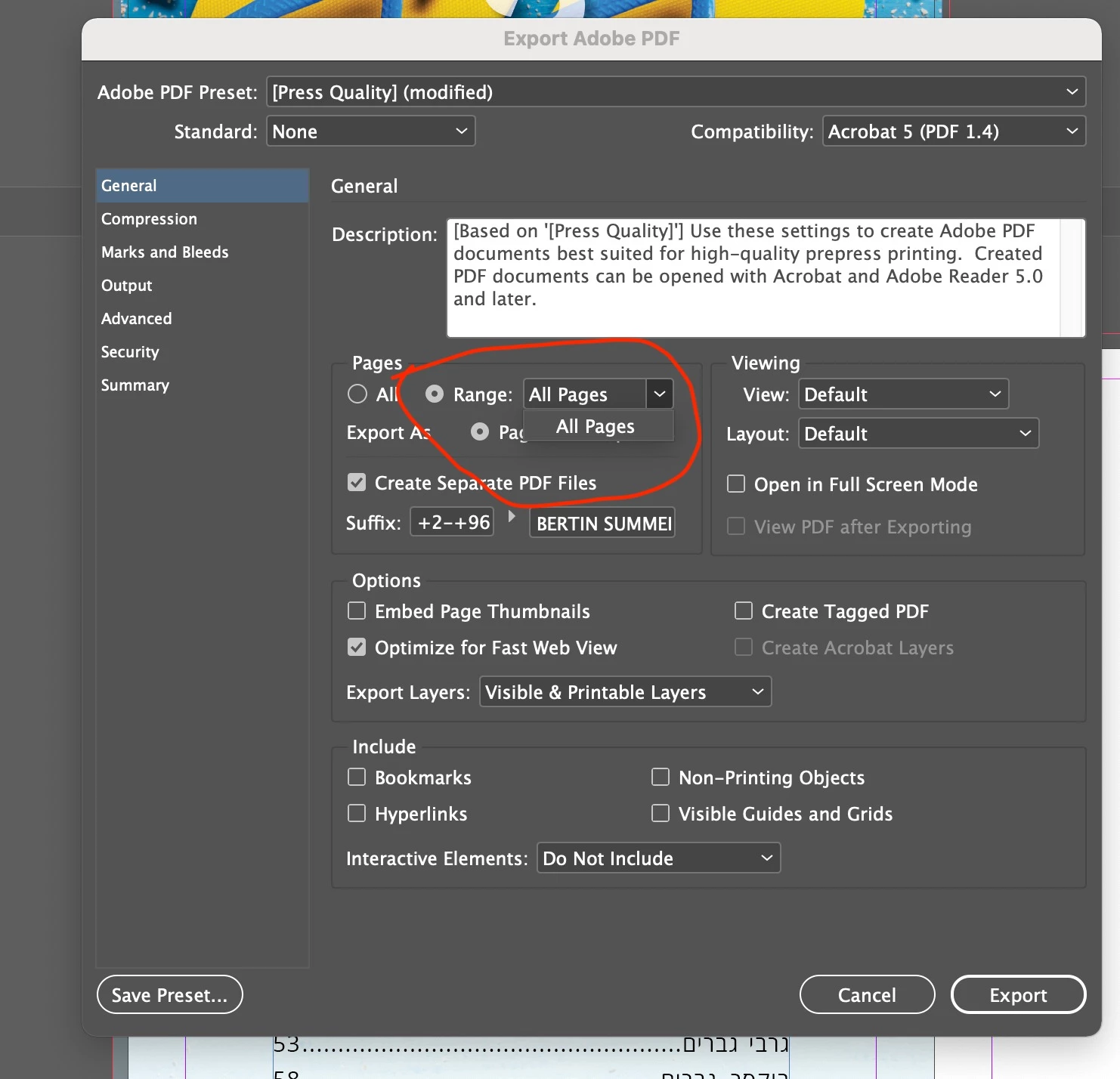
Problems exporting page range to pdf - can't choose the required pages
Community Beginner ,
Mar 08, 2021 Mar 08, 2021

a1239c66-c520-44ce-92d0-252f42658acf.jpg

TOPICS
Import and export
733
Translate
Report
Community guidelines
Be kind and respectful, give credit to the original source of content, and search for duplicates before posting. Learn more
community guidelines

correct answers 2 Correct answers

Community Beginner , Mar 09, 2021 Mar 09, 2021

Thank you, I tried you suggestion but it came out that each page was exported as a separate pdf file.
I want to export for example only pages 3-95 from 100 pages.

In the past I just picked "Range" and entered the page numbers I wanted and somehow and from some reason I don't know  it changes after one of the updates....

Translate
Community Expert , Mar 09, 2021 Mar 09, 2021

Your screen grab had that option selected. If your intent is to not have separate PDFs, then deselect that checkbox.

Translate
Community Expert ,
Mar 08, 2021 Mar 08, 2021

Do you mean you are unable to type the range in that box? "All Pages" comes up as the default range. From your screen grab, it looks like you've put your range in the Suffix area. Type 2-96 in the Range box, and change your suffix to "^P" whuch puts the page number at the end of each separate filename.

Translate
Report
Community guidelines
Be kind and respectful, give credit to the original source of content, and search for duplicates before posting. Learn more
community guidelines
Community Beginner ,
Mar 09, 2021 Mar 09, 2021

Thank you, I tried you suggestion but it came out that each page was exported as a separate pdf file.
I want to export for example only pages 3-95 from 100 pages.

In the past I just picked "Range" and entered the page numbers I wanted and somehow and from some reason I don't know  it changes after one of the updates....

Translate
Report
Community guidelines
Be kind and respectful, give credit to the original source of content, and search for duplicates before posting. Learn more
community guidelines
Community Expert ,
Mar 09, 2021 Mar 09, 2021

Your screen grab had that option selected. If your intent is to not have separate PDFs, then deselect that checkbox.

Translate
Report
Community guidelines
Be kind and respectful, give credit to the original source of content, and search for duplicates before posting. Learn more
community guidelines
Community Beginner ,
Mar 09, 2021 Mar 09, 2021
LATEST

Thank you so much! it was that simple


Translate
Report
Community guidelines
Be kind and respectful, give credit to the original source of content, and search for duplicates before posting. Learn more
community guidelines
