
Problems with docx Word import
I've experienced problems with text disappearing when importing Word docx files into InDesign 5.5 for PC, but I think the problem also arises in other versions. The solution seems to be to use the older Word doc format.
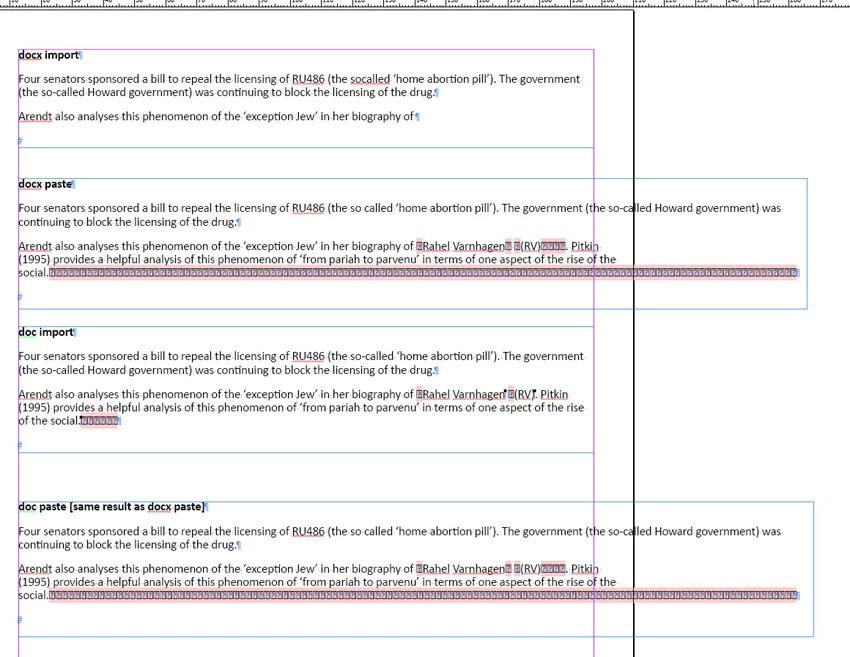
I'll illustrate with a short amount of text in two paragraphs (see screen shot). I have imported the text in docx format, then copied and pasted the same text. Then I saved the docx file in the older doc format and got a different (better) result. Pasting from that format achieved the same result as for the docx format.
The problems are the hyphen sometimes dropping out (from 'so-called'm which appears twice in parentheses in first paragraph - the first time the hyphen drops out, the second time not, and on pasting it drops out but leaves a space, and the second time it's fine), and a whole chunk of text dropping out from the dox import. It doesn't happen with the doc import, though there are numerous missing glyphs. They at least are easy to see and fix. The hyphens and text dropping out aren't easy to see of course.
The solution seems to be to forget about docx imports and use doc always.
 AdChoices