Participant
December 6, 2019
Answered

PSD with shadow over 100K background in InDesign

  • December 6, 2019
  • 4 replies
  • 1935 views

If you have a PSD file, with transparency, and a drop shadow, and you're placing that over a 100K background in InDesign, how do I prevent the shadow area from printing grey? On screen, the shadow looks darker than the background (which is what I want). Build-wise, the shadow looks like about C:45, M:45, Y:45, K:93.


I've toyed with just about all the variables I could think of:

  • with RGB and CMYK PSD files, in a CMYK InDesign document
  • Transparency Blend Space
  • Choosing PDF/X-3 and flattening a High Resolution.
  • Choosing a custom Flattening profile with the slider all the way the "raster" direction.
  • Choosing PDF/X-4 to let the RIP handle the transparency.


How do I make the shadow print darker than the background? How do I get that PSD to overprint or at least blend correctly with the background, so the shadow prints darker? This is a common problem...I see stuff printing like this, alot.


Thanks!

This topic has been closed for replies.
Correct answer rob day

As others have noted a Photshop Blending Mode doesn’t get applied to InDesign objects below, you have to work with the Blend Mode set to Normal.


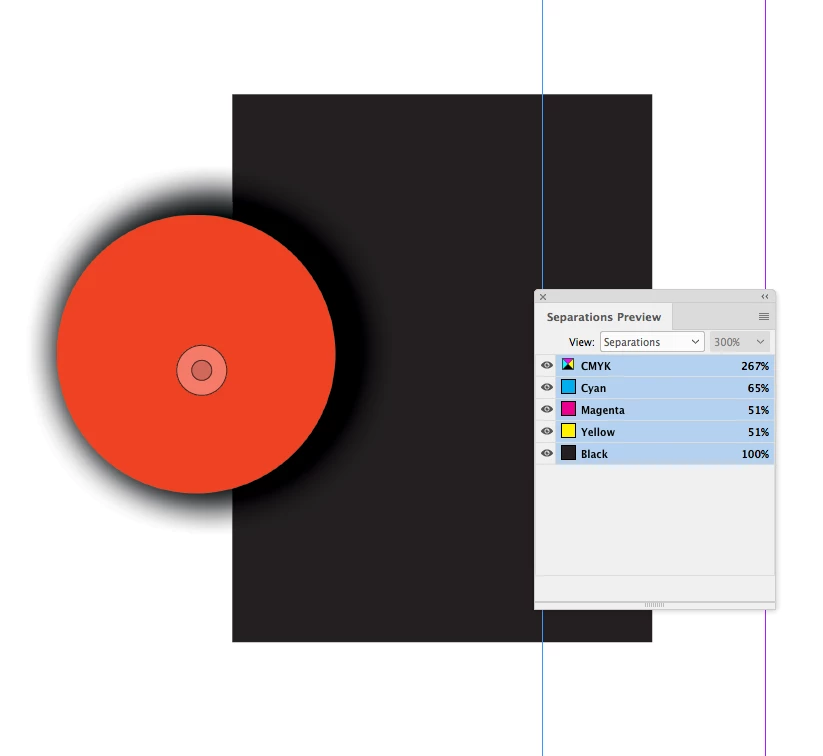
But, you should be able to get the effect you are looking for without multiplying. You could get the Photoshop shadow to overprint a 100% [Black] InDesign fill by working in CMYK mode and setting the drop shadow color to a rich black mix—here I'm using 70|55|55|100:


Placing the drop shadow in ID over a 100% black fill, and Separations Preview shows the shadow’s CMY values are overprinting. Here I'm sampling the shadow area:


Hiding the Black channel:


4 replies

rob day
Community Expert
rob dayCommunity ExpertCorrect answer
Community Expert
December 7, 2019

As others have noted a Photshop Blending Mode doesn’t get applied to InDesign objects below, you have to work with the Blend Mode set to Normal.


But, you should be able to get the effect you are looking for without multiplying. You could get the Photoshop shadow to overprint a 100% [Black] InDesign fill by working in CMYK mode and setting the drop shadow color to a rich black mix—here I'm using 70|55|55|100:


Placing the drop shadow in ID over a 100% black fill, and Separations Preview shows the shadow’s CMY values are overprinting. Here I'm sampling the shadow area:


Hiding the Black channel:


Participant
December 7, 2019

Rob_Day, I'm going to replicate what you did, and try to ge the same result. Thanks.

  • CMYK mode for my PSD
  • Blend Mode: Normal
  • use a rich black (with 100k) shadow
rob day
Community Expert
Community Expert
December 7, 2019

Also, make sure the PSD’s assigned profile is the same as the InDesign document‘s profile, or uncheck Embed Color Profile when you save the PSD.


You can also globally prevent conflicting CMYK profiles by setting the document’s CMYK Policy to Preserve Numbers (Ignore Linked Profiles) when it is created.

Scott Falkner
Community Expert
Community Expert
December 6, 2019

Layer blending modes are used to create the composite image you import in InDesign, but that image can only have one blending mode. The Multiply blending mode you want for the drop shadow won't apply where it overlaps objects in InDesign, so you have to treat is as a seperate image to apply a different blending mode than that applied to the main image. 


In Photoshop rasterize the shadow effect so it is a new layer.


In InDesign place the image with shadow. Go to Object > Layer Options and hide the drop shadow layer. Duplicate the object with no offset (easiest way is to use Option/Alt plus any arrow key to make a duplicate then use the opposite arrow key with no modified to move the duplicate back to its original position). Go to Object > Layer Options and show only the drop shadow. Set the transparency mode to Multiply then go to Object > Arrange > Send Backward.


Now you have the image placed twice, so I would select both images and group them. 

Anna Lander
Inspiring
December 6, 2019

Add background to PS file or delete shadow in PS and apply it in InDesign.

Community Expert
December 6, 2019

Transparent effects including drop shadow created within Photoshop, then saved and regardless of format saved, once placed in Indesign, the outcome of effect is not the same as in Photoshop. 

The workaround, you could exclude the shadow in PS, and apply a shadow once played in Indesign.