
Inspiring
April 20, 2017
Answered

Publish online color management issues - washed-out colors

  • April 20, 2017
  • 9 replies
  • 12969 views

I created an InDesign template for my printed photography portfolio, which worked great, no problems. Now I'm trying to share a PDF of the portfolio I created with contact around the country who I can't meet in person. I've figured out how to create a PDF with the correct sizing and layout of pages versus spreads.

The PDF I exported appears to have correct color management, colors look the way the should. However I'm interested in using Adobe's Publish Online as it looks like it may be simpler for my clients to access, but when I look at the published document on the Adobe site, the colors are all washed out, indicating a color management issue. I'm not sure where the issue is occurring, especially as the PDF's I exported look correct.

Indesign CC 2015, OS 10.11.6 Jpgs placed into Indesign document as sRGB, Color Settings RGB set for sRGB.

Any thoughts appreciated!
Correct answer Laubender

I have experienced exactly the same issue as @nicolemorrison1117
I have tried everything everyones suggested on the thread but nothing seems to work. All my images are washed out across my entire portfolio. Anyone had any updates on this?


Hi @annab93325192 ,

the workaround to solve this issue is:

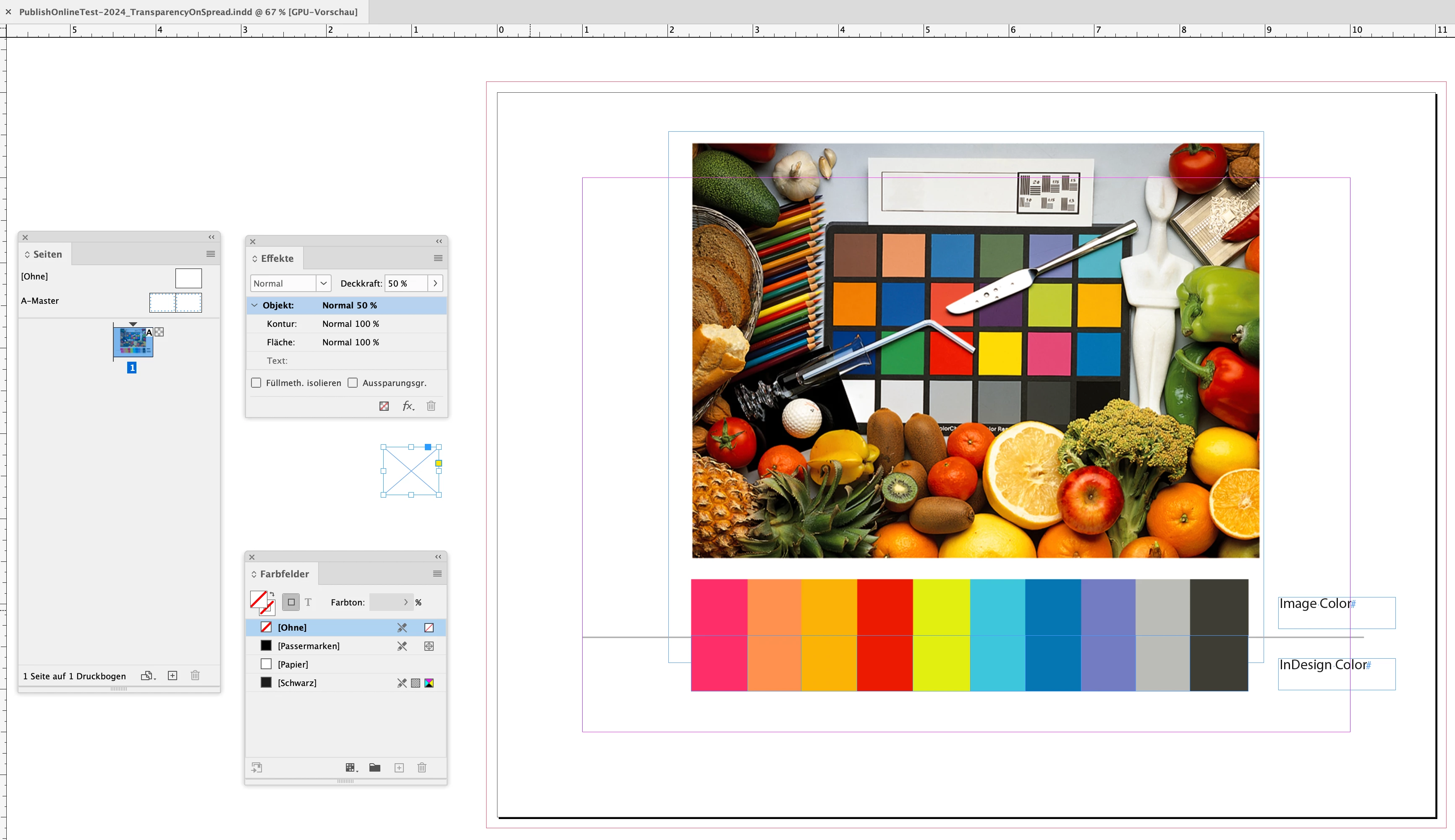
put an object with transparency on the spread. Could be a rectangle on the pasteboard with opacity set to less than 100%. See my post with Rob's document attached where I added transparency this way:

PublishOnlineTest-2024_TransparencyOnSpread.indd


No need to have a fill or a stroke on the rectangle. Also set the transparency blend space to RGB.

From my German InDesign with a rectangle on the pasteboard selected and transparency applied (opacity reduced to 50% through the Effects panel):


Regards,
Uwe Laubender
( Adobe Community Expert )

9 replies

Community Expert
August 25, 2021

Hi Nicole,

basically your Color Settings are the same regarding color management policies.

You are using sRGB, the CMYK settings do not match, but in this case they should not count.

I see no fault on your side.


Hm. What you could do:

Give me an InDesign document, just one page, page 5 perhaps, so that I can have a look.

Do a duplicate of your original InDesign document, remove all pages but page 5 and save it with a new name.

The placed images are not needed for now. Maybe later if I can detect no issue.


Thanks,
Uwe Laubender

( ACP )

nicolemorrison1117
Participating Frequently
September 2, 2021

Hi Uwe,


Please disregard my last message. I've stopped getting email notifcations when you reply and so I missed your most recent response, plus the way our conversation is ordered here is a bit confusing. Thank you for your continued help!


You can find the InDesign doc here: https://www.dropbox.com/s/hlnf7c7ju52z3rn/Nicole%20Morrison%20PDF%20copy.indd?dl=0


Thanks again!

Community Expert
August 12, 2021

Hi Nicole,

thank you for the files.

I can see the difference, e.g. on page 5, in my browser.

Still I have no idea what went wrong, because I did a new document the size of your PDF page, placed page 5 on the page plus the extracted image from the PDF as JPEG with sRGB profile as well and published this page to Publish Online with a different result. The fidelity of the colors are exactly the same: In the browser as on my InDesign document's page.


See the results:

https://indd.adobe.com/view/15ea1f60-d891-4000-9e8c-03c9259aba38


Here are my settings for Publish Online:


My color management settings when I created the document:


Hm. I wonder what's going on in your document or where my settings for Publish Online are different compared to yours.


Regards,
Uwe Laubender

( ACP )

nicolemorrison1117
Participating Frequently
August 25, 2021

Hmm, I have no idea what's going on. This is incredibly frustrating. I've restarted the document at least ten times. I reset all the settings and made a new document with the same results. And I uninstalled and reinstalled InDesign and got the same resutls. And I did all of this before I reached out via this message board. I think my Publish Online and color settings are the same as yours, but I can't be certain because I can't read yours. Is there anything else I can do?

Community Expert
August 11, 2021

Alright then, I'd like to know what the browser is you are viewing your publish online pages.

And it would help to have the URL of your publish document.


Also the exported PDF you are talking about where you can see no differences in color compared to your InDesign document. Could you attach the PDF? Or perhaps better, store it on Dropbox or a similar service where you have control over the availability of the file and post the download link.


Thanks,
Uwe Laubender

( ACP )

nicolemorrison1117
Participating Frequently
August 12, 2021

I use Chrome. Here's the url of the most recent test: https://indd.adobe.com/view/65ed6ff8-0142-4050-9bd2-76d02ba09b7b


And here's a link to download the exported PDF: https://www.dropbox.com/s/2g31ixgj29opceg/Nicole%20Morrison%20PDF.pdf?dl=0


Thanks again!

Community Expert
August 11, 2021

nicolemorrison1117 said: "I can see there's a misunderstanding here."


Hi Nicole,

well yes. A big misunderstanding. Ok, let's sort this:

If you publish online an InDesign document you are creating something like a tiny web site. Hosted on an Adobe web server. Publish Online is working with web technology like HTML, CSS or JavaScript so contents is viewable page by page in a web browser's window.


Creating PDFs is something entirely different.

What perhaps is confusing for you: nearly every web browser has built in technology to view a PDF file inside a browser window.


I hope, I get this right:

What you compare is the color of an image you see through Publish Online's viewing application for a web browser and the color of an image placed on your InDesign page where InDesign is responsible for how the color does look.

And the issue is: Some of your placed images are showing nearly the same colors in the browser and in your layout, some obviously do not.


And now you like to know what the problem is…


Regards,
Uwe Laubender

( ACP )

nicolemorrison1117
Participating Frequently
August 11, 2021

Hi Uwe,


Yes, sorry for mixing you up with my words! I get how things work in a general sense but I definitely don't have the vocabulary correct.


What you compare is the color of an image you see through Publish Online's viewing application for a web browser and the color of an image placed on your InDesign page where InDesign is responsible for how the color does look. >>YES, this! Additionally (in case it's helpful), the color of the images when I export the PDF directly from InDesign is also correct. Colors correct in: InDesign, PDF exported directly from InDesign, all places I've published them online and social. Colors bad in: Publish Online.


And the issue is: Some of your placed images are showing nearly the same colors in the browser and in your layout, some obviously do not. >>Yes, but it's ALL of my images (.jpeg files) that don't look correct. My work is very colorful so for some images it's much more obvious, but they're all affected. However, the GIFs (.gif files) look correct and I have no idea if that helps or means anything.


Thanks again!

Community Expert
August 11, 2021

Hi nicolemorrison1117,

to enable the dropdown list of PDF export presets with Publish Online in tab "Advanced" you first have to enable the option in tab "General" for PDF download. From my German InDesign 2021:


Regards,
Uwe Laubender

( ACP )

nicolemorrison1117
Participating Frequently
August 11, 2021

Thanks, Uwe! I can see why I hadn't changed this setting before, and that's because I don't want people to download this PDF. I want to use it for meetings and portfolio reviews, specifically so my GIFs play. Sort of like Google Slides, but better looking. My issue is the appearance of the online PDF, using "publish online" from InDesign. When I export to PDF directly from InDesign the colors look as expected, same as my website and Instagram.

Legend
August 11, 2021

Just to clear up some of the confusion here: Publish Online isn't an "online PDF" in any way. It is converted to regular HTML and standard web graphics formats, so it's basically a web page. Optionally you can allow a downloaded PDF, but that's an entirely separate thing with its own rules, NOT downloading directly what is on the site.

So if you talk about an "online PDF" people have to assume you mean the PDF that can be downloaded from Publish Online pages, NOT the pages themselves.

nicolemorrison1117
Participating Frequently
August 10, 2021

I've tried all the solutions mentioned here and none of them worked. I even had a graphic designer look at my document and the linked images and they found nothing wrong with my settings. The exported PDF looks as expected and I have all the same image files on my website and they look as expected–it's just the online published PDF version that doesn't look right. Which is unfortunate, because the entire reason I got InDesign was so I could share my GIFs within a PDF portfolio online. Oddly, the GIFs look as expected in the online published version, but the higher quality images look terrible. Does anyone have an idea of what it might be? If I can't figure it out I'm just going to cut my losses and unscubscribe from InDesign. For my reference images attached, I have the online version open and the corresponding image opened in Preview so you can see how colorful they should be. TIA!

rob day
Community Expert
Community Expert
August 10, 2021

Can you show a capture of the JPEG placed in InDesign with the image selected showing you Link Info panel, like this:


And also show a capture of your Edit>Assign Profiles... dialog:


nicolemorrison1117
Participating Frequently
August 10, 2021

Yes, thank you!

Participant
March 30, 2020

Hy rob, it works with firefox, bit safari and chrome still present washedout colors. 

Any solutions?

Thanks

rob day
Community Expert
Community Expert
March 30, 2020

Is the document’s RGB Assignment sRGB? Check Edit>Assign Profiles... , not Color Settings RGB Working Space. If the assignment is not sRGB use Edit>Convert to Profile>sRGB.

Participant
August 27, 2020

Hi Rob,


I am also having issues. I have tried the transparency effect/opacity levels, as well as adding a tint. The transparency renders as black through the Adobe link and the tint renders as white. I've included some screenshots for you. This is my first time trying to use interactive/animated PDFs but I'd like to use this for presentations in the future and I use transparency A LOT. Any thoughts on a next step here?


BeatrixH
Participating Frequently
May 25, 2018

Publish Online appears to be color managing the type elements in InDesign differently than placed graphics or vector elements (besides type), even though they appear the same in the InDesign preview, as well as in the preview created by Publish Online. Adobe, can you PLEASE take a look at this?

rob day
Community Expert
Community Expert
May 26, 2018

Here's a mix of objects with different color spaces, and the Transparency Blend Space set to CMYK. ID on the right OSX Firefox on the left—the RGB text object doesn't match:

With the blend space set to RGB everything matches:

Participating Frequently
November 1, 2017

Any updates to this or a solution?  It looks like a RGB to CMYK color shift for my own "washed out" issue but the shift doesn't happen for pdf output and I can't find where the conflict may be . Monitor is Calibrated and Adobe apps color synched to an RGB profile. even tried just converting doc to a new SRGB profile with no difference in outcome.  Mainly using a lot of photography (RGB) and Publish online has always done this for me ever since it came out and so It has been useless for me but would like to find  solution so I can utilize the feature. 
These are docs that get printed without color issues.