
Exit
  • Global community
    • Language:
      • Deutsch
      • English
      • Español
      • Français
      • Português
  • 日本語コミュニティ
  • 한국 커뮤니티
2

Publish Online stopped working Error 0

Community Beginner ,
Apr 12, 2023 Apr 12, 2023

I can no longer publish online. I suddenly get this error message:
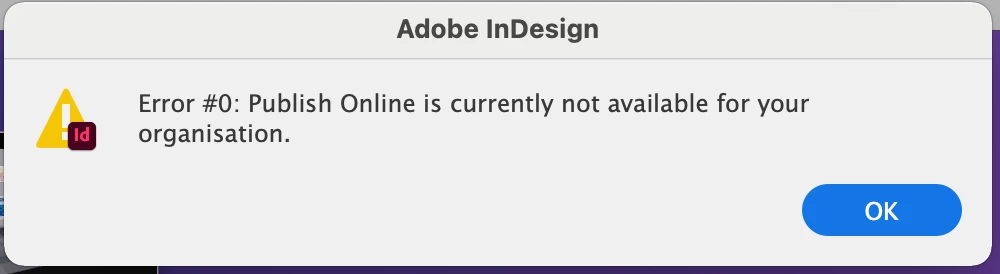
Screen Shot 2023-04-12 at 6.10.31 PM.png

I have used Publish Online frequently with no issues as recently as yesterday. Nothing has changed on my end. I have tried all suggestions listed here:
 https://helpx.adobe.com/indesign/kb/upload-error-publishing-indesign-document.html
None have solved the issue. I am using InDesign 2022 17.4.1 on an iMac running Big Sur 11.7.4 . 
Any suggestions would be appreciated. I'm on a project deadline. Thank you! 🙂


{Renamed By MOD}

TOPICS
Publish online
5.6K
Translate
Report
Community guidelines
Be kind and respectful, give credit to the original source of content, and search for duplicates before posting. Learn more
community guidelines

correct answers 1 Correct answer

Adobe Employee , May 10, 2023 May 10, 2023

Hi All,


I would like to express my gratitude for your patience and cooperation in resolving this issue.


As per the latest update from our team, Error 0 during publishing appears to have been resolved. Please notify us here if the issue persists.


Rest assured that we will make every effort to investigate and rectify the problem.


Thanks,

Harshika

Translate

correct answers 1 Pinned Reply

Adobe Employee , Apr 18, 2023 Apr 18, 2023

Thank you for sharing the details. We have logged a bug for the issue, which is only happening with the previous versions of InDesign. I'll update the discussion as soon as there is any update on the bug.

Translate
Community Expert ,
Apr 12, 2023 Apr 12, 2023

Is this just one file, or does this happen with other fils as well?


Translate
Report
Community guidelines
Be kind and respectful, give credit to the original source of content, and search for duplicates before posting. Learn more
community guidelines
Community Beginner ,
Apr 12, 2023 Apr 12, 2023

Thanks for your reply. It happens with other files. It also happens on my laptop. 

Translate
Report
Community guidelines
Be kind and respectful, give credit to the original source of content, and search for duplicates before posting. Learn more
community guidelines
Community Expert ,
Apr 12, 2023 Apr 12, 2023

I don't think there is a general problem at Publish Online or we would probably be getting other reports. Is there any way you could send the file from your laptop at a different location? Usually problems are isolated to one current file, or problems with one computer. Just a suggestion.

Translate
Report
Community guidelines
Be kind and respectful, give credit to the original source of content, and search for duplicates before posting. Learn more
community guidelines
Community Beginner ,
Apr 12, 2023 Apr 12, 2023

Yes, I will try that. It's just odd. I'm a freelance designer working out of a home office, so I'm not on a company network with an IT department... and I haven't changed any settings. 

Translate
Report
Community guidelines
Be kind and respectful, give credit to the original source of content, and search for duplicates before posting. Learn more
community guidelines
Community Expert ,
Apr 12, 2023 Apr 12, 2023

But you could be having some Internet problems at your home office that you're not aware of that are interfering with file transfer.

Translate
Report
Community guidelines
Be kind and respectful, give credit to the original source of content, and search for duplicates before posting. Learn more
community guidelines
Community Beginner ,
Apr 12, 2023 Apr 12, 2023

I guess that's true. The other services still work, however. I can still Share for Review from InDesign, and upload my interactive XD prototypes with no issue. 

Translate
Report
Community guidelines
Be kind and respectful, give credit to the original source of content, and search for duplicates before posting. Learn more
community guidelines
Community Expert ,
Apr 12, 2023 Apr 12, 2023

I'm just brainstorming. I can't tell you why one service would work and not the other.

Translate
Report
Community guidelines
Be kind and respectful, give credit to the original source of content, and search for duplicates before posting. Learn more
community guidelines
Community Beginner ,
Apr 12, 2023 Apr 12, 2023

Thank you. I appreciate it. I just tried from my laptop on a different network and get the same error message. Tried with an existing file, and then with a brand new file with no luck. 😞


Translate
Report
Community guidelines
Be kind and respectful, give credit to the original source of content, and search for duplicates before posting. Learn more
community guidelines
Community Expert ,
Apr 12, 2023 Apr 12, 2023

I'm running out of ideas because my simple file had no problem. Sorry!

Translate
Report
Community guidelines
Be kind and respectful, give credit to the original source of content, and search for duplicates before posting. Learn more
community guidelines
Community Beginner ,
Apr 12, 2023 Apr 12, 2023

Thanks for trying. I learned it isn't my computer, my network, or my file. I guess all that is left is the software itself, or my user id. I'll try an uninstall and reinstall. If that doesn't work, I'm going to hit the bourbon...


Translate
Report
Community guidelines
Be kind and respectful, give credit to the original source of content, and search for duplicates before posting. Learn more
community guidelines
Community Beginner ,
Apr 12, 2023 Apr 12, 2023

In case this helps someone else: Uninstall / Reinstall worked!! It is working again. InDesign 2023 18.2.1

Translate
Report
Community guidelines
Be kind and respectful, give credit to the original source of content, and search for duplicates before posting. Learn more
community guidelines
Community Expert ,
Apr 12, 2023 Apr 12, 2023

Hi, I wish I had thought of that, but I'm glad you tried it!


Steve

Translate
Report
Community guidelines
Be kind and respectful, give credit to the original source of content, and search for duplicates before posting. Learn more
community guidelines
New Here ,
Apr 17, 2023 Apr 17, 2023

Hi, I'm having the same issue today so I will try this uninstall and reinstall, of course it would happen in the middle of a deadline wouldn't it and when someone is waiting to publish the link!!


Translate
Report
Community guidelines
Be kind and respectful, give credit to the original source of content, and search for duplicates before posting. Learn more
community guidelines
Community Expert ,
Apr 17, 2023 Apr 17, 2023

This is why I refuse to count on a free, add-on for any kind of client work.


Translate
Report
Community guidelines
Be kind and respectful, give credit to the original source of content, and search for duplicates before posting. Learn more
community guidelines
Adobe Employee ,
Apr 18, 2023 Apr 18, 2023

Hi @DemiurgeDesign ,


Thank you for sharing the details. We have logged a bug for the issue, which is only happening with the previous versions of InDesign. I'll update the discussion as soon as there is any update on the bug.


Thanks

Rishabh

Translate
Report
Community guidelines
Be kind and respectful, give credit to the original source of content, and search for duplicates before posting. Learn more
community guidelines
Community Expert ,
Apr 12, 2023 Apr 12, 2023

I know Publish Online service is up at this moment because I just published a small file.


Translate
Report
Community guidelines
Be kind and respectful, give credit to the original source of content, and search for duplicates before posting. Learn more
community guidelines
Community Expert ,
Apr 17, 2023 Apr 17, 2023

Same issue here

Translate
Report
Community guidelines
Be kind and respectful, give credit to the original source of content, and search for duplicates before posting. Learn more
community guidelines
Community Expert ,
Apr 17, 2023 Apr 17, 2023

Publish Online is not working on any version of Indesign. The service is available with other computers in my network.

Translate
Report
Community guidelines
Be kind and respectful, give credit to the original source of content, and search for duplicates before posting. Learn more
community guidelines
Adobe Employee ,
Apr 17, 2023 Apr 17, 2023

Hi @Jeffrey_Smith ,


Sorry to hear about the trouble. Would you mind confirming the exact version of InDesign & OS. Is this happening with a specific file or multiple files?


Thanks

Rishabh

Translate
Report
Community guidelines
Be kind and respectful, give credit to the original source of content, and search for duplicates before posting. Learn more
community guidelines
Community Expert ,
Apr 17, 2023 Apr 17, 2023

The error occurs with all files.

Indesign 15.0.2 and 16.0.2

MacOS 10.14.6 

Translate
Report
Community guidelines
Be kind and respectful, give credit to the original source of content, and search for duplicates before posting. Learn more
community guidelines
Community Expert ,
Apr 17, 2023 Apr 17, 2023

Several people now reported the Error #0 error with older versions of InDesign and macOS.


I have no problems with InDesign 18.2.1 and macOS Ventura 13.3.1

Translate
Report
Community guidelines
Be kind and respectful, give credit to the original source of content, and search for duplicates before posting. Learn more
community guidelines
Community Expert ,
Apr 17, 2023 Apr 17, 2023

I am starting to believe the OS and ID version is the cause.

Translate
Report
Community guidelines
Be kind and respectful, give credit to the original source of content, and search for duplicates before posting. Learn more
community guidelines
Adobe Employee ,
Apr 18, 2023 Apr 18, 2023

Thank you for sharing the details. We have logged a bug for the issue, which is only happening with the previous versions of InDesign. I'll update the discussion as soon as there is any update on the bug.

Translate
Report
Community guidelines
Be kind and respectful, give credit to the original source of content, and search for duplicates before posting. Learn more
community guidelines
Community Expert ,
Apr 18, 2023 Apr 18, 2023

Thanks for the update.

Translate
Report
Community guidelines
Be kind and respectful, give credit to the original source of content, and search for duplicates before posting. Learn more
community guidelines