Known Participant
April 18, 2019
Answered

"Let InDesign Determine Colors"

  • April 18, 2019
  • 2 replies
  • 2741 views

InDesign CC on a Mac.

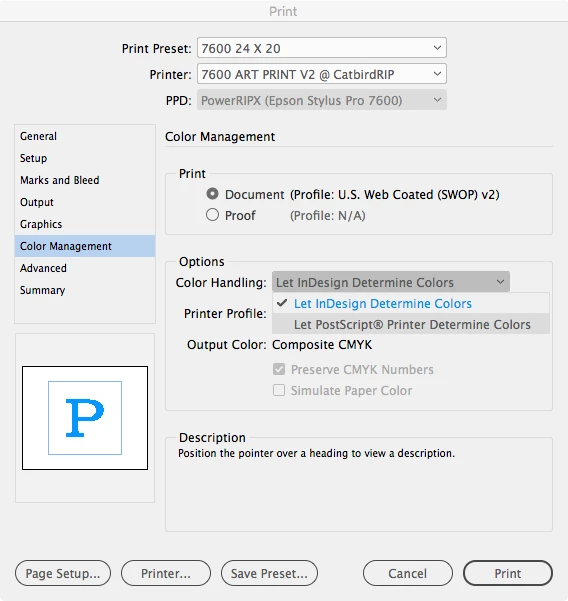
In Print>Color Management there is an "Option" of "Let InDesign Determine Colors". Presumeable, the alternative would be to let the printer driver take over. However, I've yet to find a combination of settings that make anything else available. Clicking the downward arrow shows a menu containing only one option: "Let InDesign Determine Colors".

How can I get other choices?
    This topic has been closed for replies.
    Correct answer rob day

    How can I get other choices?

    If the Print driver is PostScript you’ll get this choice:

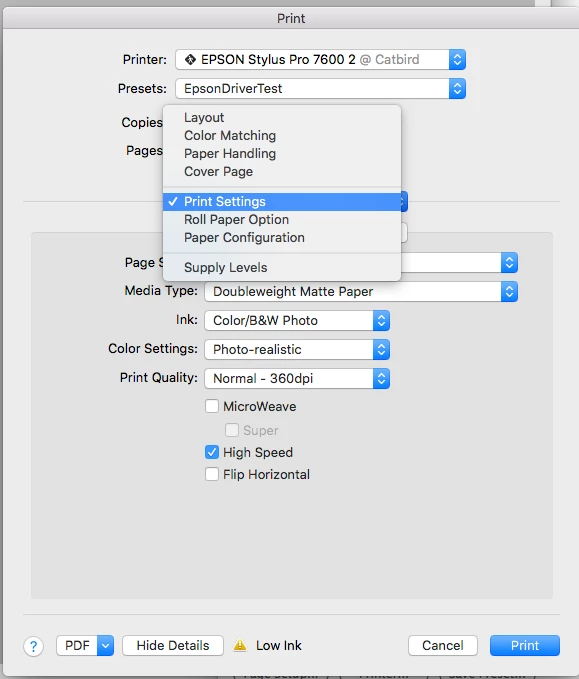
    But in either case the Print Driver’s settings located under Printer... would affect the output

    2 replies

    rob day
    Community Expert
    rob dayCommunity ExpertCorrect answer
    Community Expert
    April 18, 2019

    How can I get other choices?

    If the Print driver is PostScript you’ll get this choice:

    But in either case the Print Driver’s settings located under Printer... would affect the output

    Sandee Cohen
    Legend
    April 18, 2019

    And just as a FYI, the same menu in Illustrator shows the PostScript Option, but grayed out.

    rob day
    Community Expert
    Community Expert
    April 18, 2019

    It’s grayed out if the Printer is not postscript. Here it’s grayed out with native Epson driver, but not with a software RIP

    winterm
    Legend
    April 18, 2019

    Directly from InDesign - you can't. Export your work to pdf and print from Acrobat.

    Color Management settings usually are located in Print>Advanced dialog window (Advanced Print Setup).

    Not sure about exact location on Mac, though.