OsakaWebbie
Inspiring
March 23, 2024
Answered

"Right Justify Tab" ASCII code, and how to right-justify continuation on second line

  • March 23, 2024
  • 6 replies
  • 2050 views

I'm importing content from a database to create a people directory in InDesign. The first line of each entry includes their name left-justified, and then a year and an organization abbreviation right-justified. InDesign's special Right Indent Tab character makes that happen nicely. But I have two questions:


(1) What is the character code (hex value for ASCII or UTF-8) for the Right Indent Tab so I can insert it programmatically in the text being imported?


(2) The column is somewhat narrow, so in some cases, the name and/or the organization is long enough that the end result wraps to a second line. That second line would contain the last part of the organization name, so I would want it right-justified. Is there a way to do that? If there was the opposite of a Right Indent Tab ("Left Justify Tab"?), I'd right-justify the paragraph and use that special character to force the name to the left, but I don't think there is such a thing. Ideas for solving this?
This topic has been closed for replies.
Correct answer Robert at ID-Tasker

Sure - I hid them the first time because I didn't want to constrict anyone with ideas of how to approach a solution.


@OsakaWebbie 


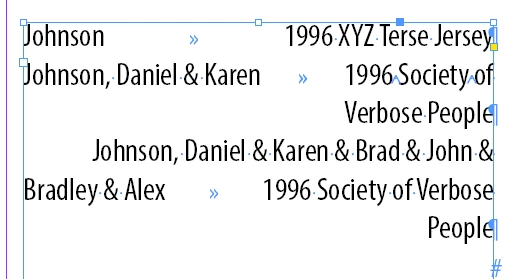
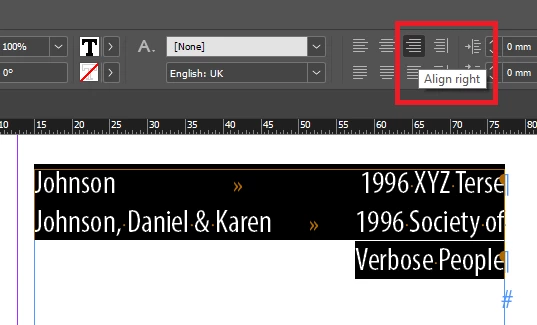
Like I've suspected - ALIGN RIGHT does the trick:


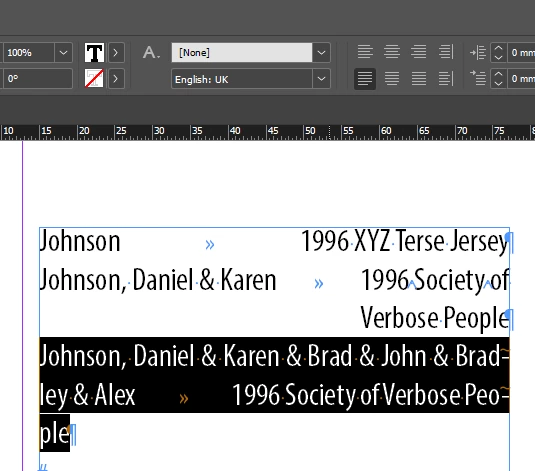
But there is a problem in 3rd case - too long 1st part:


Can you check length of the 1st part when exporting from a database?

And then "mark" paragraph as "fully justified with last line aligned left"?


And your idea with using Right Indent Tab - won't always work correctly anyway:


6 replies

Barb Binder
Community Expert
Community Expert
March 23, 2024

I wasn't at my computer this morning, and still unclear on year position but this was what I was envisioning. 


~Barb


~Barb at Rocky Mountain Training
OsakaWebbie
Inspiring
March 23, 2024

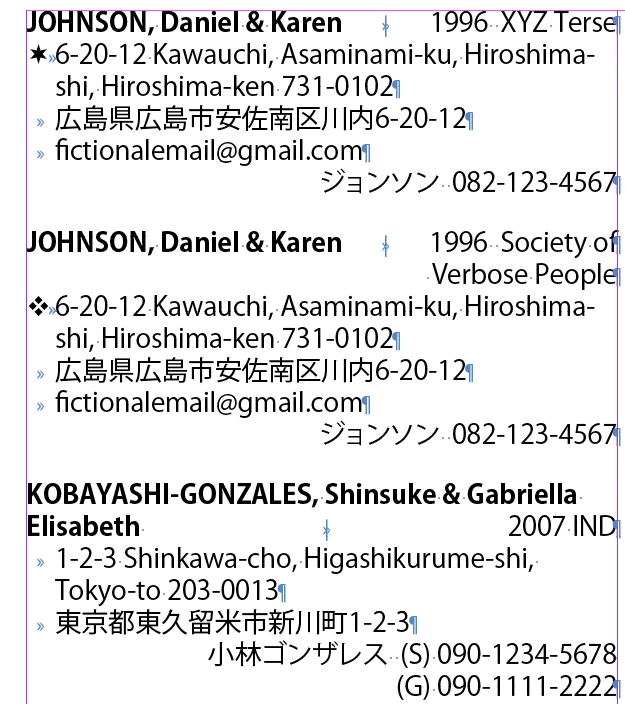
Wow, thanks to all of you who were working on this while I slept! (I live in Japan, so my timezone is probably much different from most of you.) Yes, I should have included an example screenshot - I'll do that now.

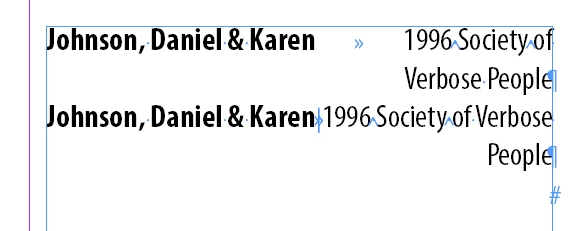
The first and second examples are how a short and long first line would look using a Right Indent Tab. (Thanks to @Robert at ID-Tasker for the ASCII code. Yes, I know I can use a normal tab with a right-justified tab stop at the column edge, but Right Indent Tab works even if the column width is changed later.)

@rob day: No, I don't want to add line breaks manually (I assume that's what you mean by "forced line break") - the whole point of this is to avoid manual editing as much as possible, as there are over 1,000 entries in the directory and mistakes are easy to make.


The third and fourths examples are using @Barb Binder's idea of a separate paragraph right-justified with baseline shift. At first I thought that was genious until I tried it - then I realized it has two issues, as you can see in the screenshot: (1) it doesn't wrap to avoid overlapping the name, and since the name length is also unpredictable, I can't just assign a left indent to the pstyle; (2) the next line has a gap above it. I guess #2 could be solved by baseline-shifting the Name downward instead of the Year/Org upward (since I want some space between entries anyway, although it would force the minimum space to be the height of a full text line), but how would I solve #1?

Robert at ID-Tasker
Legend
March 24, 2024
quote

Like I've suspected - ALIGN RIGHT does the trick:


Wow, I didn't even think to try a right-justified paragraph with a Right Indent Tab (or normal tab to a right-aligned tab stop)! I completely assumed that with all that "right" stuff, nothing would start on the left. That's why I kept talking of wishing there was a Left Indent Tab or something. Who knew?! (apparently you did 👍)


quote

But there is a problem in 3rd case - too long 1st part:

Can you check length of the 1st part when exporting from a database?


As I said, I'm not too worried about the 3rd case, as the number of occurrences is very low. Yes, I can (and will) have my export code check the number of characters in the name, but that isn't an exact prediction of how wide it will be in a variable-spaced font, and the column width and/or font size could change also. I would only use the character count as an alert to tell me to check it in InDesign and adjust manually if necessary.


quote

And your idea with using Right Indent Tab - won't always work correctly anyway:


That didn't happen with this exact text in my font and column width, but indeed, it happened when I removed a couple letters from the name - thanks for the warning. But I would still prefer not to have to choose a fixed location for a tab stop (in case we decide to change the column width). Instead, I can just export a couple spaces after the name (before the Right Indent Tab) to make sure they don't get too close - not a purist's solution but perfectly functional.


Thanks to @Robert at ID-Tasker for the final clue and the others for pitching in. InDesign is awesome and so is this community!


@OsakaWebbie 


My last reply - with all the screenshots - it's WITHOUT "fixed location for tab stop" - just plain text with TABs - or RITABs.


Always happy to help.


Robert at ID-Tasker
Legend
March 23, 2024
quote

[...]

(1) What is the character code (hex value for ASCII or UTF-8) for the Right Indent Tab so I can insert it programmatically in the text being imported?

[...]


By @OsakaWebbie


If you want to check UNICODE value of the Character - use can use F8 / Windows -> Info:


Normal TAB is 0x9 - but I'm pretty sure you know that already:


Robert at ID-Tasker
Legend
March 23, 2024

@OsakaWebbie 


Top - not styled


rob day
Community Expert
Community Expert
March 23, 2024

is long enough that the end result wraps to a second line.


Hi @OsakaWebbie , On the lines that break you could replace the Right Indent Tabs with Forced Line Breaks:


so I can insert it programmatically in the text being imported?


By programmatically do you mean via scripting? If that’s the case in JavaScript it would be SpecialCharacters.RIGHT_INDENT_TAB


Robert at ID-Tasker
Legend
March 23, 2024
quote

[...]

so I can insert it programmatically in the text being imported?


By programmatically do you mean via scripting? If that’s the case in JavaScript it would be SpecialCharacters.RIGHT_INDENT_TAB


By @rob day


I'm pretty sure OP means "when exporting from a database".


Barb Binder
Community Expert
Community Expert
March 23, 2024

Screen shots always help—I'm confused about the placement of the year. But let's look at just the name/organization delimma. 

Since this is database-driven and editing would happen in the database and not InDesign, an option is to define these elements as two separate paragraphs and use a baseline shift to place them on the same line. Then the name style can be aligned right and the organization aligned left.


~Barb

~Barb at Rocky Mountain Training
Robert at ID-Tasker
Legend
March 23, 2024
quote
[...] define these elements as two separate paragraphs and use a baseline shift to place them on the same line. Then the name style can be aligned right and the organization aligned left.


By @Barb Binder


Point (2):


The column is somewhat narrow, so in some cases, the name and/or the organization is long enough that the end result wraps to a second line.


TAB generated from the database will be used as per Tab Stops defined in the ParaStyle definition.


Robert at ID-Tasker
Legend
March 23, 2024

Set Tab Stops in ParaStyle definition.