

keithm1972
Inspiring
October 25, 2021
Answered

"Space Before" Not Working

  • October 25, 2021
  • 2 replies
  • 3231 views

I've reviewed other posts on this issue, but still confused.

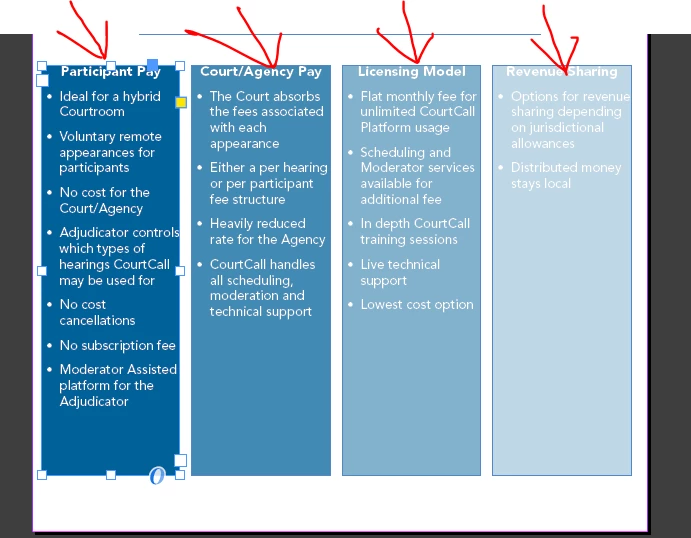
I created the four text boxes below, a paragraph style for the headers and another for the bullet points. When I go to the paragraph style for the headers and increase the "space before" nothing happens. How do I increase the space of these headers so they aren't stuck at the top of the box?

"Space between paragraphs using the same style" is set to ignore for both of these paragraph styles.

Thanks!


This topic has been closed for replies.
Correct answer Bevi Chagnon - PubCom.com

Inset Options are on the frame, not on the text via paragraph styles.

Select the Frame, right-click and choose Text Frame Options.


The 4 fields for Inset Spacing let you select different amounts on each side of the frame. The chain link icon lets you set the all the same, or independently.


Think of "inset spacing" as padding between the text and the edge of the frame.


2 replies

Community Expert
October 25, 2021

Another solution is to add a Rule Above with a certain amount of offset.

In my sample below: 5 mm. Enable the option that the rule will be kept inside the text frame.

See two screenshots from my German InDesign.


Keep in frame disabled:


Keep in frame enabled:


Color the rule above with swatch [None] when satisfied with the amount of offset:


Regards,
Uwe Laubender

( ACP )

Scott Falkner
Community Expert
Community Expert
October 25, 2021

Space Before only applies when there is text from a previous paragraph. If a paragraph is at the top of a text frame then Space Before is ignored. To make that text lower in the text frame you can add an inset to the frame or change the First Line Offset for the frame. 

keithm1972
Inspiring
October 25, 2021

Makes sense, thanks. I learned something new!

Leading to new question, can I do Inset Spacing under Paragraph Styles? Not seeing an option for it. I can do it under Object/Text Frame Options, but Paragraph Styles would be more efficient.

Bevi Chagnon - PubCom.com
Legend
October 25, 2021

Inset Options are on the frame, not on the text via paragraph styles.

Select the Frame, right-click and choose Text Frame Options.


The 4 fields for Inset Spacing let you select different amounts on each side of the frame. The chain link icon lets you set the all the same, or independently.


Think of "inset spacing" as padding between the text and the edge of the frame.


|    Bevi Chagnon   |  Designer, Trainer, & Technologist for Accessible Documents ||    PubCom |    Classes & Books for Accessible InDesign, PDFs & MS Office |