Known Participant
March 29, 2024
Answered

quotation mark problem
  • March 29, 2024
  • 6 replies
  • 1114 views

Hi,

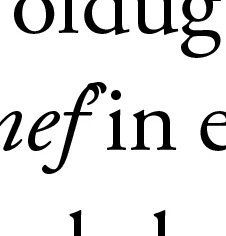
Quotation marks appear distorted when text is italicized 

how do i solve this problem

I would be happy if you help

    This topic has been closed for replies.
    Correct answer Eugene Tyson

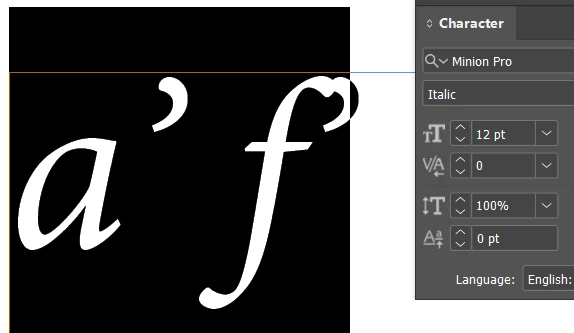
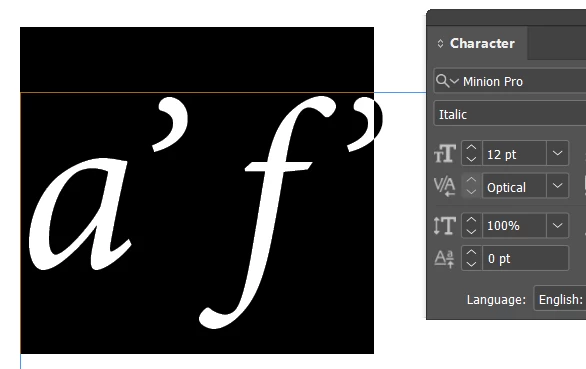
    For this - the optical alignment is off due to certain settings


    Change the kerning option - here it's set to 0
     

    If you set it to optical it works well


    6 replies

    Eugene TysonCommunity ExpertCorrect answer
    Community Expert
    March 30, 2024

    For this - the optical alignment is off due to certain settings


    Change the kerning option - here it's set to 0


    If you set it to optical it works well


    Harun 34Author
    Known Participant
    April 22, 2024

    thanks thankst hanks

    Barb Binder
    Community Expert
    Community Expert
    March 29, 2024

    Ok. Well, nothing is actually distorted, it's just that the f is leaning to the right and the apostrophe is not getting out of the way because it is not italics.


    Looking at my font, the f is only italic character that slants into the roman apostrophe. I manually edited the horizontal spacing (and added a color to help you see it), saved it as a character style and assigned the character style as a GREP style to the f'.


    ~Barb


    ~Barb at Rocky Mountain Training
    Barb Binder
    Community Expert
    Community Expert
    March 29, 2024

    Hi @Harun 34:


    It's just the shape/angle of the italicised letter f next to the apostrophe, which isn't in italics. Is there some reason that you wouldn't put italics on the apostrophe?


    ~Barb


    ~Barb at Rocky Mountain Training
    Harun 34Author
    Known Participant
    March 29, 2024

    hi barb,


    Proper nouns will be written in italics, suffixes after the nouns will be regular, f' apostrophe will be regular

    James Gifford—NitroPress
    Legend
    March 29, 2024

    It's hard to guess exactly what's going on from your small screen snip, but —

    • The font or document could be corrupted;
    • The font kerning data may not accommodate the large swash F next to a quote mark (not every possible combination of characters is always mapped in kerning);
    • The italics may be applied only as far as the F, exaggerating the kerning collision with the non-italic quote mark.


    On that last, I often see collision between a last italicized character and a next non-ital one, moreso in web text than in InDesign but it's not uncommon in any layout. (My solution in web design is to tack a few points of right-padding onto any italicized style, so that the next character is pushed over a bit, thus forcing something like desired or "normal" spacing.)


    I think you may just have to fix this manually, or with a GREP style. It's unlikely there is any fix, per se; it's just an unlucky combination of fonts exceeding the limits of auto-spacing and kerning. Either a tracking value or inseting some width of space (from thin on up) would 'solve' the problem, if imperfectly.

    Harun 34Author
    Known Participant
    March 29, 2024

    hi mr.

    Yes, I think it can be done manually as you said, it is entirely related to the font.

    kglad
    Community Expert
    Community Expert
    March 29, 2024

    in the future, to find the best place to post your message, use the list here, https://community.adobe.com/

    p.s. i don't think the adobe website, and forums in particular, are easy to navigate, so don't spend a lot of time searching that forum list. do your best and we'll move the post (like this one has already been moved) if it helps you get responses.


    <"moved from using the community">
    John Waller
    Community Expert
    Community Expert
    March 29, 2024

    Which Adobe app are you using?

    Harun 34Author
    Known Participant
    March 29, 2024

    Sory,

    Adobe İndesign