
Known Participant
September 6, 2024
Question

Ränder lassen sich nicht ändern

  • September 6, 2024
  • 2 replies
  • 1396 views

Bei meinem Dokument lassen sich die Ränder nicht ändern.
Das Problem hatte ich schon mehrfach.


Die Ränder stehen auf "0", links im Dokument
sieht man dennoch die violetten Linien, die sich
überhaupt nicht ändern lassen.
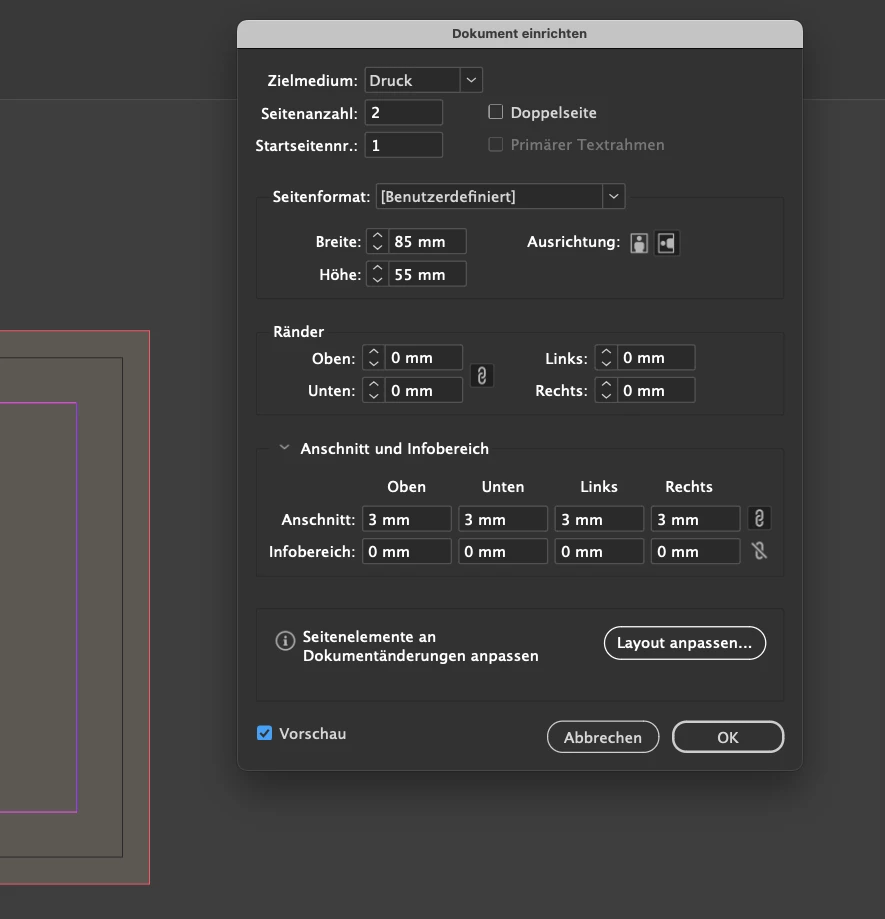


2 replies

Bill Silbert
Community Expert
Community Expert
September 20, 2024

Using Document setup to globally change margins will only work on pages that have the original Parent Page applied. Any pages that have a second Parent Page applied will not be affected by changing margins in Document Setup. Using Layout>Margins and Columns needs to be used to change the margins on any new Parent or Document pages that have the new parent applied. If you have the new Parent Page open and change margins through Layout>Margins and Columns then all pages with the Parent applied will be changed. If you only want a specific page changed then have it open and then use Layout>Margins and Columns on it. All other pages with that Parent will be unaffected.

Participant
May 28, 2025

Thank you, Bill!

Robert at ID-Tasker
Legend
September 6, 2024

You should change it in the Layout / Margins and Columns - with appropriate Master Spread active/open.


derAktiveAuthor
Known Participant
September 20, 2024

I don't understand what you mean by that.
Are there different places to change these settings?
What are those different places?
I was trying to change it for the whole document,
as i did it the last decade.

cbmg
Known Participant
February 12, 2025

Seit kurzem – das gleiche Problem (InDesign). Ränder lassen sich nur noch für alle Seiten gesamt und einheitlich ändern und nicht mehr unter Ränder ändern…


Recently - the same problem (InDesign). Margins can only be changed for all pages as a whole and uniformly and no longer under Change margins...


UPDATE - 13. Feber 2025

OK - habe jetzt einen TIpp von einem Kollegen und Adobe Profi erhalten: Indd Prefs rausschmeißen und Neustart. Perfekt! Jetzt funktioniert auch wieder die Möglichkeit die Ränder im Dokument zu ändern 😉