Participating Frequently
November 26, 2018
Answered

Random hyphens appearing in text pasted from Word

  • November 26, 2018
  • 8 replies
  • 13984 views

I've just started noticing random hyphens appearing in text I'm pasting from Word into InDesign. I'm pasting into a series of InDesign docs in a journal that get updated every year, and I've never had this happen before. I just pasted in a 900-word story, for example, and there are 12 hyphens inserted into seemingly random words with no pattern I can detect.

Hyphenation is turned off in both Word and the InDesign paragraph style, so there should be no hyphens.

They’re definitely not discretionary hyphens. I have Invisibles turned on in both Word and InDesign and everything looks completely regular. The words are all followed by a space (blue dot) and there are no special characters.

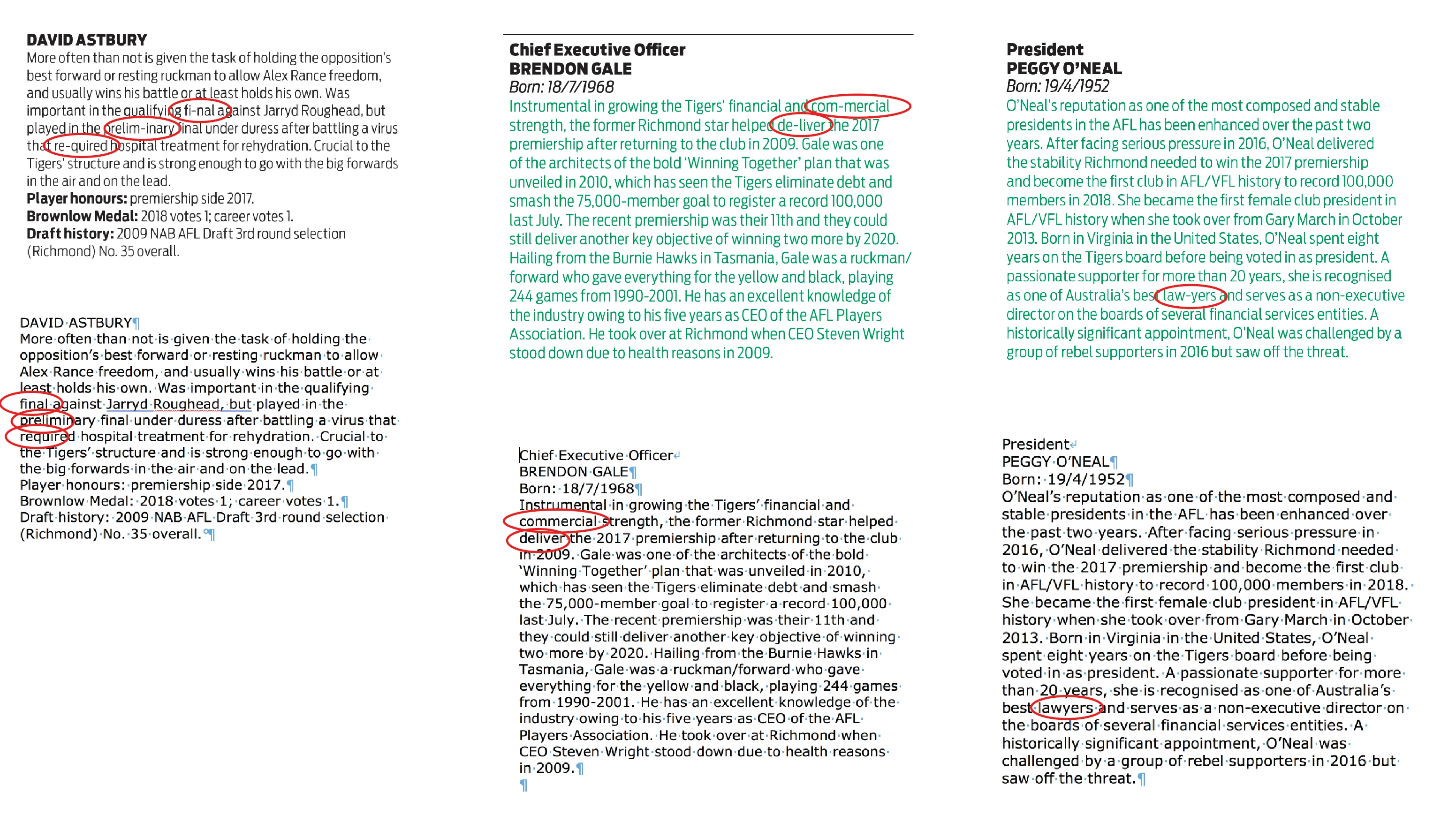
The screenshot I've attached shows the text in InDesign with the source text in Word below.

Anyone else seen this?
Correct answer Michelle243482146jck

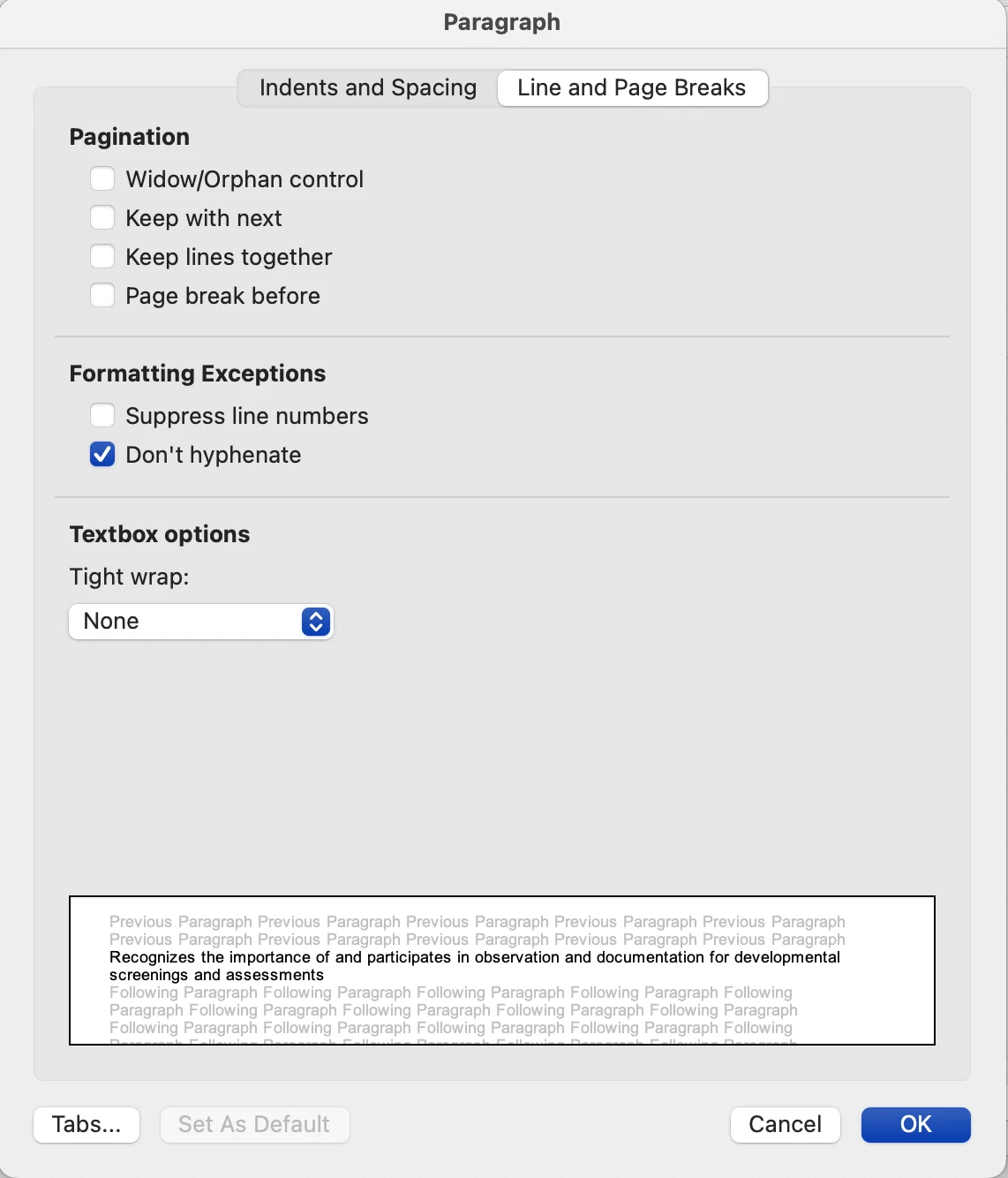
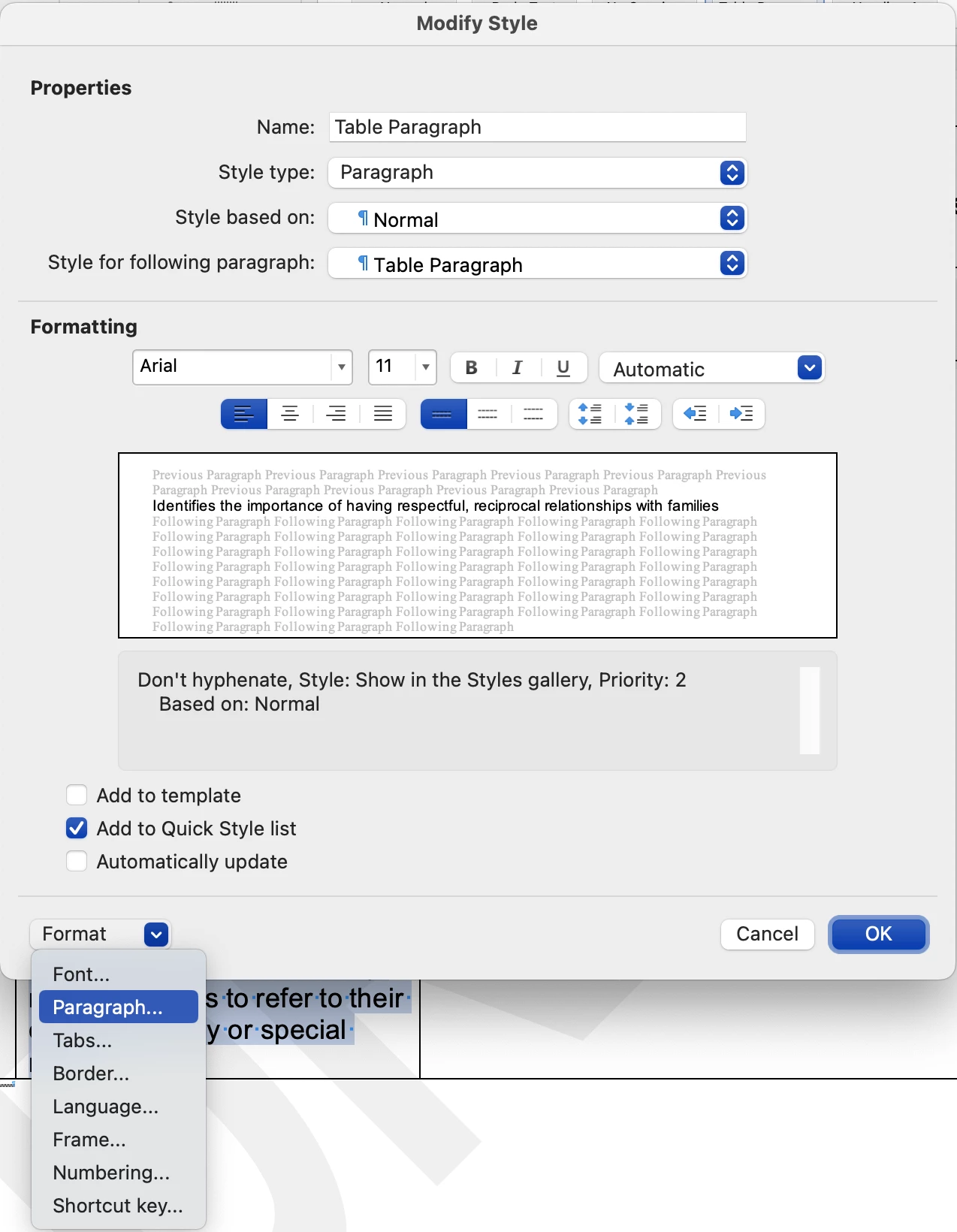
I have had the same issue. Hyphenation is turned OFF. Hyphens appear in InDesign whether copy OR paste is used.  I discovered that the paragraph style has a sneaky little checkbox that, when I selected it, the issue stopped happening.


Make sure the paragraph style in Word has paragraph formatting set to "do not hyphenate." 

Mac:

Modify style > Format Paragrpah > Line and Paragraph Breaks > FOrmatting Exceptions: check "Don't hyphenate"


I hope this helps!

8 replies

Michelle243482146jckCorrect answer
Participating Frequently
August 23, 2023

I have had the same issue. Hyphenation is turned OFF. Hyphens appear in InDesign whether copy OR paste is used.  I discovered that the paragraph style has a sneaky little checkbox that, when I selected it, the issue stopped happening.


Make sure the paragraph style in Word has paragraph formatting set to "do not hyphenate." 

Mac:

Modify style > Format Paragrpah > Line and Paragraph Breaks > FOrmatting Exceptions: check "Don't hyphenate"


I hope this helps!

Participant
July 30, 2024

This worked for me, thank you!

Participant
February 10, 2023

Hi, I know this is an old thread but the problem is still happening with my 2022 versions of Indesign and Word. What worked for me is this: I noticed that my Word file had hyphenation turned ON. (Although the hyphens that were being added in Indesign were not the same as the end-of-line hyphenated words in Word.) So I turned OFF hyphenation in the Word file and after that, when copying and pasting from Word to Indesign, the problem did not present itself again.

James Gifford—NitroPress
Legend
February 10, 2023

That aligns with my notion that newer versions of Word have more than one undocumented change — in this case, actually placing discretionary hyphens for "faster" use (in the web/cloud version?) that are picked up in cut and paste.


Bit of a WAG, but noting that turning hyphenation off eliminates the problem seems to confirm it, and is a useful point — thanks!


Participating Frequently
February 8, 2023

Cause and a solution 2023: For me the hyphens appear in places where they would be if hyphenation would be on in Word.  Applies to both cut and copy.  Since I cut short snippets from a Word table, I made the columns so wide that they rarely wrap, which solved the problem.  I assume making the font size very small in Word would also help.

James Gifford—NitroPress
Legend
February 8, 2023

Soft or discretionary hyphens should not be in most text. Automatic hyphenation does not rely on them being there; it sounds as if some part of the doc creation or editing process inserted discretionary hyphens for hyphenation assistance or override, and ID is importing them as visible characters.


Possibly a search and replace, exchanging all discretionary hyphens for "nothing," might end the problem. I don't have the text code for discretionary hyphens at hand but you should be able to look it up and validate this with a quick search. (THEN do the search-replace.)


TJenningsFineArt
Known Participant
November 30, 2018

In all the years (decades) I've been copying and pasting from Word into InDesign, I've never encountered this problem before this week. Not even all articles. What the heck? I wonder if I copy and paste into TextEdit and then into ID...nope. Still getting the hyphens. I've never placed the text...

So, this time I placed the text, cleaned up what was not supposed to be there at the beginning, and no hyphens. Ridiculous.

BobLevine
Community Expert
Community Expert
November 30, 2018

So, doing it the right way, in your opinion is ridiculous?

TJenningsFineArt
Known Participant
November 30, 2018

In the 15 years that I've been using ID, and copying and pasting text from a Word document, I haven't had to. This time, up until I started "placing" it, I've spent the client's money figuring out what was going on. And, because the attorneys writing these articles for this hella long newsletter are getting all fancy-schmancy with their headline formatting, I can't just copy and paste the part I need anyway. I have to place and clean up. So, yeah, to have a problem all of a sudden is ridiculous. But hey, you'll be comforted to know I'm doing it "the right way" now.

dave c courtemanche
Inspiring
November 29, 2018

This happens to me when copy/pasting non-English languages. I've added a step to my workflow to turn off hyphenation in word before copying/pasting into indesign. That fixes the issue for me.

Stephen_LAuthor
Participating Frequently
November 27, 2018

Update for those following along.

I've just discovered that the hyphens are only appearing when I CUT-and-paste into InDesign from Word. COPY-and-paste is fine.

I tend to cut-and-paste as it helps me keep track of where I'm up to in the source document. I asked a friend to try and replicate my issue on his Mac (to see if the problem was with mine), and as I watched I noticed he copy-and-pasted. He's a copier, not a cutter. I went back and tried his way on mine, and problem solved.

Still doesn't explain why it's happening in the first place, but at least there's a simple workaround.

Community Expert
November 27, 2018
Stephen_LAuthor
Participating Frequently
November 27, 2018

Thanks Eugene. I turned that setting on, but no hyphens appeared in my Word doc. They only appear after I cut-and-paste the text, and they appear whether or not Optional Hyphens is ticked.

Inspiring
November 26, 2018

Stephen

You will get better results if you place the text rather than pasting it.

Ian

Stephen_LAuthor
Participating Frequently
November 26, 2018

Thanks for your reply, Ian, but unfortunately placing the text isn't really practical in my example. If it was like a novel/essay, then sure, but in my case the InDesign docs are made up of many text frames for different profiles/stories, and I'm supplied one Word doc with text for a whole section. I'm no chance of getting each bit of text supplied as a separate Word doc, and importing all text then deleting what I don't need is not ideal.

hammer0909
Community Expert
Community Expert
November 26, 2018

I would still flow it into InDesign by choosing File > Place. Just drop it into a frame on the pasteboard where you can make it as big as you want. Now you can just copy and paste it out of that frame and put the "chunks" of text where they belong. Or try disabling hyphenation in the Word document before copying and pasting. I'd try the place method first though. I recall running into this issue in the past with other clients. If the Word doc is hyphenating the text, the hyphens will get pasted into InDesign.

Stephen_LAuthor
Participating Frequently
November 26, 2018

Some more examples for reference. InDesign top, Word below. Most words that end up hyphenated in InDesign do seem to be at either the start or end of a line in Word, but as you can see in the screenshot in the post above, not always.