
Participant
October 24, 2023
Question

Random lines behind font

  • October 24, 2023
  • 2 replies
  • 823 views

Help! 

Trying to create these signs and I noticed these random lines showing up. It's only between certain letters and seems to be when I'm using the berlin sans font in bold demi and regular bold? help. see it in between fire and grill in the picture blwo. 
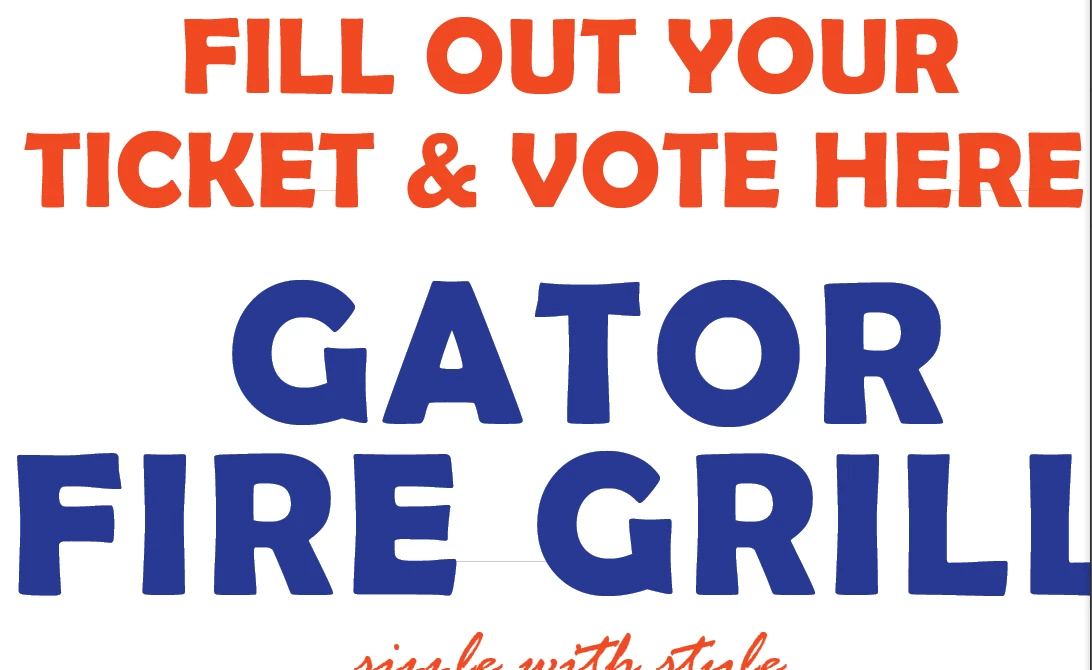
 

This topic has been closed for replies.

2 replies

Brad @ Roaring Mouse
Community Expert
Community Expert
October 24, 2023

A few questions:

Where did you obtain your fonts? format?

Is your PDF from InDesign? What is your system?

Does it also occur in other apps (e.g. Illustrator?)

also: can you upload a sample PDF where this is occuring?

Participant
October 24, 2023

The fonts are the ones that are preloaded with the indesign download, no third parties.  The PDf was made from indesign. I can't confirm whether it happens on other apps. I just edited and changed the font, so it's definitely an issue with that family of fonts. Berlin sans bold and berlin sans demi bold. 

Unfortuntely, I didn't save the OG PDF document.. but this is weird, no? 

Brad @ Roaring Mouse
Community Expert
Community Expert
October 24, 2023

Do you mean the ones preloaded on your System?
e.g. Windows/Office supplies Berlin Sans in TrueType/OpenType TT

It definitely did not "come preloaded" with InDesign.

In any case, I've already looked at the Berlin Sans that comes with Windows and have tested it, and I have been able to reproduce the issue. Compared to my old Font Bureau Type 1 version, there's a flaw in the TrueType outlines for some letters, specifically the capital letter E near the bottom left: there's a bad vector point that is causing your issue on display, but it would likley not cause any issue at all with printing... it's purely a display issue. Still it's annoying, I know.

A little history: Font Bureau created this font originally as Postscript Type 1 waaaaay back when (1992), and then probably converted it to TrueType (Windows's version is dated 1997) where they introduced the flaws.

It is now sold as OpenType CFF (PS) versions wherever it's available to purchase.

Regardless, there's nothing you can do about it, though, unless you buy the OpenType CFF (PS) versions.

Peter Spier
Community Expert
Community Expert
October 24, 2023

Do you see it if you export a PDF?

Participant
October 24, 2023
Yes unfortunately! That’s how I noticed

Kiah Cacicedo
Merchandising & Marketing Manager, Business Implementation
Peter Spier
Community Expert
Community Expert
October 24, 2023

Sounds like it's isolated to the Berlin Sans, correct? Is it possible you have more than one version of the font installed? Did you get your copy from one of the dodgy free font sites?