
bosei82265009
New Participant
March 10, 2020
Answered

Rectangle in a circle

  • March 10, 2020
  • 1 reply
  • 1475 views

Hello,

I have a question.

I 'am looking for to how adapt an rectangle in circle, so its edge perfectly matches the circle.
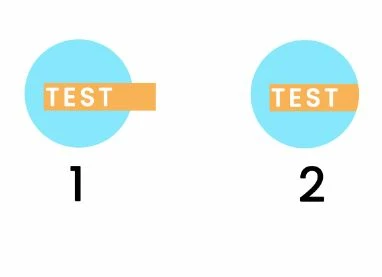
Here a scheme i made, to i want to know how to transform 1 to 2 in indesign.
Hope i was more clear as possible.
Thanks for your help


    This topic has been closed for replies.
    Correct answer Migintosh

    It's hard to say what went wrong, but let's review the steps again.

    1. Make sure your circle is an image frame
    2. Select the text frame with the Selection tool (black arrow)
    3. Cut or copy it
    4. Click on the image frame (circle) with the Selection tool and paste into

    1 reply

    Brainiac
    March 10, 2020

    Make the circle an image frame, cut or copy the text frame, select the image frame and go to Edit>Past Into. The portions of the text frame that lie outside of the circle will be cropped.

    bosei82265009
    New Participant
    March 10, 2020

    I pasted the text frame, into the circle but it make the same things as the 1 situation.

    Why?

    Brainiac
    March 10, 2020

    How to check if the circle is an image frame ? I created it with circle tool.

    Isn't there a simpler solution like the clipping mask on photosohp?


    Click on the circle with the Select tool and go to Object>Content. If Graphic is not already checked, check it and it will turn your circle into a graphic frame without changing it to a different shape. In the future, you can make a frame have the content you want by selecting the type in the Tools pallet.


    Also, if a tool has a triangle to the right of it, you can click the triangle to show other options of that tool. In the case of the frame tools, you can select whether the shape is a rectangle, an elipse or a polygon.