


Inspiring
December 14, 2024
Question

Rectangle vs. Graphic Frame

  • December 14, 2024
  • 2 replies
  • 1673 views

Hi all,


does anyone have any idea how to differentiate between these two rectangles using ExtendScript.
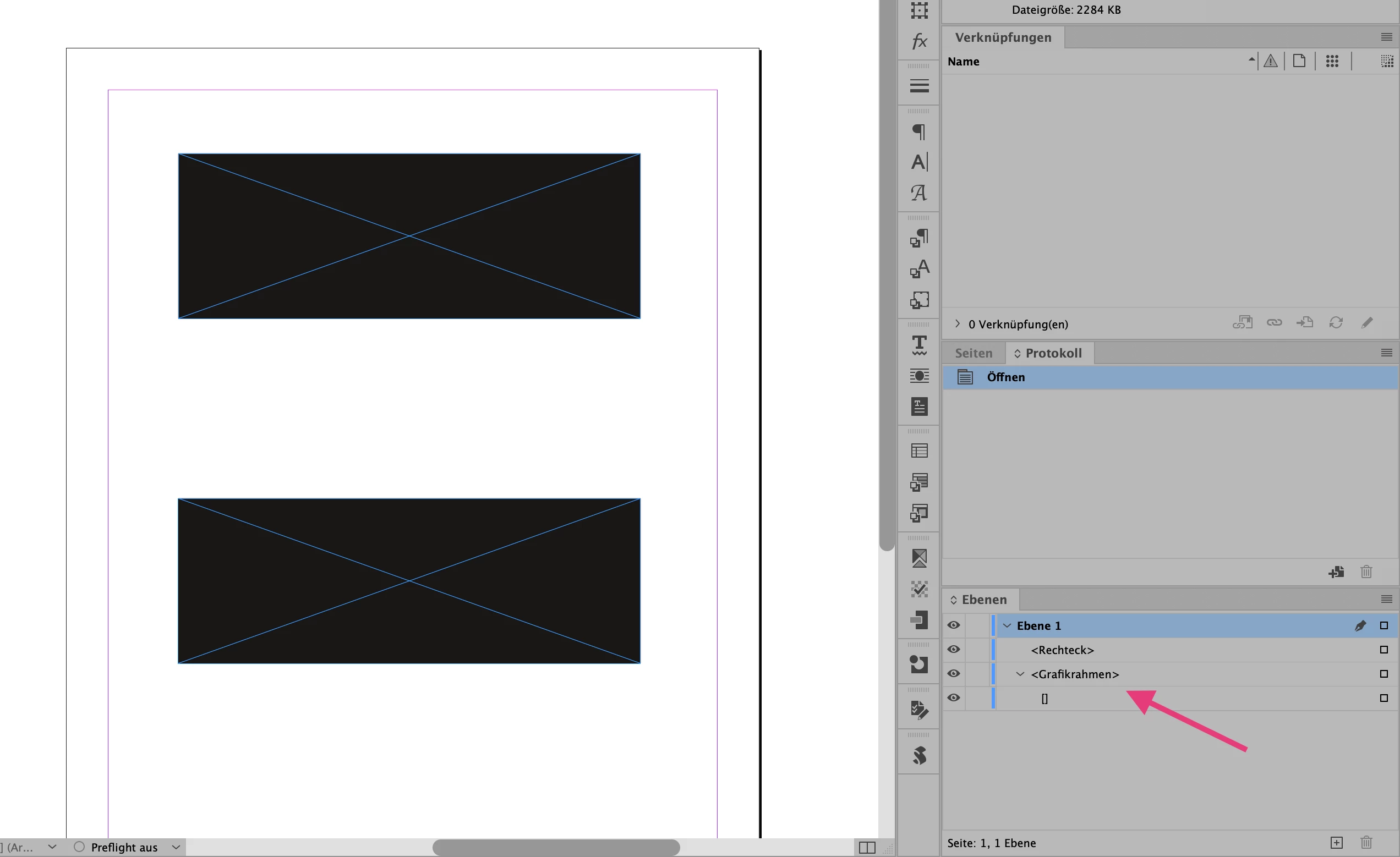


About the creation process: An XML tag was assigned to the lower rectangle, which was then removed. This way, the appearance in the layer palette can be recreated.


They do not differ in IDML. Thus, the lower element becomes a “normal” rectangle when the IDML file is opened.


Thanks for any hints
Roland

This topic has been closed for replies.

2 replies

m1b
Community Expert
Community Expert
December 14, 2024

Hi @Roland Dreger, I couldn't find a single thing that differentiated these two frames, based on doing diff between the two dumps in the ExtendScript debugger. Maybe the exported XML is different?


I don't know your use case, but I wondered if the following code might be safe to use:


var doc = app.activeDocument,
    item1 = doc.rectangles[0],
    item2 = doc.rectangles[1];

resetGraphicRectangle(item1);
resetGraphicRectangle(item2);

function resetGraphicRectangle(item) {

    if (
        ContentType.GRAPHIC_TYPE !== item.contentType
        || 0 === item.graphics.length
    )
        return;

    item.contentType = ContentType.UNASSIGNED;
    item.contentType = ContentType.GRAPHIC_TYPE;

};


Edit: fixed typo.


- Mark


Inspiring
December 15, 2024

Hi Mark, hi Eugene,

thank you for your investigation. My use case: Before the PDF export, it should be checked whether a tag (tagged PDF) is exported for an object. I would prefer not to change anything in the document during this check, otherwise it could potentially irritate the users.


But for an action to correct these issues, this is a good idea. Possibly also check whether an XML element is still associated with the object.


Roland

m1b
Community Expert
Community Expert
December 15, 2024

Alas, as you can guess, I'm out of my depth here. I hope someone more knowledgeable about this area of scripting can help. Eugene, I'm not sure I follow your idea, but if you have time, perhaps you could pursue it with Roland's sample file? It sounds intriguing.

James Gifford—NitroPress
Legend
December 14, 2024

I am not sure what your goal or needs are, but ID frames are... malleable entities that shift with the designer's whim. Drag out a "Rectangle"; drag out a rectangular "Frame"; either can be used as a graphics element or tagged as a graphics or text frame by subsequent actions.


Not a Script Guy, but I'd wager that script-level actions are no more differentiated. That is, I'd bet you can create a (graphics) Rectangle and follow up with assigning and formatting text in it, or placing a graphic, and vicey-versey-alleey-roundy.

Inspiring
December 14, 2024

Thank you for your answer.  That's right, you can convert it back to its original state. But what I want to find out is how these two states of the rectangle can be distinguished at script level.


Both are rectangle frames, both have (it seems) the same script properties and are the same in IDML. Only one rectangle was tagged once (XML) and the tag removed again.


Background, why I want to find out: one rectangle is tagged when exporting a PDF, the other is not.

Robert at ID-Tasker
Legend
December 15, 2024

@Roland Dreger


Maybe because of XML?


What is your end goal?