fredl11600511
Inspiring
October 10, 2019
Question

Redefiine Style is grayed out

  • October 10, 2019
  • 3 replies
  • 2494 views

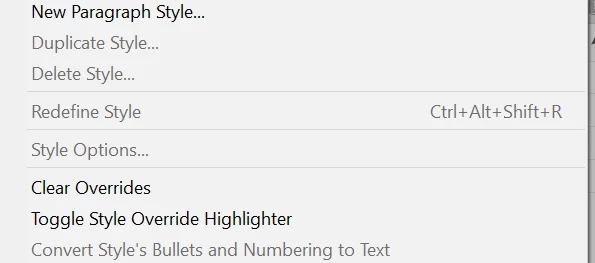
for one particular style which I originally created and then changed: if I go to "redefine style", it is grayed out. Why is it not an option for a style?
  

    3 replies

    Ashutosh_Mishra
    Inspiring
    September 25, 2020

    Hi there,


    Thanks for reaching out. In addition to responses given above, I'd request checking out this help article to know how you can use Redefine Style option.

    Hope it helps.


    Regards,

    Ashutosh

    lflegg
    Inspiring
    September 24, 2020

    Hello. 

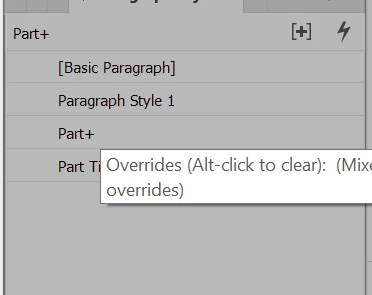
    I select some text, a paragraph style is selected (with the + overrides) and yet I'm unable to redefine it.

    How can I redefine this style?

    Thanks!

    lflegg
    Inspiring
    September 24, 2020

    Ah, think I solved it. It only has + overrides when I 'select all' because some words are in yellow type. I can't apply random words being yellow as a style I can apply elsewhere. Apart from the yellow words, this is just normal 'Bullets' style

    Community Expert
    September 24, 2020

    Hi lflegg,

    in your screenshot paragraph style "Bullets" is showing as selected.

    It does not show an override. Why?

    You may not have selected text with the override.


    Regards,
    Uwe Laubender

    ( ACP )

    rob day
    Community Expert
    Community Expert
    October 10, 2019


    Do you have some of the redefined text selected? Redefine Style lets you override a selection of text and then update the style based on the changed text, but there needs to be a selection—either a range of same styled text or an insertion point:


    lflegg
    Inspiring
    September 24, 2020

    Hello,

    Thank you but this doesn't work for me. I select some text, a paragraph style is selected (with the + overrides) and yet I'm unable to redefine it.
