
July 11, 2018
Answered

Remove all Object Styles, Paragraph Styles, Character Styles

  • July 11, 2018
  • 2 replies
  • 3851 views

Attempting to remove all Object Styles, Paragraph Styles, Character Styles while not affecting text frame attributes or text attributes currently present in the indd.

Basically keeping the visual presentation and position of all frames and it’s text content intact while removing all styles sheets in the document.

The below code successfully removes character styles and paragraph styles but:

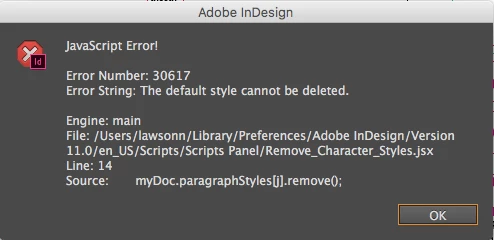
• It gives an error on the paragraph style (yet removes them except the [Basic Paragraph] default style) (screenshot below).

• doesn’t remove object styles at all.

What I would like is to not get that paragraph error somehow?

In addition to obviously removing all Object Styles.

Any leads are greatly appreciated.

*Script below.

Error thrown regarding Paragraph Style default style issue.
Current script.

#target InDesign   

    myDoc = app.activeDocument;   


    var chs1 = myDoc.characterStyles.length;   

    for(var j=chs1-1; j>0; j--) //j++ replaced here by j--   

    {   

      myDoc.characterStyles.remove();   

    }   

  var pghs1 = myDoc.paragraphStyles.length;   

    for(var j=pghs1-1; j>0; j--) //j++ replaced here by j--   

    {   

      myDoc.paragraphStyles.remove();   

    }   

  var objs1 = myDoc.objectStyles.length;   

    for(var j=objs1-1; j>0; j--) //j++ replaced here by j--   

    {   

      myDoc.objectStyles.remove();   

    }

This topic has been closed for replies.
Correct answer payalm68947498

for(var j=pghs1-1; j>1; j--)

you can not remove basic paragraph styles, because it is root style which is already define.

2 replies

Community Expert
July 12, 2018

Hi Neal,

also take a look at www.hilfdirselbst.ch where Hans Häsler did a similar job.

The discussion can be found here:

Alle Formate entfernen

https://www.hilfdirselbst.ch/gforum/gforum.cgi?post=543325#543325

Script "KeineFormate_502d.js" by Hans Haesler

http://www.fachhefte.ch/downloads.php?groupIDX=&orderby=name&sort=ASC&search_query=&itemIDX=&begin=&limit=&read_group=18&page=0&downloadIDX=141

Regards,
Uwe

payalm68947498
payalm68947498Correct answer
Inspiring
July 12, 2018

for(var j=pghs1-1; j>1; j--)

you can not remove basic paragraph styles, because it is root style which is already define.

July 12, 2018

*Palms on face* Ha.

It’s funny I just tested making all the variables distinct (i.e. j, i, n) and placing a “1” instead of a “0” at the i>0 part of the script, and that did it.

Removes everything including object styles, without giving that error on paragraph styles not being able to remove root style, etc.

Then when I came back here to post, I just noticed that‘s what you literally wrote in your post, duh, smh. Thanks a lot man. Really appreciate it.

So that number, is the style from the top of the list of styles? So whatever is the top style doesn’t get removed?

Then again, object styles contains 3 root, default styles, that also don’t get removed and that part of the script still contains a zero, “0”?

So what do the numbers really represent?

Final script below btw.

#target InDesign  

    myDoc = app.activeDocument;  


    var chs1 = myDoc.characterStyles.length;  

    for(var j=chs1-1; j>0; j--) //j++ replaced here by j--  

    {  

      myDoc.characterStyles.remove();  

    }  

  var pghs1 = myDoc.paragraphStyles.length;  

    for(var i=pghs1-1; i>1; i--) //j++ replaced here by j--  

    {  

      myDoc.paragraphStyles.remove();  

    }  

  var objs1 = myDoc.objectStyles.length;  

    for(var n=objs1-1; n>0; n--) //j++ replaced here by j--  

    {  

      myDoc.objectStyles.remove();  

    }

brian_p_dts
Community Expert
Community Expert
July 25, 2020

Hello from Texas!


I am dearly wishing to have a script that works to strip all the text, table, and object styles, but am not geek enough to incorporate your above code into a script file and get it to work.


I copy/pasted into a new file in ExtendScript Toolkit and saved it to the InDesign Scripts folder. It's showing up in my Scripts panel, but sadly I'm getting a JavaScript error #24 (Error String: myDoc.characterStyles.remove is not a function). 


Using a MacBook Pro running macOS Mojave.


What am I messing up?


The script is missing its index numbers in the for loop. I also added table styles. See if you can write cellStyles too! Try this: 


#target InDesign   

    myDoc = app.activeDocument;   
    var chs1 = myDoc.characterStyles.length;   
    for(var j=chs1-1; j>0; j--) //j++ replaced here by j--   
    {   
      try { myDoc.characterStyles[j].remove(); 
      } catch(e) {}
    }  

  var pghs1 = myDoc.paragraphStyles.length;   
    for(var i=pghs1-1; i>1; i--) //j++ replaced here by j--   
    {   
      try { myDoc.paragraphStyles[i].remove();   
      } catch(e) {}
    }   

  var objs1 = myDoc.objectStyles.length;   
    for(var n=objs1-1; n>0; n--) //j++ replaced here by j--   
    {   
      try { myDoc.objectStyles[n].remove();   
      } catch(e){}
    }

var tbls1 = myDoc.tableStyles.length;   
    for(var t=tbls1-1; t>0; t--) //j++ replaced here by j--   
    {   
      try { myDoc.tableStyles[t].remove();   
      } catch(e){}
    }