
July 11, 2018
Answered

Remove all Object Styles, Paragraph Styles, Character Styles

  • July 11, 2018
  • 2 replies
  • 3851 views

Attempting to remove all Object Styles, Paragraph Styles, Character Styles while not affecting text frame attributes or text attributes currently present in the indd.

Basically keeping the visual presentation and position of all frames and it’s text content intact while removing all styles sheets in the document.

The below code successfully removes character styles and paragraph styles but:

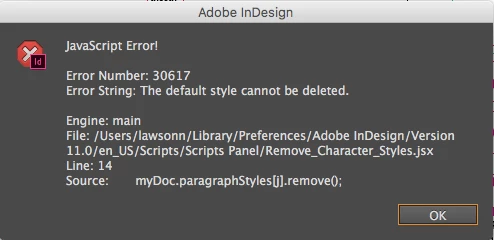
• It gives an error on the paragraph style (yet removes them except the [Basic Paragraph] default style) (screenshot below).

• doesn’t remove object styles at all.

What I would like is to not get that paragraph error somehow?

In addition to obviously removing all Object Styles.

Any leads are greatly appreciated.

*Script below.

Error thrown regarding Paragraph Style default style issue.
Current script.

#target InDesign   

    myDoc = app.activeDocument;   


    var chs1 = myDoc.characterStyles.length;   

    for(var j=chs1-1; j>0; j--) //j++ replaced here by j--   

    {   

      myDoc.characterStyles.remove();   

    }   

  var pghs1 = myDoc.paragraphStyles.length;   

    for(var j=pghs1-1; j>0; j--) //j++ replaced here by j--   

    {   

      myDoc.paragraphStyles.remove();   

    }   

  var objs1 = myDoc.objectStyles.length;   

    for(var j=objs1-1; j>0; j--) //j++ replaced here by j--   

    {   

      myDoc.objectStyles.remove();   

    }

This topic has been closed for replies.
Correct answer payalm68947498

for(var j=pghs1-1; j>1; j--)

you can not remove basic paragraph styles, because it is root style which is already define.

2 replies

Community Expert
July 12, 2018

Hi Neal,

also take a look at www.hilfdirselbst.ch where Hans Häsler did a similar job.

The discussion can be found here:

Alle Formate entfernen

https://www.hilfdirselbst.ch/gforum/gforum.cgi?post=543325#543325

Script "KeineFormate_502d.js" by Hans Haesler

http://www.fachhefte.ch/downloads.php?groupIDX=&orderby=name&sort=ASC&search_query=&itemIDX=&begin=&limit=&read_group=18&page=0&downloadIDX=141

Regards,
Uwe

payalm68947498
payalm68947498Correct answer
Inspiring
July 12, 2018

for(var j=pghs1-1; j>1; j--)

you can not remove basic paragraph styles, because it is root style which is already define.

July 12, 2018

Yeah I gathered that.

But how would I get the script to not attempt to remove the default, root, Paragraph Style, while still removing every other non-root Paragraph Style?

Does it have something to do with the variable equation?:

for(var j=pghs1-1; j>1; j--)

I can play around with that, but I don’t completely understand it, for instance what do the semicoloons ; stand for when in between parenthesis in that way (i.e. when set up with for(var _________)?

*Also, any clues on how to cleanly remove all Object Styles (similar to Character Styles, which is the only part of the script that fully works cleanly)?

Thanks.

July 12, 2018

Put try catch over removing statement, when it is root style it won't  get removes and loop moves to next.

try{

       myDoc.paragraphStyles.remove();

    }

catch(e){}

code for removing object style is working fine in my system.

Regards,

      Payal


The below script works great also, even while the Paragraph Style part contains the i>0.

What’s the difference between this script and the one I previously posted? Do they in any way behave differently at in certain scenarios?

Cheers.

#target InDesign   

    myDoc = app.activeDocument;   


    var chs1 = myDoc.characterStyles.length;   

    for(var j=chs1-1; j>0; j--) //j++ replaced here by j--   

    {   

      myDoc.characterStyles.remove();   

    };   

  var pghs1 = myDoc.paragraphStyles.length;   

    for(var i=pghs1-1; i>0; i--) //j++ replaced here by j--   

  try  {   

      myDoc.paragraphStyles.remove();   

    }   

catch(e){} ;

  var objs1 = myDoc.objectStyles.length;   

    for(var n=objs1-1; n>0; n--) //j++ replaced here by j--   

    {   

      myDoc.objectStyles.remove();   

    };