
JonathanArias
Legend
January 5, 2018
Answered

remove space before paragraph break

  • January 5, 2018
  • 4 replies
  • 5968 views

Hi,

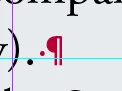
what is the find and replace way  to remove a space before a paragraph space?

Like when this happens:
Thank you

    This topic has been closed for replies.
    Correct answer AnneMarie Concepcion

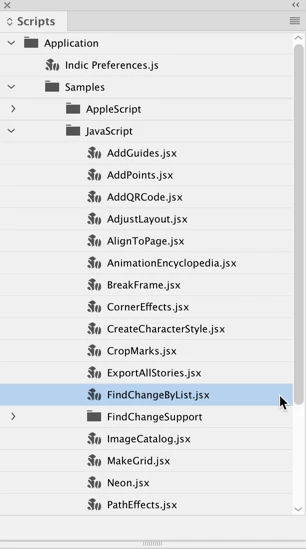
    Removing those spaces is one of the 10 different Find/Change greps done by the free script bundled with InDesign, Find/Change By List. (Window > Utilities > Scripts). Faster than a speeding bullet!

    by List
    4 replies

    Mike Witherell
    Community Expert
    Community Expert
    January 8, 2018

    I rewrote the Find / Change by List so that it doesn't disturb paragraph styles:

    Mike's Find/Change By List 2017

    You can download it for free from my resources page.

    Mike Witherell
    JonathanArias
    Legend
    January 8, 2018

    got it!

    AnneMarie Concepcion
    Community Expert
    AnneMarie ConcepcionCommunity ExpertCorrect answer
    Community Expert
    January 5, 2018

    Removing those spaces is one of the 10 different Find/Change greps done by the free script bundled with InDesign, Find/Change By List. (Window > Utilities > Scripts). Faster than a speeding bullet!

    by List

    JonathanArias
    Legend
    January 5, 2018

    I believe i remember this one from you word to indesign workflow training in lynda.com.

    I love your videos.

    AnneMarie Concepcion
    Community Expert
    Community Expert
    January 8, 2018

    Thank you!

    Adobe fixed the FindChangeBuyList.txt file in CC2018, it no longer messes up paragraphs styles.

    AM

    Barb Binder
    Community Expert
    Community Expert
    January 5, 2018

    Or use the InDesign-provided GREP query—remove trailing whitespace. Preferable to me because it also picks up multiple spaces at the end, and extra ¶s.

    \s+ (any white space, one or more)

    $ (at the end of a paragraph)

    ~Barb

    ~Barb at Rocky Mountain Training
    Bill Silbert
    Community Expert
    Community Expert
    January 5, 2018

    In the Find field type a space and ^p. In the Change field just type ^p.

    Jongware
    Community Expert
    Community Expert
    January 5, 2018

    There have been reports that replacing returns in the regular text Find/Change may mess with applied paragraph styles – the return gets "removed", pastring paragraphs temporarily together, and then it gets reinserted in the Change To.

    Is that solved in recent InDesigns?

    Community Expert
    January 8, 2018

    https://forums.adobe.com/people/%5BJongware%5D  wrote

    There have been reports that replacing returns in the regular text Find/Change may mess with applied paragraph styles – the return gets "removed", pastring paragraphs temporarily together, and then it gets reinserted in the Change To.

    Is that solved in recent InDesigns?

    Hi Jongware,

    it's not resolved. Did a simple test with CC 2018.

    Before find/change:

    Result:

    So it's better to do something like that with a GREP find/change using a positive lookahead.

    Before:

    After:

    Regards,
    Uwe