
magnetic_Twinkle5D1E
Participant
January 21, 2018
Answered

Removing the headers from master templates

  • January 21, 2018
  • 1 reply
  • 4863 views

Hi - how do you remove the headers from master templates.  Trying to update the page numbers didn't work and I appear stuck with headings that I cannot remove.  In powerpoint you'd go to the master - how do you do that in InDesign?
    This topic has been closed for replies.
    Correct answer Steve Werner

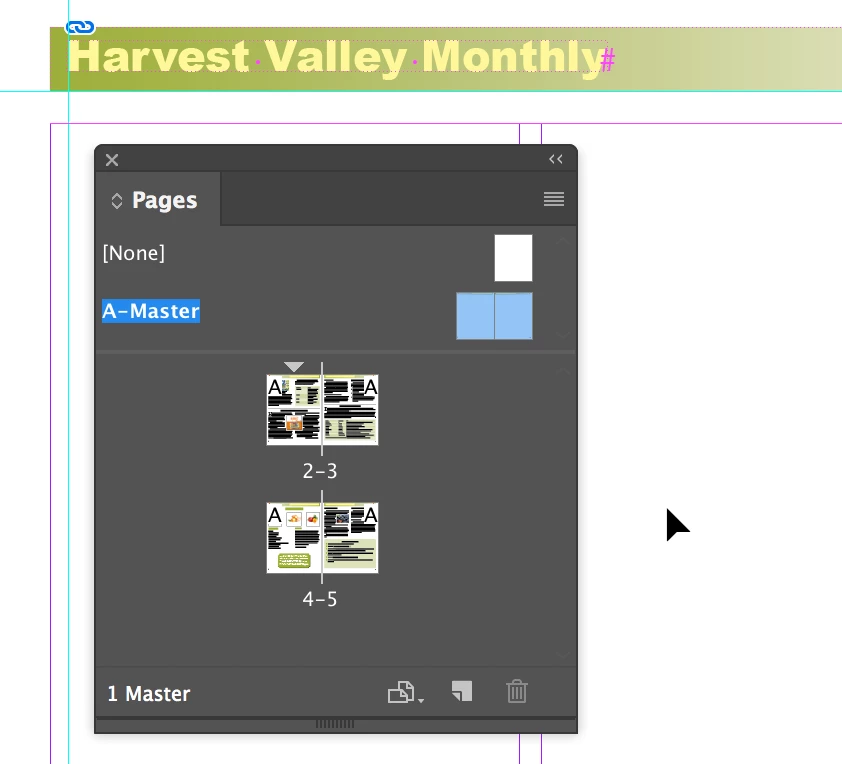
    Headers and page numbers are placed on InDesign master pages as shown below:

    Read more about them in InDesign Help:

    Learn how to use master pages in InDesign - Adobe Support

    1 reply

    Steve Werner
    Community Expert
    Steve WernerCommunity ExpertCorrect answer
    Community Expert
    January 22, 2018

    Headers and page numbers are placed on InDesign master pages as shown below:

    Read more about them in InDesign Help:

    Learn how to use master pages in InDesign - Adobe Support