Exit
  • Global community
    • Language:
      • Deutsch
      • English
      • Español
      • Français
      • Português
  • 日本語コミュニティ
  • 한국 커뮤니티
0

Reorder Alternative Layouts

Participant ,
Mar 16, 2021 Mar 16, 2021

I have created 3 x test alternative layouts for responsive output using InDesign / In5 : Square (to match the printed document), mobile (portrait) and mobile (landscape).


I now realise that I should create a larger version of the square pages, is there any way I can move this column of page thumbnails to be second in order - please see the attached screen grab.


Thanks

TOPICS
How to , Publish online
283
Translate
Report
Community guidelines
Be kind and respectful, give credit to the original source of content, and search for duplicates before posting. Learn more
community guidelines

correct answers 1 Correct answer

Community Expert , Mar 16, 2021 Mar 16, 2021

Hi aldoc51168322,

what should work:
Select all pages of that alternate layout in the Pages panel.

Drag the selected pages in the Pages panel to the beginning of the second alternate layout.

Three screenshots from my German InDesign on Windows 10 to illustrate this:


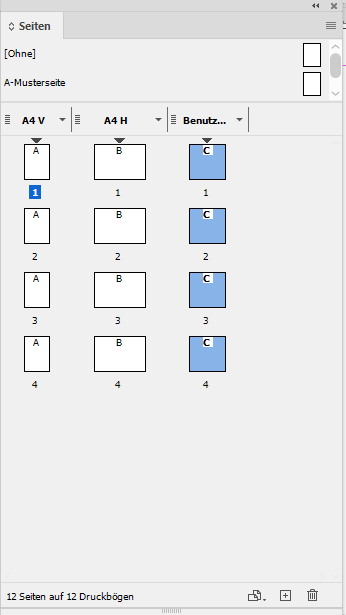
[1] Pages selected I want to move:
MoveAlternateLayout-1.PNG


[2] While dragging the pages something like a target insertion point is showing.

Make sure it is not after page 1 of the first alternate layout, but that it is before page 1 of the second alterna

...
Translate
Community Expert ,
Mar 16, 2021 Mar 16, 2021
LATEST

Hi aldoc51168322,

what should work:
Select all pages of that alternate layout in the Pages panel.

Drag the selected pages in the Pages panel to the beginning of the second alternate layout.

Three screenshots from my German InDesign on Windows 10 to illustrate this:


[1] Pages selected I want to move:

MoveAlternateLayout-1.PNG


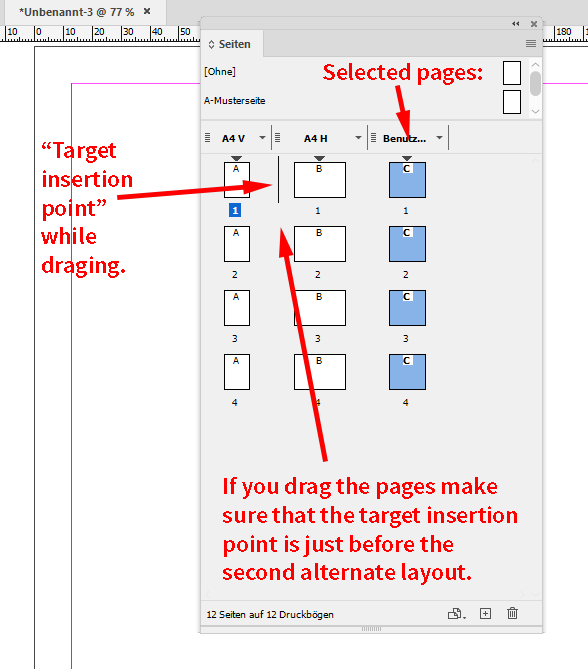
[2] While dragging the pages something like a target insertion point is showing.

Make sure it is not after page 1 of the first alternate layout, but that it is before page 1 of the second alternate layout like that:
MoveAlternateLayout-2.png

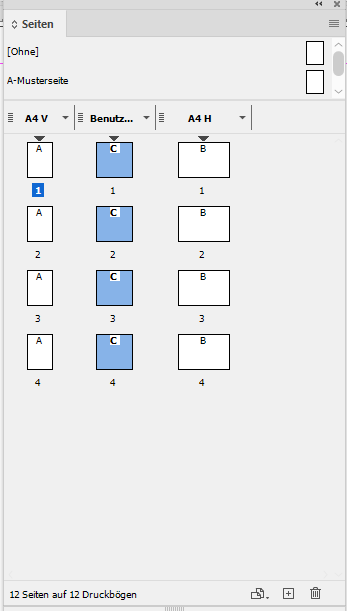
[3] Here the result of dragging the pages:
MoveAlternateLayout-3.png


Regards,
Uwe Laubender

( ACP )

Translate
Report
Community guidelines
Be kind and respectful, give credit to the original source of content, and search for duplicates before posting. Learn more
community guidelines


