Copy link to clipboard
Copied
Hi there,
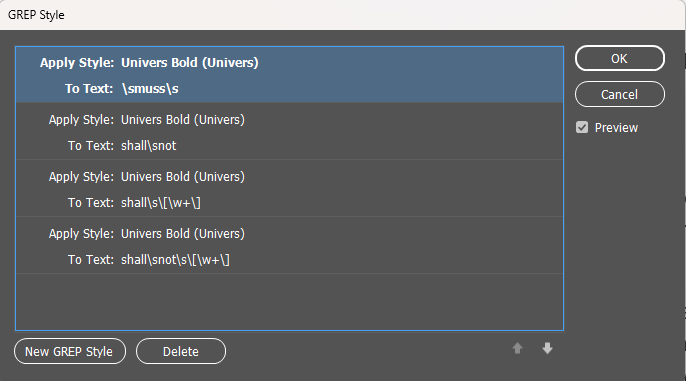
I have received an InDesign document. The document has some GREP STYLES set that instruct InDesign to Bold all instances of the word SHALL and all instances of SHALL NOT. Those GREP STYLES are present in most of the paragraph styles, and there are a lot.
They look like that: Apply style: Universal Bold; To Text: \ssall\s.
The document was translated into German, and I must instruct InDesign to Bold all instances of MUSS and MUSSEN.
I opened PARAGRAPH - GREP STYLES, and I changed shall with muss and mussen. It didn't work.
So, I selected the text and went to Paragraph Style. I opened the style used for that paragraph, and I opened the GREP style Tab, and I noticed that the definition was still in English. I changed "shall" with "muss" and it worked.
However, as I mentioned, there are a lot of paragraph styles that use these GREP Styles. It is time-consuming to open each style and change "shall" with "muss". Is there a way to do that automatically?
I tried to find and replace GREP. But without any result.
Thanks in advance.
Sebastian

Copy link to clipboard
Copied
I test this and it works on shall and shall not and changing it to muss and mussen
the section // New GREP pattern for nested styles
has the grep styles - so you can add or remove different variations of muss and mussen where necessary.
Hope it works for you - it has single undo step so you can undo quickly
Let us know if works for you or needs any refinements.
// ================================================
// InDesign Script: Update GREP styles "shall"/"shall not" → "muss"/"mussen"
// Only updates nested GREP styles in paragraph styles
// Wrapped in a single undo step
// ================================================
function main() {
var doc = app.activeDocument;
var allParagraphStyles = doc.allParagraphStyles;
// New GREP pattern for nested styles
var newGrepPattern = "\\b(muss|mussen|mussest|müss|müssen)\\b";
// -------------------------
// Loop through all paragraph styles
// -------------------------
for (var i = 0; i < allParagraphStyles.length; i++) {
var ps = allParagraphStyles[i];
// Skip the default Basic Paragraph style
if (ps.name == "[Basic Paragraph]") continue;
try {
var nestedGrepStyles = ps.nestedGrepStyles.everyItem().getElements();
for (var j = 0; j < nestedGrepStyles.length; j++) {
var gs = nestedGrepStyles[j];
// Only update GREP styles containing 'shall' or 'shall not'
if (/shall not|shall/i.test(gs.grepExpression)) {
gs.grepExpression = newGrepPattern;
}
}
} catch (e) {
// Skip paragraph styles that cannot have nested GREP styles
continue;
}
}
alert("Nested GREP styles updated: 'shall/shall not' → 'muss/mussen'");
}
// Wrap the script in a single undo
app.doScript(
main, // the function to execute
ScriptLanguage.JAVASCRIPT, // scripting language
undefined, // no arguments
UndoModes.ENTIRE_SCRIPT, // single undo step
"Update GREP Styles" // optional name for undo
);
Get ready! An upgraded Adobe Community experience is coming in January.
Learn more