
danielw42205661
Known Participant
June 1, 2022
Answered

Request: Script to export pdf using doc bleed settings

  • June 1, 2022
  • 3 replies
  • 2608 views

Hi there,


I work on documents with different bleed measurements – 3mm, 5mm, 10mm etc. I am wondering if it is possible to write a script that exports the pdf with bleed and crop marks based on the document's bleed settings. e.g if I have a doc with 5mm bleed, the script will export it with 5mm bleed and 5mm offset for the crop marks. And if I have a doc with 3mm bleed, the same script will do the same but with 3mm bleed and 3mm offset.


Other requirements;

1. I want it to export directly to the same folder the indesign file is in (i.e i don't want a dialogue box to pop up asking where to save).

2. Press quality

3. Have same name as the indesign doc e.g "document.indd" exports "document.pdf" 

4. Export to pages (not spread)

5. PDF to open after export completes


Hopefully that covers everthing. 

Any help would be greatly appreciated, thank you. 
This topic has been closed for replies.
Correct answer rob day

That is checked already, but the crop offset is set to 3mm (I have to have the crop offset the same measurement as the bleed). As far as I can tell, there is no way in presets to specify this. It is an absolute number, in the case of my script, the crop offset is set to 3mm. So if I have document set up at 10mm bleed, it's going to offset crop marks to 3mm, not 10mm. 


Hi @danielw42205661 , Does the script below work for you?


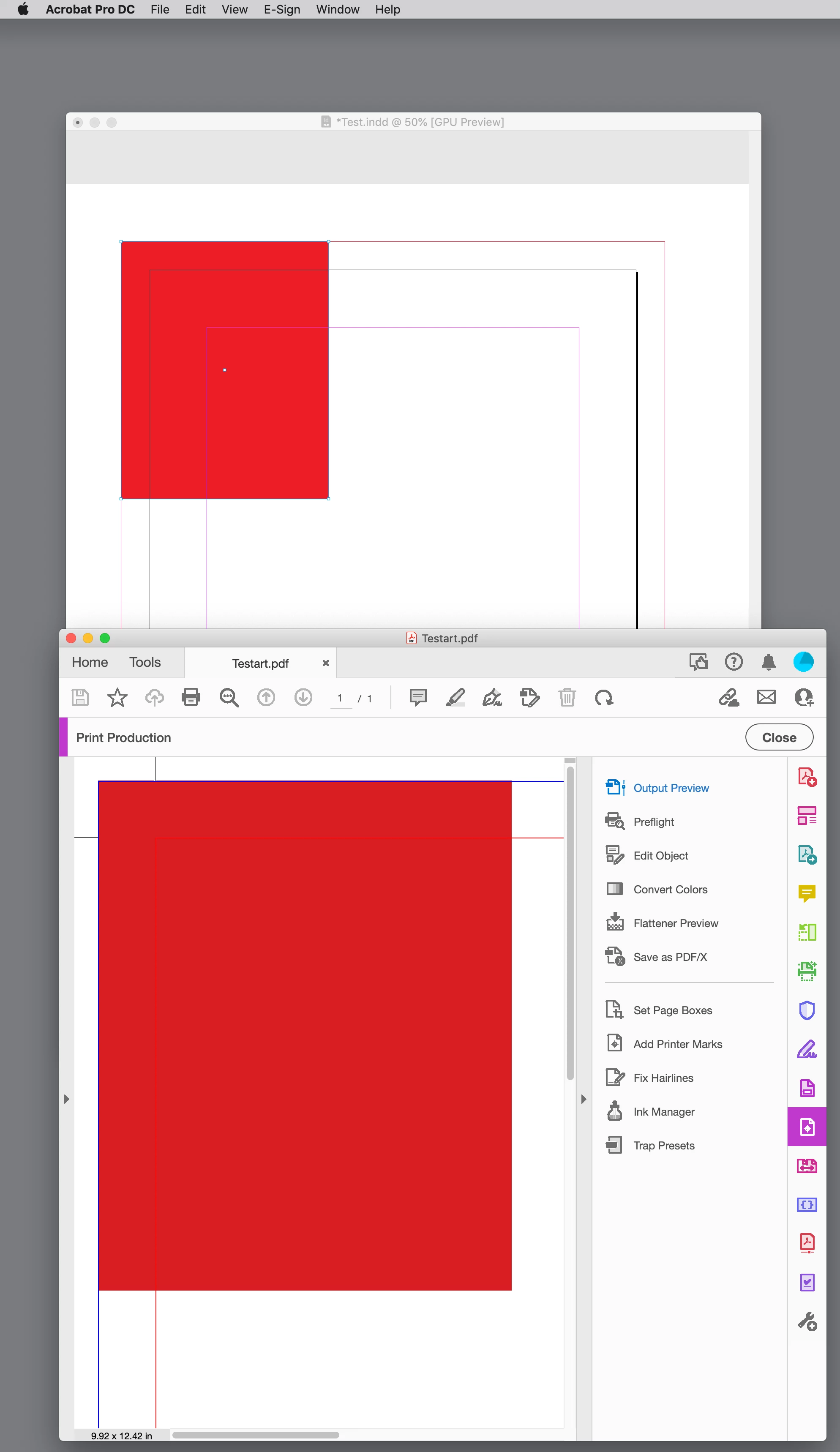
It gets the existing "_Art" preset and sets the preset’s pageMarksOffset property to the document‘s top bleed amount—as Peter points out the page marks offset is uniform. If _Art does not exist, a new preset named _Art is made based on a chosen existing preset—[Press Quailty] in this case:


main()

function main(){
    var doc = app.activeDocument;
    if (!doc.saved) {
        alert("Please Save")
        return
    } 
    var tb = doc.documentPreferences.documentBleedTopOffset;
    var fp = doc.filePath + "/" +  doc.name.replace(/\.[^\.]+$/, '') + "art.pdf"
    
    //get the existing _Art preset of make one based on [Press Quality]
    var preset = makePDFPreset("_Art", app.pdfExportPresets.itemByName("[Press Quality]"));
    preset.properties = {useDocumentBleedWithPDF:true, cropMarks:true, pageMarksOffset:tb}
    
    app.pdfExportPreferences.properties={pageRange:PageRange.ALL_PAGES, viewPDF:true}
    doc.exportFile(ExportFormat.pdfType, File(fp), false, preset);
}


/**
* Gets an existing PDF preset, or makes a new named PDF Preset based on an existing preset 
* @ param the preset name 
* @ param based on preset 
* @ return the pdf preset  
*/
function makePDFPreset(n, bo){
    var ps  = app.pdfExportPresets.itemByName(n);
    if (ps.isValid) {
        return ps;
    } else {
        ps = app.pdfExportPresets.add({name:n});
        ps.properties = bo.properties;
        return ps;
    }
}


Example with .5" top bleed:


3 replies

Jens Trost
Inspiring
June 3, 2022

Hi Daniel,
the question is, do you have scripting expierence and looking for pointers or do you look for someone who'll write it for you?
If first, then look at

https://www.indesignjs.de/extendscriptAPI/indesign-latest/#PDFExportPreference.html


If the latter, I'm pretty sure there are floating snippets around here in the forums which consists of 4-5 lines which do what you need.

BUT Willi's suggestion about the joboptions are valid nevertheless – create joboptions and then you can simply reference them in your script. Otherwise the script will use the last used export settings aside from the set documentBleed setting.
You would have to define every possible option of pdfExportPreference in your script, which is not very reasonable in my humble opinion.

danielw42205661
Known Participant
June 3, 2022

I dont have any scripting experience at all. I've seen countless posts on this site where people have asked about scripts (a lot seemingly more complex than my one), and others will help out and post the code for it. Have a search for "script" and you will see what I mean. 


It's clear that that will not happen in this case, which is fine. I will survive without it, would have just been a good workflow improvement. 


I still dont get the joboptions rationale, compared to my hypothetical script. I would need to create countless joboptions e.g a separate one for 3mm, 5mm, 15mm, 20mm and on and on etc bleed. If there was a script that got the bleed information from the document, applied it, and then chose the same number for the crop offset, you would literally just need the one script and it would work with whatever bleed was set up for the document. Alas.  

danielw42205661
Known Participant
June 7, 2022

Daniel,


All you need to do is to open the _Art preset, check the 'Use document bleed settings', and save it. Then you can use your script and the exported PDF will have the document's bleeds applied.


P.


That is checked already, but the crop offset is set to 3mm (I have to have the crop offset the same measurement as the bleed). As far as I can tell, there is no way in presets to specify this. It is an absolute number, in the case of my script, the crop offset is set to 3mm. So if I have document set up at 10mm bleed, it's going to offset crop marks to 3mm, not 10mm. 

Peter Kahrel
Community Expert
Community Expert
June 1, 2022

That's perfectly doable with a script. Offer to pay a fee and no doubt someone here will write it for you.


P.

Willi Adelberger
Community Expert
Community Expert
June 1, 2022

Create a joboption. Use the given means. All is available to preset on board when you export PDFs from InDesign. Nothing is missing. 

danielw42205661
Known Participant
June 1, 2022

Fortunately scripting exists so we dont have to just use the given means. I'd much prefer to literally press one button on my keypad to export a pdf (assigning shortcut to a script), instead of doing command+e, click save, change pdf preset, click export. 

Willi Adelberger
Community Expert
Community Expert
June 1, 2022

Choose a PDF JOBOPTION and InDesign will export. When you have saved a PDF JOBOPTIONS once you need not to change it anymore. I do not see any advantage to create a script as it is no shortcut.