
ashimg23377171
Inspiring
October 3, 2017
Question

Restarting numbering of a list in InDesign

  • October 3, 2017
  • 1 reply
  • 11490 views

Hello

I have created a numbered list style;

01. XXX

a. XXX

  i. $$$

I wish to know how I can restart the numbering. In WORD, you can simply right click on the number, and select the restart numbering option. What is the way to accomplish this in InDesign? For example, in the  screen print below, I wish to restart the numbering of the text that follows under section 1.2 Responsibilities.
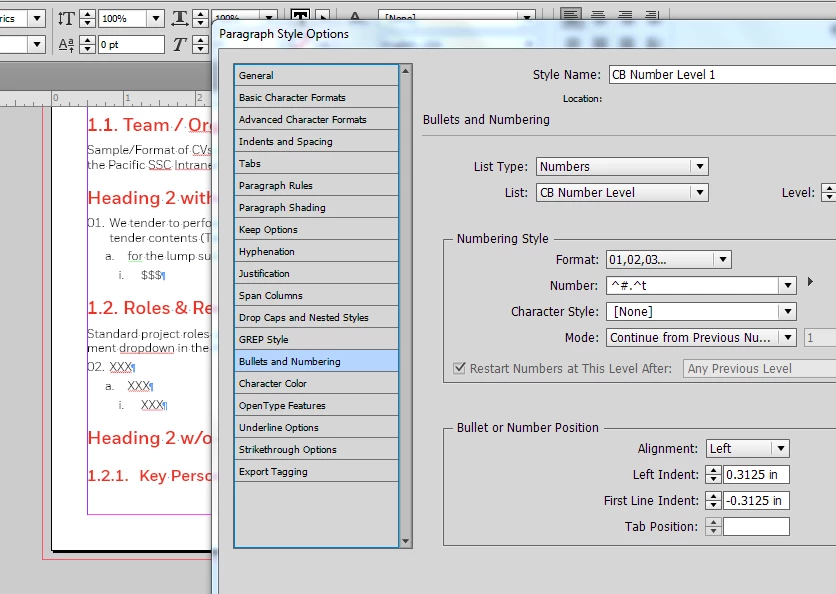
Thanks for your help.

    1 reply

    amaarora
    Community Manager
    Community Manager
    October 3, 2017

    Hi,

    You need to set up the styles correctly and make use of the "Levels" option.

    In order to illustrate this i have added a sample file at Dropbox - sample_bullets.idml so that you can download it. Do compare your style definitions with the ones defined in the sample file to achieve the desired numbering.

    Let me know if you still face any difficulties.

    -Aman

    ashimg23377171
    Inspiring
    October 3, 2017

    Thanks Aman.

    I'm gonna have a look at your file in dropbox.

    But i am using levels in my numbering style:

    Thanks

    ashimg23377171
    Inspiring
    October 3, 2017

    So I've been able to get it to work.

    A shout out to @BarbBinder who's guidance I followed per the article below:

    https://indesignsecrets.com/tip-automatically-restart-numbered-lists.php

    So essentially I created another level 1 number style who's mode starts at 1

    so I have CB number level 1 - restart ---> mode starts at 1

    and I have CB number level 1 --> mode is continuous

    Thanks