
Inspiring
October 29, 2019
Answered

Reveal in Finder Shortcut

  • October 29, 2019
  • 2 replies
  • 5194 views

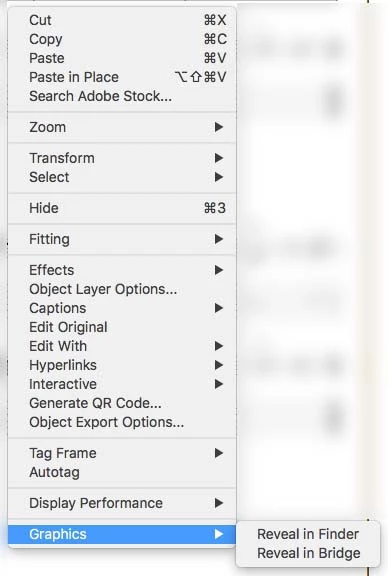
Is there a way to create a shortcut to "Reveal in Finder" a graphic that is selected in InDesign Mac? I've looked through "Edit > Keyboard Shortcuts..." but can't find it (I really wish there was a search function in there!).
    This topic has been closed for replies.
    Correct answer flaming1

    Hi zimbop, I agree that a search function would be useful for finding where keyboard shortcuts are!

    But if you do want to use the built in shortcut you can find it here:

    Edit > Keyboard Shortcuts... > Product Area: Panel Menus > Links: Reveal in Finder


    When you have some spare time it's worth going through all the available keyboard shortcuts and setting up whatever you might find useful.

    2 replies

    flaming1Correct answer
    Inspiring
    October 30, 2019

    Hi zimbop, I agree that a search function would be useful for finding where keyboard shortcuts are!

    But if you do want to use the built in shortcut you can find it here:

    Edit > Keyboard Shortcuts... > Product Area: Panel Menus > Links: Reveal in Finder


    When you have some spare time it's worth going through all the available keyboard shortcuts and setting up whatever you might find useful.

    MrZZYAuthor
    Inspiring
    October 30, 2019

    Ah yes, this also works. Thank you! I've spent some time going through it before but don't find it at all intuitive. All the more reason I guess to do as you say and become more familiar with it!

    Community Expert
    October 29, 2019

    Hi zimbop,

    very good question!


    What's working on my Windows machine is the following ExtendScript ( JavaScript ) code that, unfortunally, I cannot test right now on Mac OS X:

    var mA = app.menuActions.itemByID( 132620 );
    if( mA.enabled ){ mA.invoke() };


    You should save it as a pure text file with e.g. TextEdit app with suffix *.jsx and store it in the appropriate folder in your User folder. To navigate to that folder just right-click the User folder in your InDesign Scripts panel and do Reveal in Finder.


    From my German InDesign where the Scripts panel is named "Skripte" and the user folder is named "Benutzer":


    Later when installed you should be able to assign a keyboard shortcut to that script file.

    Maybe you have to restart InDesign to see the script in the Keyboard Shortcuts listed.


    Regards,
    Uwe Laubender

    ( ACP )

    MrZZYAuthor
    Inspiring
    October 29, 2019

    Laubender! Thank you so much! Works like a dream just as you described 🙂


    I know it seems like "how hard is it to use the contextual menu", and the answer is of course, it's fine for one or two. If you have loads of edits like this then this is so much nicer!


    Thank you thank you again 🙂