


Copy link to clipboard
Copied
Hi all,
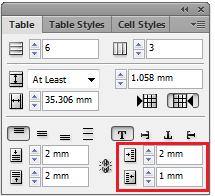
please i need help badly to create a script to reverse table cells inset on all tables for a document
for ex:
i need to change Left cell inset value with Right cell inset on all tables with all cells
Thanks in Advance


 1 Correct answer

sorry, mistyped a bracket there:
(function() {
        try {
            var cells = app.activeDocument.stories.everyItem().tables.everyItem().cells.everyItem().getElements();
            for (var i = 0; i < cells.length; i++) {
                var l = cells.leftInset;
                cells.leftInset = cells.rightInset;
                cells.rightInset = l;
            }
        } catch (e) {


        }
}())

 12
Replies
12
12
Replies
12

Copy link to clipboard
Copied
Show your code. What have you tried so far?
Copy link to clipboard
Copied
hey Vamitul,
i tried this code
app.activeDocument.stories.everyItem().tables.everyItem().cells.everyItem().rightInset = "3mm"
app.activeDocument.stories.everyItem().tables.everyItem().cells.everyItem().leftInset = "4mm"
but in case i have many tables with different values then i can't unify same values to all tables, i need to read left inset and reverse it to right inset
Thanks


Copy link to clipboard
Copied
This ought to get you up and running:
http://indesignsecrets.com/tackling-tables-through-scripting.php
As you may already know, these properties are called 'leftInset' and 'rightInset'; exchanging them should be easy (but take care to use a temporary variable in between).
Copy link to clipboard
Copied
Thanks Jongware for this link it helps me a lot for another things  , but this
Copy link to clipboard
Copied
(function(){
  try {
  var cells=app.activeDocument.stories.everyItem().tables.everyItem().cells.everyItem().getElements();
  for (var i=0; i<cells.length;i++){
  var l=cells.leftInset;
  cells.leftInset=cells.rightInset;
  cells.rightInset=l;
  }catch(e){

  }
  }
}())
Copy link to clipboard
Copied
Dear Vamitul,
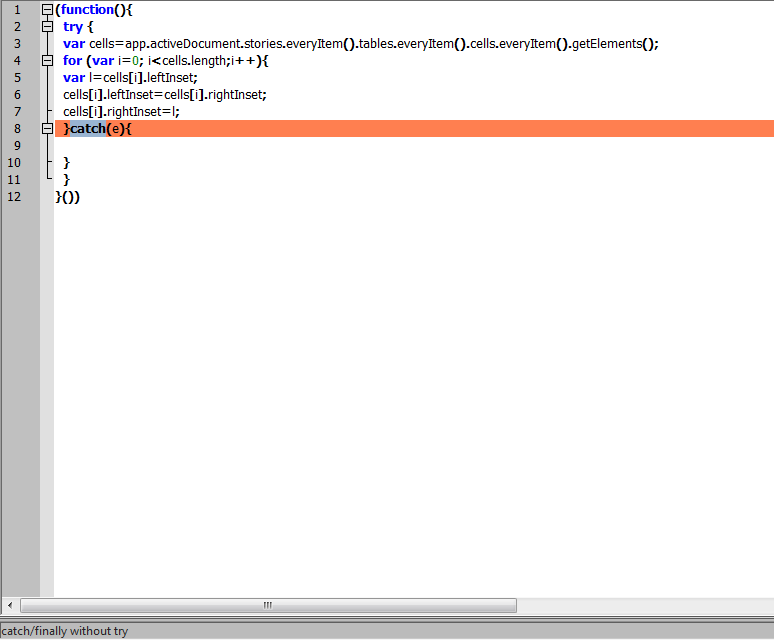
Thanks a lot for your help but i got this error
Copy link to clipboard
Copied
sorry, mistyped a bracket there:
(function() {
        try {
            var cells = app.activeDocument.stories.everyItem().tables.everyItem().cells.everyItem().getElements();
            for (var i = 0; i < cells.length; i++) {
                var l = cells.leftInset;
                cells.leftInset = cells.rightInset;
                cells.rightInset = l;
            }
        } catch (e) {


        }
}())
Copy link to clipboard
Copied
OMG 
Thanks a lot you are really made my day Vam
your help is highly appreciated
one more question
can i use this code to reverse text wrap insets too??
Best Reagrds

Copy link to clipboard
Copied
Fine! Thanks Vamitul! 
Copy link to clipboard
Copied
Vamitul,
I've 2 questions:
• Why do you place the "function" between two parenthesis?
• Is the "try … catch …" truly useful here?
Thanks in advance!
Copy link to clipboard
Copied
the (function(){}()) pattern is called and self-executing anonymous function. Because javascript has function-based scope, it is used to isolate the variables in the script as not to pollute the global namespace. While in this, and many other simple scripts is not really needed, since the engine in which the script runs is not persistent, it does not hurt and it's a good habit to get into for when you start to write much larger scripts. There are quite a few resources about this online, for example: http://stackoverflow.com/questions/14322708/what-is-self-executing-anonymous-function-or-what-is-thi...
The try-catch here is very useful here:
consider what happens if a document has no tables:
app.activeDocument.stories.everyItem().tables.everyItem() returns and empty specifier, that has no "cells" object, so you would get an error. Or, taking things to a bit more extreme, what if there is no document opened? I agree it's not the nicest, most elegant or expressive way of doing it, but it works in a pinch (to be read as: don't do as i do).
Copy link to clipboard
Copied
Thanks a lot for these explanations!


Get ready! An upgraded Adobe Community experience is coming in January.
Learn more
 AdChoices