
m90583877
Known Participant
July 24, 2018
Answered

Right align text in an InDesign interactive form

  • July 24, 2018
  • 1 reply
  • 5271 views

Hi everyone,

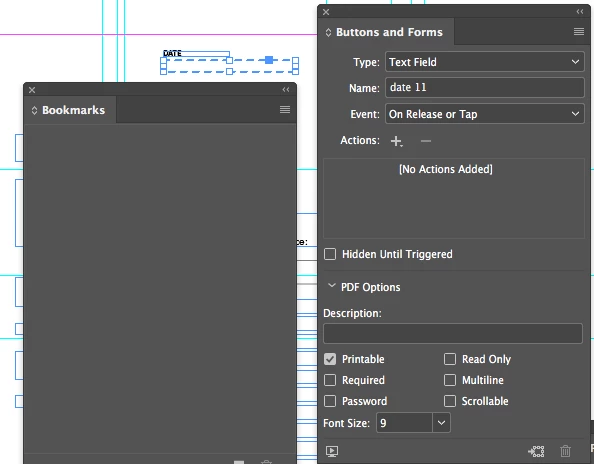
is it possible to right align the text in an Indesign interactive form? I only see options for the font size, not even font family, are there more settings to it, most importantly alignment?

Thank you!
This topic has been closed for replies.
Correct answer BobLevine

https://www.id-extras.com/products/formmagic

1 reply

vladan saveljic
Inspiring
July 24, 2018

You could set align right to your text box in indesign

or

you could do it in acrobat pro

field properties > alignment

m90583877
m90583877Author
Known Participant
July 24, 2018

It is not a usual text field, but an interactive form which is supposed to be filled in the exported pdf.

When I click on the form field the paragraph setting seems to be disabled and in the form properties it only has font size:

Vivek-Sharma
Community Manager
Community Manager
October 31, 2024

We need a way to create forms that have the numbers aligned to the right, just like any normal text would be.


Hi, Thank you for contacting us. To align text in the interactive field, you may try right-aligning the text frame in InDesign.


^VS