
Celull0yd
Inspiring
August 15, 2017
Question

Right Indent Not Always Working

  • August 15, 2017
  • 4 replies
  • 3979 views

I'm trying to get line listings in a catalog that have multiple lines of text to automatically right-indent so I don't have to use soft returns. I've applied my settings:
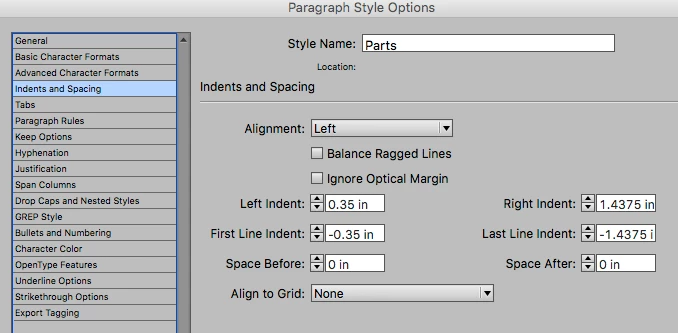
to the appropriate style sheet but as you can see, it's not working with every listing:
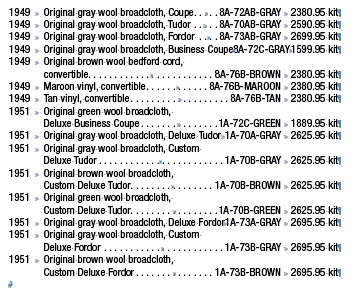
The fourth line shows an instance where it's not working, and the fifth line shows an instance where it IS working. You can look down the list and see other instances of both working and non-working.

Can anyone tell me what I'm doing wrong?

I'm using CC 2014 on a Mac running El Capitan.

Thanks,

Lloyd

    This topic has been closed for replies.

    4 replies

    Barb Binder
    Community Expert
    Community Expert
    August 15, 2017

    Sorry, I had to go back in to teach an Illustrator class. I agree with Rob, you can get stuck where the tab fits, but doesn't have room for a space. I still think no break is the answer and you will have to play with the tab spacing a bit.

    ~Barb at Rocky Mountain Training
    Celull0yd
    Celull0ydAuthor
    Inspiring
    August 15, 2017

    This is what I'm trying to do but it's not working:

    Right-indent the last line of a paragraph

    You can use the Last Line Right Indent option to add a hanging indent on the right side of the last line in a paragraph. This option is especially useful for right-aligning prices in a sales catalog.

    Right indent the last line
    Last line right indent


    • Type your paragraphs. In the last line of each paragraph, place the insertion point before the text to be indented, and choose Type > Insert Special Character > Other > Right Indent Tab.

    • Select the paragraphs.

    • To create a right indent for paragraphs, specify a value (such as 2p) in the Right Indent field of the Paragraph panel or Control panel.

    • To offset the right indent value for the text that follows the tab, type a negative value (such as ‑2p) in the Last Line Right Indent field of the Paragraph panel or Control panel.

    Jeff Witchel, ACI
    Community Expert
    Community Expert
    August 15, 2017

    In line 4, there is too much type to fit in the second column between your first and second tabs, so the type can't line up with the next column correctly.

    You may want to look at using Tables to create your columns instead (with stokes between rows instead of using Leaders. In a table, if there's too much type in a cell in a particular column, the cell will automatically get taller, so columns will always line up.

    Check out this video tutorial about working with Tables: http://www.jeffwitchel.net/2014/06/bringing-easier-editing-to-the-table-in-indesign-cc/

    Hope this helps.

    Celull0yd
    Celull0ydAuthor
    Inspiring
    August 15, 2017

    Jeff,

    I know what you're saying but that's the exact reason I want it to bump down to a second line...because there's too much type to fit between tab stops, the same as in the line directly below that one. The tab stops are all set the same (I'm using the paragraph style for all the lines shown) so why does it work for some lines and not for others?

    Thanks,

    Lloyd

    Celull0yd
    Celull0ydAuthor
    Inspiring
    August 15, 2017

    I think that the "X-Factor" here is the combination of a long left line with a longer parts number with color. The lines that are flipping combine to be past the point of the peaceful coexistence of line four (which is probably just shy of the limit). Personally, I would prefer to do something like this with soft returns so that I would have the choice of line breaks.


    Bill,

    I'm considering changing the fonts in the catalogs anyway, so that might help. We can't use tables because we have 30 catalogs ranging from 184 pages to 384 pages, with hundreds of thousands of listings like this. To use tables would cause my entire department to quit.   

    The problem with using soft returns is that we use a plug-in to update prices that depends upon columns (in this case separated by tabs) to tag the prices. Soft returns make it impossible to tag the prices using consistent columns/tabs.

    To reiterate, I'm stumped...

    Lloyd

    Bill Silbert
    Community Expert
    Community Expert
    August 15, 2017

    The lines that are being forced to a second line and thus not having the right indent are too long to fit on a single line. You could try tracking them in to a width that will fit. Right indent will not be applied to lines that are too short and will automatically force break if they are too long.

    Celull0yd
    Celull0ydAuthor
    Inspiring
    August 15, 2017

    Bill,

    I guess I didn't make myself clear. I WANT the longer lines to bump down to a second line WITHOUT having to use a soft return (like in the fifth line down) but it's only working on some of the lines, not all of them. In fact, if you look at the fourth line down, it's actually squashing/moving the part number farther to the right than it should be. In that line, the word "Coupe" should jump to a second line, along with the part number and price, but it's not.

    I'm stumped.

    Lloyd