
Participant
March 17, 2019
Question

RTL + LTR lang in one paragraph with justification

  • March 17, 2019
  • 2 replies
  • 2440 views

Hi,

Really need help!

I have very strange bug in InDesign CC, that I haven't had in oldest versions of InDesign:

I have to use 2-3 languages with different directions (English + Hebrew/Arabic for ex.) with justification.

If I choose Paragraph / Single-line composer, then I get flipped Hebrew language  

If I choose World-Ready Paragraph / World-Ready Single-line Composer, then I get gaps between English letters.
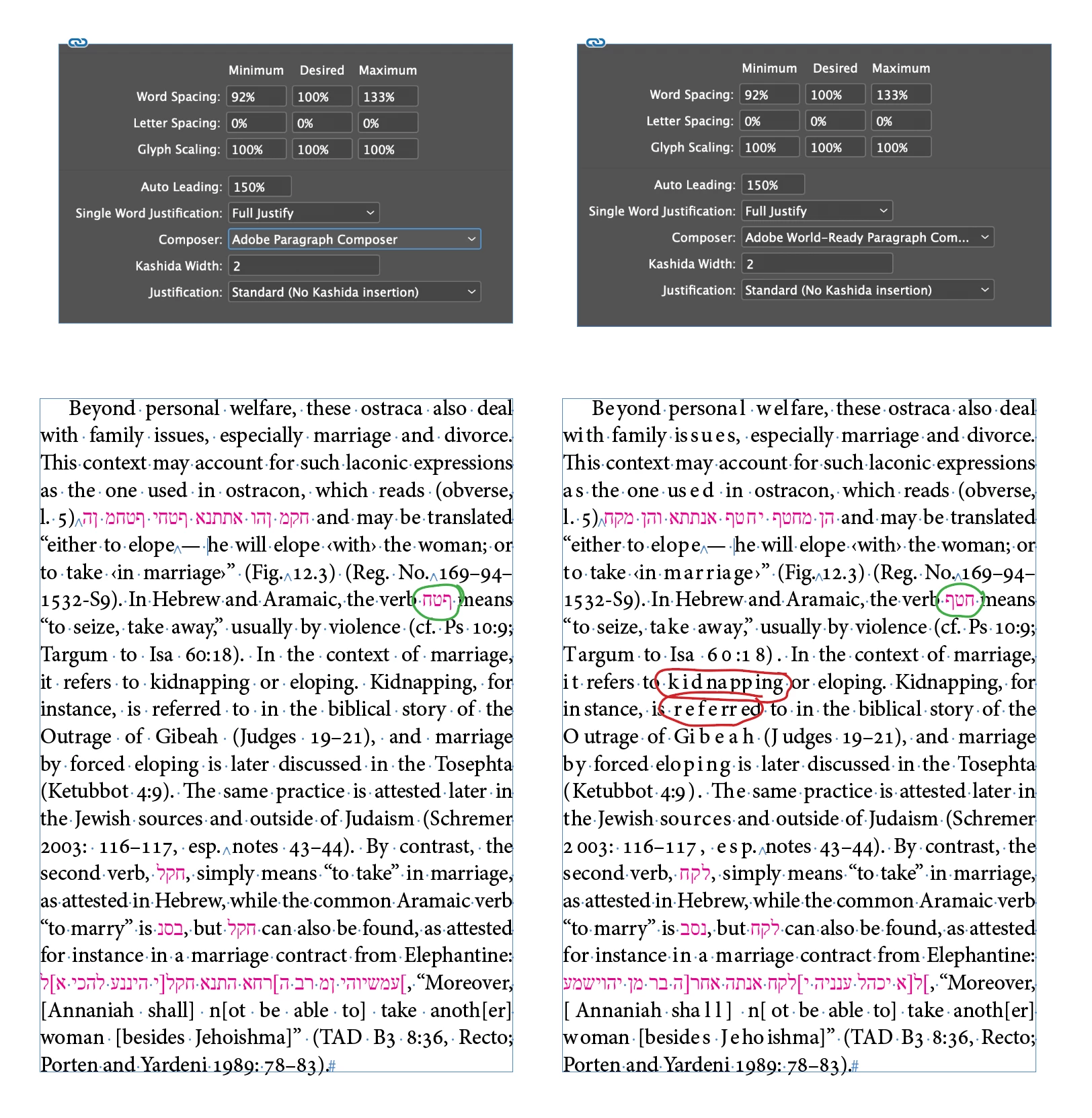
Any suggestions how to fix this gaps? Flip the Hebrew manually not the option, I have a lot of words in each paragraph.

I tried, I think, all possible combinations with Tracking/Justification options/ Kashidas/ different font families / flip character direction...   

    This topic has been closed for replies.

    2 replies

    Inspiring
    March 18, 2019

    Hi annahayat

    I reported this same bug several years ago and have been reposting about it since. It first showed up for me in InDesign CS6. While I am still being frustrated by it, but I am cautiously hopeful that it will be resolved relatively soon. Adobe contacted me late last year requesting a file showing the issue, which I sent. It appears that they are finally at least working on it.

    What I have found helpful as a runaround is to force InDesign to recompose all stories. You have to be careful, though, that once you've forced the recomposition, you don't do anything that will cause InDesign to recompose on its own. Simply scrolling or jumping to another page can re-corrupt affected paragraphs. To prevent this, I generally ignore the issue until I'm finished working on the file. I then navigate to the first page in the document, force the recomposition, then save the document and close it.

    On a Mac, the keyboard shortcut to force InDesign to recompose all stories is Opt + Cmd + /.

    Sam A.
    Inspiring
    March 18, 2019

    Hi, this is a serious bug indeed. For a workaround, see reply 14 in this thread: weird character spacing in paragraphs

    Willi Adelberger
    Community Expert
    Community Expert
    March 17, 2019
    1. You should use the world composer.
    2. Did you use a paragraph style with the main language defined in extended character properties, as in your example is English? You should do so.
    3. Did You use a Character Style with the Hebrew Language defined for those words with Hebrew? You have to do so.
    4. Other huge problems will come if you have LTR as main direction and have RTL in multiple lines. This will not work out. Several words without a line break are ok. But with a line break you will come into the "Teufels Küche" (Devels Kittchen) as we would say in German. Therefore I add for the minority direction always "no break" as additional characgter style property. If the parts require multiple lines I ask the author to change the text so, that those will come in a separate paragraph as it does not work out otherwise.
    5. Guard the settings in the Justification Part of the Character Style.
    Community Expert
    March 18, 2019

    Hi Willi,

    I guess annahayat is seeing a bug with the Adobe World-Ready Paragraph Composer.

    Already reported years ago. At hilfdirselbst.ch there is a lengthy discussion about this problem in German:

    Globaler Adobe Absatzsetzer: unerwünschte Spationierungen an zufälligen Stellen

    Martin Fischer, 26. Jul 2016, 20:15

    https://www.hilfdirselbst.ch/gforum/gforum.cgi?post=551491#551491

    See also here at InDesign Uservoice to see the latest report on this:

    World-Ready Composer Is messing up the kerning in Latin fonts – Adobe InDesign Feedback

    Regards,
    Uwe

    annahayatAuthor
    Participant
    March 18, 2019

    Hi Uwe,

    Yep, this is a bug, and I see that nothing changed ...