TypoMan23
Known Participant
September 1, 2022
Answered

Same CMYK colour looks different on another document - why?

  • September 1, 2022
  • 2 replies
  • 1466 views

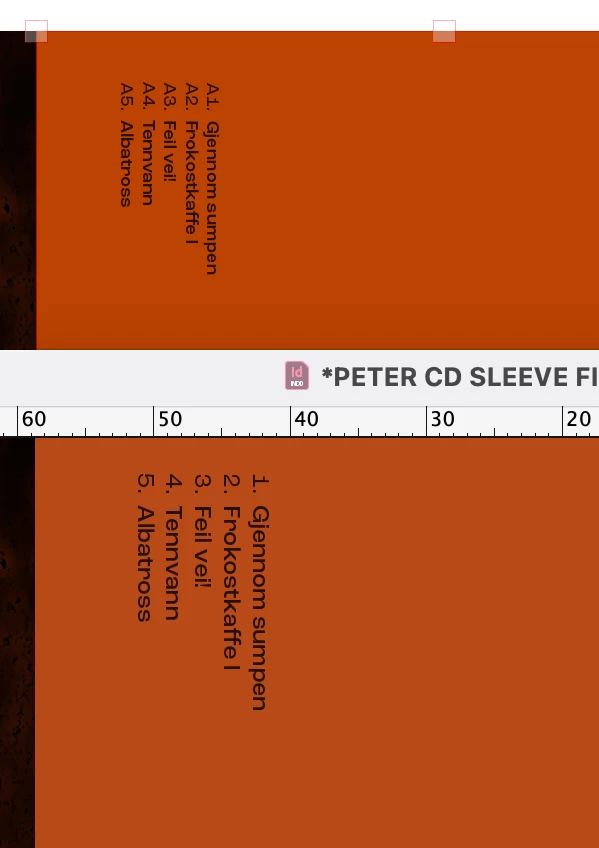
I am using some templates made by another designer, to set up some print files. The same CMYK colour on a CD sleeve document, appears very different to on the LP sleeve. I have checked settings and they seem to be the same on both files.

One can see how on the bottom file (CD sleeve) the colour is more washed out and less vibrant.

Any idea what is going on here?
 

Correct answer Jens Trost
quote

The CMYK values are exactly the same in both, but they look different. 
This is very strange!


Naa... that's the big misconception about CMYK values... those are device (and paper) dependent, so every printer/machine/device-paper combination prints the same values differently.

That's what ICC profiles are for. A blank CMYK value without it's intented output profile tells you diddly-squat about how the color should look.

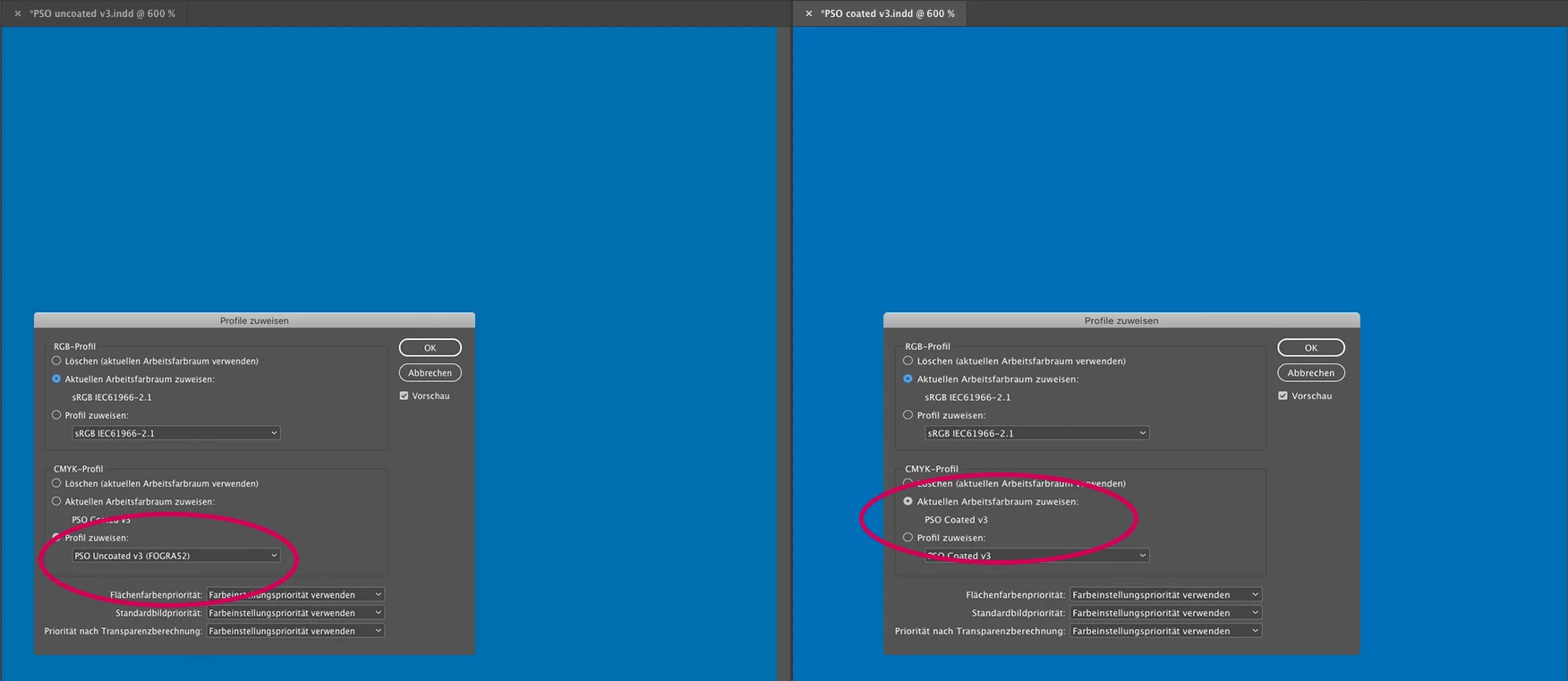
Check if your InDesign documents use the same working profiles, under Edit -> Assign profiles.

See screenshot – same CMYK values, the only difference between the two documents are different profiles, resulting in an different look.

2 replies

Mike Witherell
Community Expert
Community Expert
September 1, 2022

What does Edit > Transparency Blendspace ... tell you? Any difference in the 2?

Mike Witherell
Mike Witherell
Community Expert
Community Expert
September 1, 2022

Have you set up color management in Photoshop and synchronized it with InDesign?

Have you calibrated both monitors with a spectrophotometer or a colorimeter?

Does the color mode of the InDesign document agree with the color mode of the art placed on the InDesign document page?

Are you using Adobe Swatch Exchange (in PS and ID) to share color swatches?

Mike Witherell
TypoMan23
TypoMan23Author
Known Participant
September 1, 2022

Thank you very much for the reply. 

These are 2 ID files in the screenshot - on one monitor, mine.
There is no Photoshop file, it's just a solid CMYK coloured rectangle in ID: C0 M77 Y100 K27

The CMYK values are exactly the same in both, but they look different. 
This is very strange!

Jens Trost
Jens TrostCorrect answer
Inspiring
September 8, 2022
quote

The CMYK values are exactly the same in both, but they look different. 
This is very strange!


Naa... that's the big misconception about CMYK values... those are device (and paper) dependent, so every printer/machine/device-paper combination prints the same values differently.

That's what ICC profiles are for. A blank CMYK value without it's intented output profile tells you diddly-squat about how the color should look.

Check if your InDesign documents use the same working profiles, under Edit -> Assign profiles.

See screenshot – same CMYK values, the only difference between the two documents are different profiles, resulting in an different look.