Participating Frequently
February 28, 2025
Answered

Same image displays differently when copying from one file to another in InDesign

  • February 28, 2025
  • 10 replies
  • 3207 views

Hey all,


I have two InDesign files. The first file displays and exports to a PDF perfectly, and when i went to start a new file, the image i copied and pasted from the orginal file is displaying as washed out and faded. My tranparency blend space is set to RGB in both and the colour settings on both files appear to be identical. The output setting I use to export a PDF were also identical yet the colour discrepancy showed in the PDFs. 


Are there settings somewhere else other than 'colour settings' and 'transparency blend space' that I am not aware of?


Please help me understand this.

 

Correct answer Robert at ID-Tasker

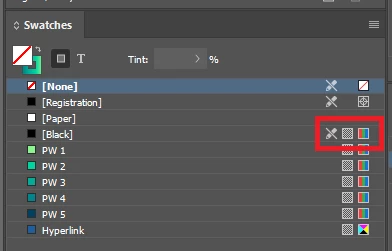
In the "inccorect" file - [Black] is CMYK:


10 replies

Robert at ID-Tasker
Legend
March 3, 2025

Hopefully - this will help:


(above is available in the free version) 


https://www.indesignjs.de/extendscriptAPI/indesign-latest/#DocumentIntentOptions.html


Name

Description

Value

DocumentIntentOptions.MOBILE_INTENT

Intended purpose of document is for publishing to mobiles.

1768846445

DocumentIntentOptions.PRINT_INTENT

Intended purpose of document is for print output.

1768846448

DocumentIntentOptions.WEB_INTENT

Intended purpose of document is for web output.

1768846455


Robert at ID-Tasker
Robert at ID-TaskerCorrect answer
Legend
March 3, 2025

In the "inccorect" file - [Black] is CMYK:


Peter Spier
Community Expert
Community Expert
March 4, 2025

Well Done, Robert.

Mike Witherell
Community Expert
Community Expert
March 3, 2025

Is an Object Style getting involved (since you said copynpaste from one document to another)?

Generally, copynpasting an image frame should be OK to do. Makes me wonder if an Object Style is adding something.

Mike Witherell
Participating Frequently
March 3, 2025

I dont think so

Brad @ Roaring Mouse
Community Expert
Community Expert
March 2, 2025

The second grab looks very much like it has been converted to CMYK somewhere along the line.

Waht does the Link panel say about the pasted image in the second document (re: Color space, etc).

Does it do the same thing if you Place the image again (i.e. NOT copy and paste it?)

What are your Color Management Policies? re: Preserve/Convert, etc.

Dave Creamer of IDEAS
Community Expert
Community Expert
March 2, 2025

Exactly. Assuming the info the OP posted was accurate, it could have happened during export to PDF. (Which is why I asked for the PDF settings...)


David Creamer: Community Expert (ACI and ACE 1995-2023)
Peter Spier
Community Expert
Community Expert
March 2, 2025

But he says the output settings are the same and that the discrepancy shows up in the .indd as well, which makes it more likely the problem is in the document.

But all of this goes to the point that there are too many variables at play here to make an intelligent diagnosis without seeing all of the various settings for both files.

Scott Falkner
Community Expert
Community Expert
March 2, 2025

Do both files use the same Transparency Blend Space (Edit menu)? Is the image RGB or CMYK?

Dave Creamer of IDEAS
Community Expert
Community Expert
March 2, 2025

According to the original post, the space is the same:

"My tranparency blend space is set to RGB in both ..."

David Creamer: Community Expert (ACI and ACE 1995-2023)
Peter Spier
Community Expert
Community Expert
March 1, 2025
quote


Are there settings somewhere else other than 'colour settings' and 'transparency blend space' that I am not aware of?


Please help me understand this.

By @generalinternet

The color profiles assigned to any particular doeument might be different from the ones listed in the color settings dialog. There are two dialogs that can affecrt this: Edit > Assign Profiles... which will leave your color numbers unchanged and interpret them as being in the assigned profile, and Edit> Convert to Profile... which will change the numbers to get the closest appearance match in the new profile.

Participating Frequently
March 3, 2025

Checked both of these in both files and they are also identical 

Dave Creamer of IDEAS
Community Expert
Community Expert
March 1, 2025

What are your PDF export settings?

Also, is the original image linked before you copied it, or was it pasted into InDesign?


David Creamer: Community Expert (ACI and ACE 1995-2023)
Participating Frequently
March 3, 2025

PDF export settings for proofs are usually PDF/X-4:2008, but the same thing was happening with 'High Quality Print"


The image is linked. 

Robert at ID-Tasker
Legend
March 1, 2025

@generalinternet


Also, can you add a new, blank page - WITHOUT anything on it and with no parent page applied - does it happen?


Maybe, on the destination page - you have something with transparency effect - or you have in the source document - but you don't have in the destination document. 


Participating Frequently
March 3, 2025

created a new blank page in the file that is messed up, with no parent and pasted the image into that page and it's still lfaded. 

Dave Creamer of IDEAS
Community Expert
Community Expert
March 3, 2025

It mostly likely is in your color settings and profile handling. 

David Creamer: Community Expert (ACI and ACE 1995-2023)
Robert at ID-Tasker
Legend
March 1, 2025

@generalinternet


What if you create your "new file" by copying the original, change number of pages if needed, and then copy your image?


If there will be no change - then your previous files are not identical. 


Or, one of your initial files is corrupted - try IDMLing on both of them - export as IDML, open, save with a new name - do not overwrite your original file. 


Participating Frequently
March 3, 2025

Yes, this is exaclty how i worked around the issue - and the image and colours are still looking proper 

James Gifford—NitroPress
Legend
February 28, 2025

Copy and paste has its limitations. You should be working with a discrete image file that is Placed in each document.

Peter Spier
Community Expert
Community Expert
March 1, 2025

@James Gifford—NitroPress Copying a linked image copies the link. There's no reason not to do that.

James Gifford—NitroPress
Legend
March 1, 2025

True, but it's vague as to how the original image was placed. I note that question's been asked.

Peter Spier
Community Expert
Community Expert
February 28, 2025

We really need to see all of those settings....

Participating Frequently
March 3, 2025

Sure thing - which ones shall i screen grab?