Exit
  • Global community
    • Language:
      • Deutsch
      • English
      • Español
      • Français
      • Português
  • 日本語コミュニティ
  • 한국 커뮤니티
0

Saving a JPEG - does it automatically convert to 72dpi?

Community Beginner ,
Sep 22, 2023 Sep 22, 2023

Hi all,


I have photos at 300dpi - if I place into an InDesign document and save as a JPEG will it automatically convert to 72dpi or must it be done manually?


The photos are RGB.


My intention is to use them in a slide show.

TOPICS
How to
377
Translate
Report
Community guidelines
Be kind and respectful, give credit to the original source of content, and search for duplicates before posting. Learn more
community guidelines

correct answers 1 Correct answer

Community Expert , Sep 24, 2023 Sep 24, 2023

and save as a JPEG will it automatically convert to 72dpi or must it be done manually?


Hi @Niall5CB2 , InDesign’s JPEG Export will let you export a selection, so you would have to select the image and export:


Screen Shot 2.png


Screen Shot 3.png


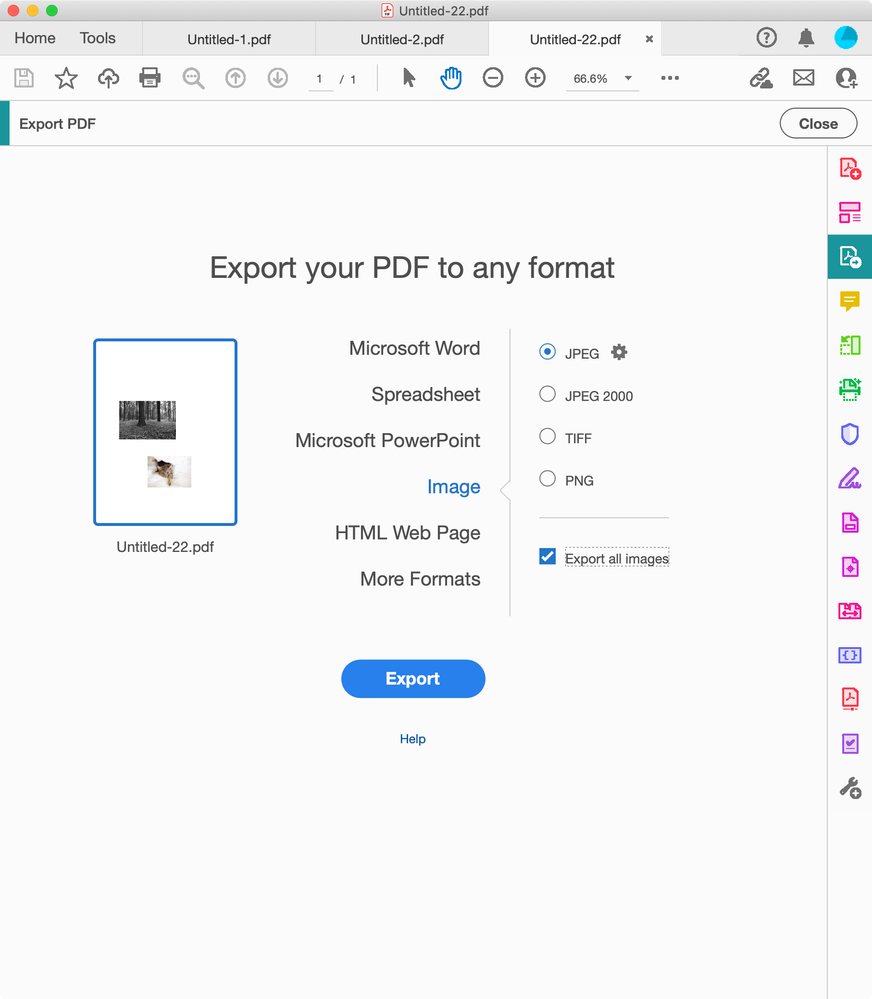
Alternatively you could Export the document as a PDF with the Compression tab set to Downsample to 72ppi, and then use AcrobatPro’s Export tool to Export All Images:

 

Screen Shot 4.png

Translate
Community Expert ,
Sep 23, 2023 Sep 23, 2023

Why use InDesign? 
Use Photoshop to size the images and crop them. 

No idea what you're doing here with InDesign.

Translate
Report
Community guidelines
Be kind and respectful, give credit to the original source of content, and search for duplicates before posting. Learn more
community guidelines
Community Beginner ,
Sep 24, 2023 Sep 24, 2023
LATEST

I do use Photoshop to size and crop, I just place them in an InDesign document.

Translate
Report
Community guidelines
Be kind and respectful, give credit to the original source of content, and search for duplicates before posting. Learn more
community guidelines
Community Expert ,
Sep 24, 2023 Sep 24, 2023

and save as a JPEG will it automatically convert to 72dpi or must it be done manually?


Hi @Niall5CB2 , InDesign’s JPEG Export will let you export a selection, so you would have to select the image and export:


Screen Shot 2.png


Screen Shot 3.png


Alternatively you could Export the document as a PDF with the Compression tab set to Downsample to 72ppi, and then use AcrobatPro’s Export tool to Export All Images:


Screen Shot 4.png

Translate
Report
Community guidelines
Be kind and respectful, give credit to the original source of content, and search for duplicates before posting. Learn more
community guidelines
Community Beginner ,
Sep 24, 2023 Sep 24, 2023

That PDF Export method seems to be the best way, thanks.

Translate
Report
Community guidelines
Be kind and respectful, give credit to the original source of content, and search for duplicates before posting. Learn more
community guidelines

