judithd24701392
Participant
February 2, 2018
Question

'saving' and 'undo'

  • February 2, 2018
  • 4 replies
  • 1209 views

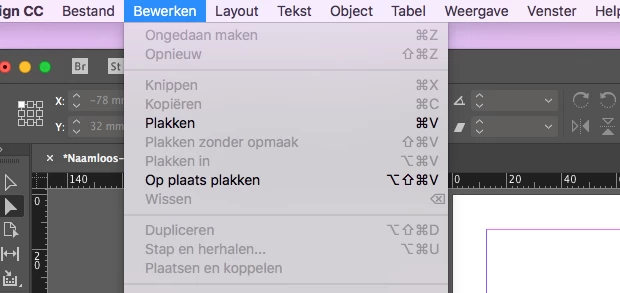
I currently can't save my documents or undo anything in InDesign.

Saving only works when the document is still empty.

I work with MacOS High Sierra. Version 10.13.2 and Adobe Creative Cloud CC18
    This topic has been closed for replies.

    4 replies

    Participant
    June 22, 2018

    Me too, the same problem. Can't save (High Sierra 10.13.5, CC 2018). Changing the file name did not help. Packaging of files not possible. At first, InDesign said something like "not enough disk space", but 217 GB are free.

    Derek Cross
    Community Expert
    Community Expert
    June 22, 2018

    Randya and Homburger, which version of InDesign are you using with High Sierra?

    Participant
    June 22, 2018

    I am using the latest version of InDesign CC 2018.

    CHOCGRAVY
    Participant
    June 21, 2018

    I'm having the same problem...Just lost about 2 hour's work because I could neither undo or save. Did anyone ever find a solution?

    Srishti Bali
    Community Manager
    Community Manager
    June 27, 2018

    Hi Randy,

    I would like to know if the steps suggested above worked for you, or the issue still persists.

    Kindly update the discussion if you need further assistance with it.

    Thanks,

    Srishti

    Bill Silbert
    Community Expert
    Community Expert
    February 2, 2018

    Have you tried trashing your InDesign preferences? Doing so will reset the program to default and hopefully solve the problem.

    To do so on a Mac:

    With InDesign closed Launch a Finder Window in column view and click on your home folder. With the Option Key pressed choose Library from the Finder Go Menu. Within the Library folder find the folder called Preferences and within it find the following two files and delete them: “Adobe InDesign” and “com.adobe.InDesign.plist”. When InDesign is next launched it will create new preference files and the program will be restored to its defaults.

    After you’ve reset up the program (make sure that no document window is open) to your liking, you can create copies of your personalized “mint” preference files (make sure that you quit the program before copying them—that finalizes your customization) and use them in the future to replace any corrupt versions you may need to delete.

    Marja de Klerk
    Inspiring
    February 2, 2018

    Undo is only available when you did something. When there is no previous action this function is grey.

    The command Save is no longer available when you just saved the document. Do something new and you can save the document again.

    Hope this answers your question.

    Groeten uit Eindhoven

    judithd24701392
    Participant
    February 7, 2018

    yes, this I know.

    But it also is like this while I'm working on a document.
