Answered
Scaling photos proportionally in indesign
Hi wondering if anyone knows how to change a shortcut for scaling photos proportionally in indesign?

Hi wondering if anyone knows how to change a shortcut for scaling photos proportionally in indesign?
The shortcut is not cmdoption< or > (Mac) or at least on
my mac is Shift+option, I need to change it to just Shift.
The shortcut absolutely is cmd+option < or > (Mac). It's shift+cmd if you're dragging a handle.
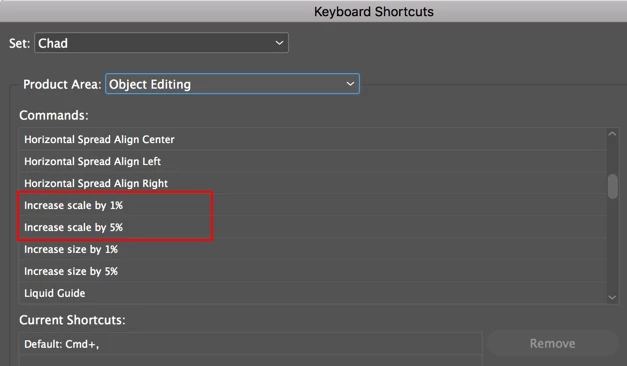
There is no Increase/Decrease scale by 1% or 5% in the drop down menu for
Object Editing.
There absolutely is. See screenshot below.
Thank you, I am aware of these but need to know how to change the shortcut.
I told you in my previous post how to change the shortcut and the screenshot above shows you which options in which you would assign that shortcut.
I need to change it to just Shift.
You won't be able to do that as InDesign requires a minimum of two keys to be used. Shift + something else.
Already have an account? Login
Enter your E-mail address. We'll send you an e-mail with instructions to reset your password.
 AdChoices