
Participant
November 8, 2019
Answered

Screen Mode Icons disppeared
  • November 8, 2019
  • 3 replies
  • 4785 views

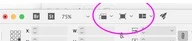
I've upgraded to InDesign 2020 and these little icons disappeared. I can't find anywhere to bring them back. I use them all the time.


[Moved from generic Start/Help forum to the specific Program forum... Mod]
[To find a forum for your program please start at https://community.adobe.com/]

This topic has been closed for replies.
Correct answer sharpdes

I FINALLY found it. It's at the bottom of the tool box.

3 replies

Barb Binder
Community Expert
Community Expert
November 11, 2019

Hi Sharpdes: It does look like the Application bar was removed from InDesign 2020, taking those icons with it (although the zoom menu was moved to the bottom left of the window).


If you use the screen mode icons frequently, it's worth noting that tapping W (as long as you don't have an insertion point in text) will toggle you between Normal and Preview. Sh+W will activate Full screen mode. Esc will return to Normal view.


~Barb


~Barb at Rocky Mountain Training
Steve Werner
Community Expert
Community Expert
November 11, 2019

Adobe wants to standardize the applications a bit. It probably seems like a pain to some if you ONLY use InDesign. But Illustrator and Photoshop didn't place similar controls on what used to be the Application Bar. They've placed them at the bottom of the tools (or in menus like Window > Arrange for the arrangements of multiple windows). 


It's easier for newcomers and for those of us who bounce between multiple appications to be more consistent.


Participant
November 10, 2019

I also use the Screen Mode icons ALL THE TIME, and to have to use the pull down menu to toggle between Normal and Preview is super inefficient. Why would Adobe remover this?!

sharpdesAuthorCorrect answer
Participant
November 11, 2019

I FINALLY found it. It's at the bottom of the tool box.

Participant
November 11, 2019

Wow! Thank you sharpdes

Participant
November 8, 2019

The zoom percentage field has been moved to the left lower corner ... I really went nuts when trying to find it ...